Technical Insights
The 2 AM Test: What Portworx Enterprise 3.7.0 brings to the Admin

Summarize Blog With
Table of Content
Like deja vu, it’s 2:14 AM and your phone jolts you awake with a new critical alert. This time a VM went unresponsive on a Kubernetes node, and now every workload with a replica on that node is waiting. With anticipation, you grab a coffee and watch the dashboard, wait for the cluster to decide that the node is really gone, wait longer for the storage to catch up, then watch the pods come back online. Slowly. One by one.
That wait, the gap between “node is gone” and “storage is available again”, is the window where our engineering teams really wanted to reduce with Portworx Enterprise 3.7.0. Not necessarily to make failures rarer, because environmental factors can be out of our control, but by making them boring.
PXE 3.7.0 has a number of exciting improvements. Let’s talk about a few of them and how they help you reduce or eliminate these challenges.
Failover that doesn’t wait for the data
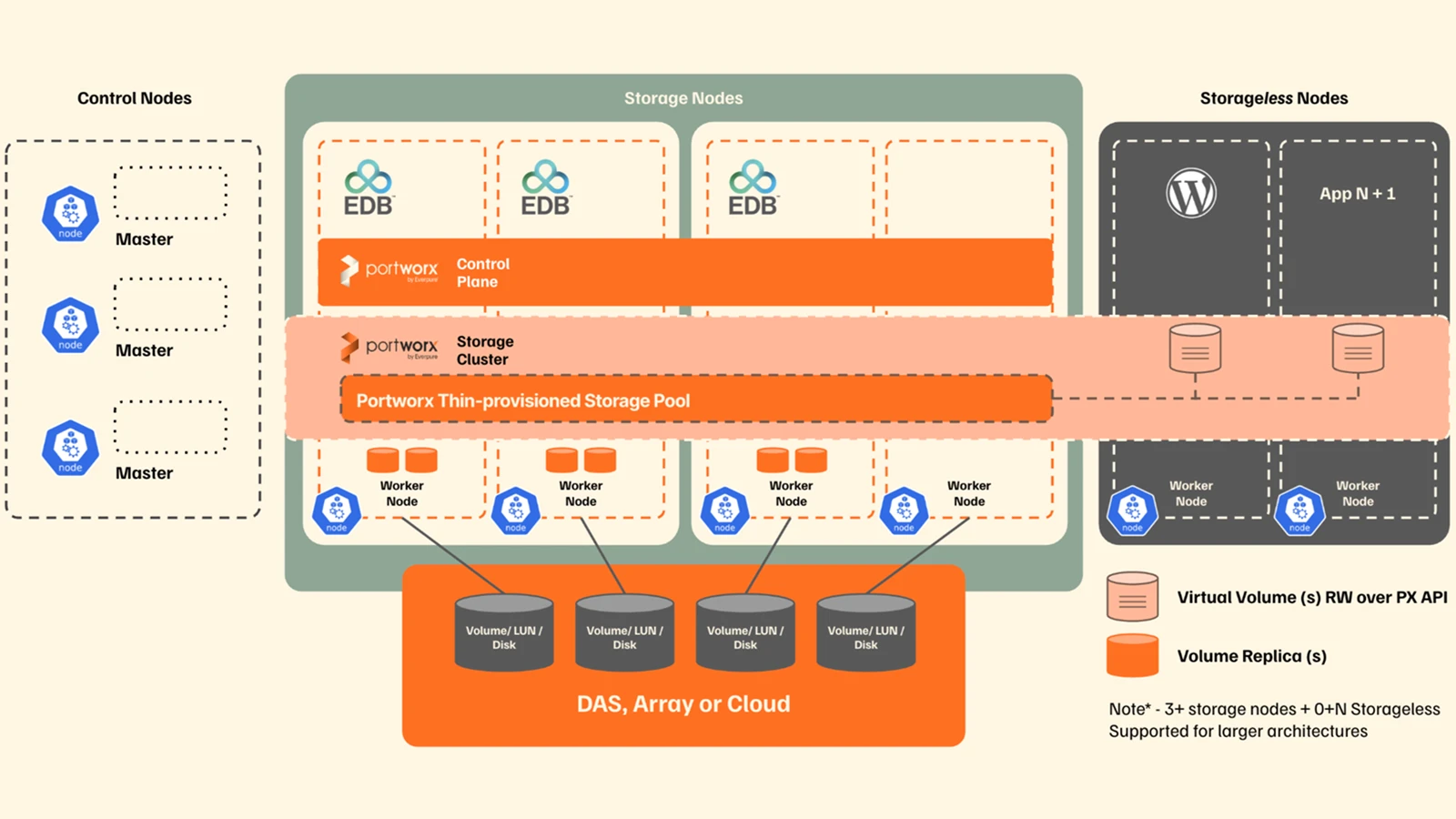
The alert above is common when running dynamic pools on shared SAN storage, as a replication factor of 1 (repl=1) is inherent in the intended design: the ability to dynamically detach the entire storage pool from one node and reattach to another. In dynamic pools, the high availability of the data is handled by the FlashArray, and Portworx Enterprise is responsible for who, as in which compute node, needs the data. If a node fails, the workloads running on that node and the storage pool it was hosting needs to come back up somewhere else, and historically, “somewhere else” meant time where the cluster had to be sure the node was actually down and not just slow, before anything could be safely moved.
You have to be careful here on when to react: if you reattach a pool while the original node is still alive, you have two things writing to the same storage and you might create an even bigger problem. The old detection logic meant a noticeable delay, and every extra second was an extra second of stalled I/O for anything depending on that pool.
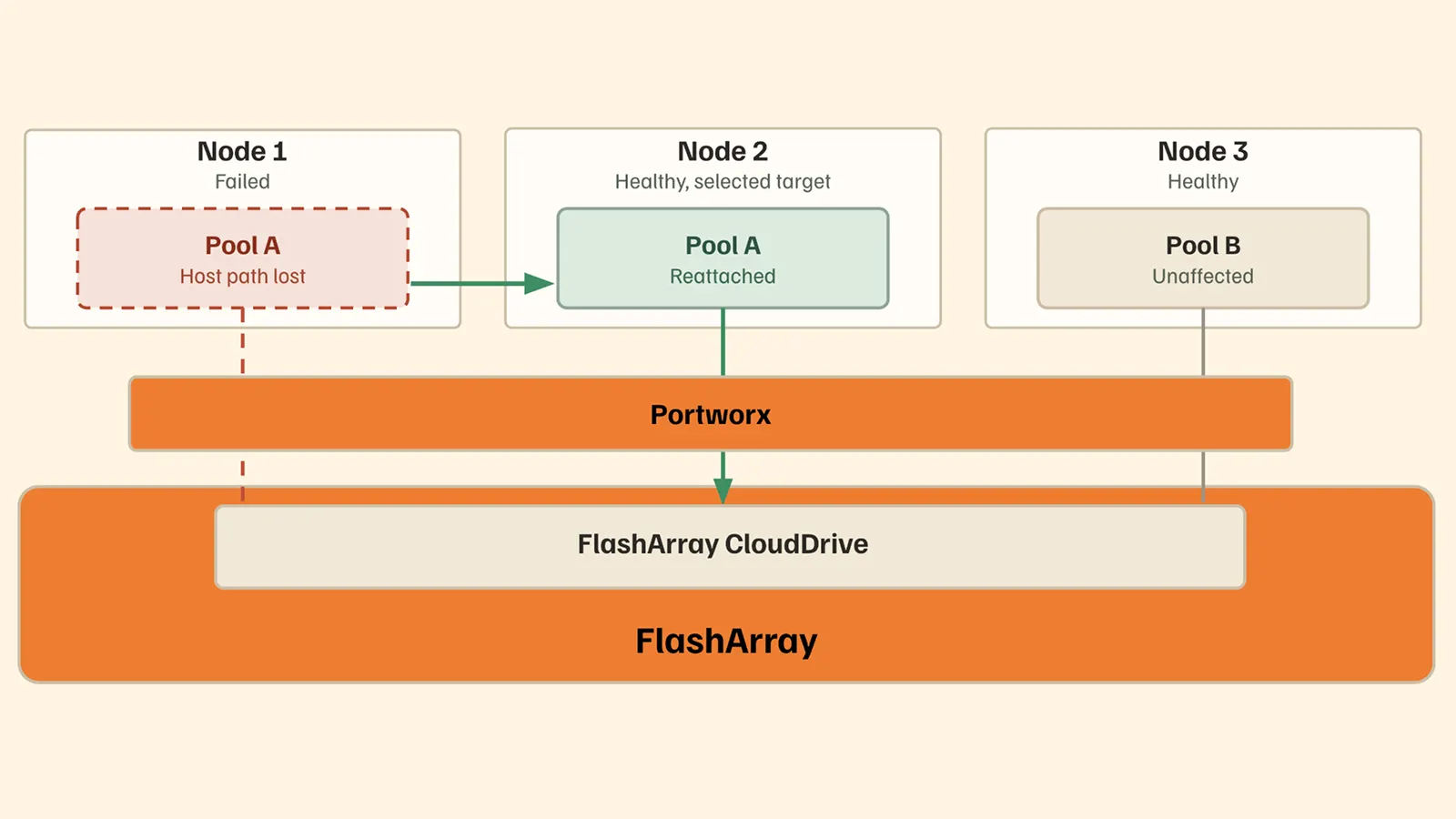
As an enhancement to Kube Datastore (KDS) with dynamic pools, 3.7.0 ships a new detection path purpose-built for this handoff: liveness checks and cluster-safety checks run together, fast, and once they agree the node is actually gone, failover starts immediately. Portworx is now typically completing dynamic pool failover in 7 to 12 seconds, down from a process that could stretch into minutes.
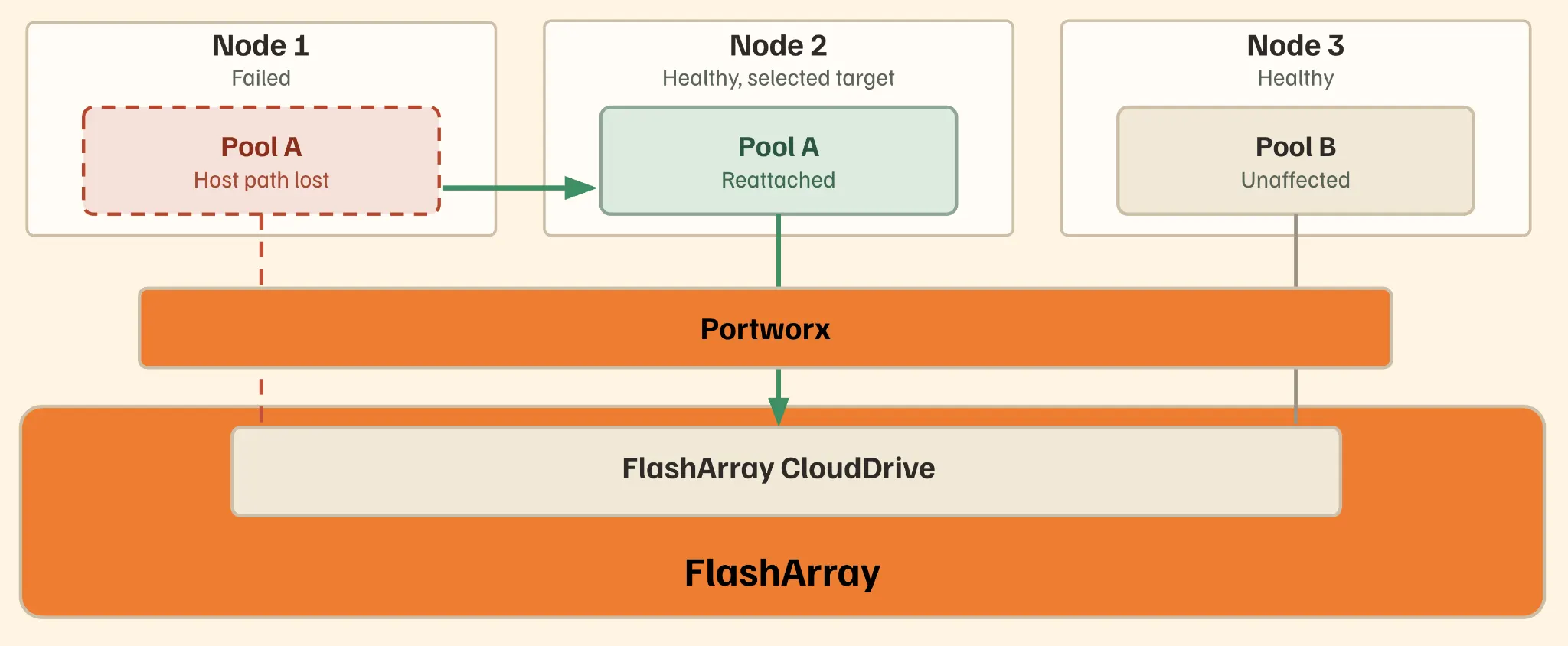
Because dynamic pools sit on shared SAN-backed storage rather than node-local disks, “failover” doesn’t mean copying data anywhere, as the data was never tied to the failed node in the first place. It means reattaching the existing pool to a healthy node. The new fast-node-down detection exists to shrink the decision time, not the data-movement time, because there isn’t any data movement to shrink. That’s also why this trick is specific to dynamic pools: replicated volumes on local disks don’t get this shortcut, because there’s no shared backend to just point at again.
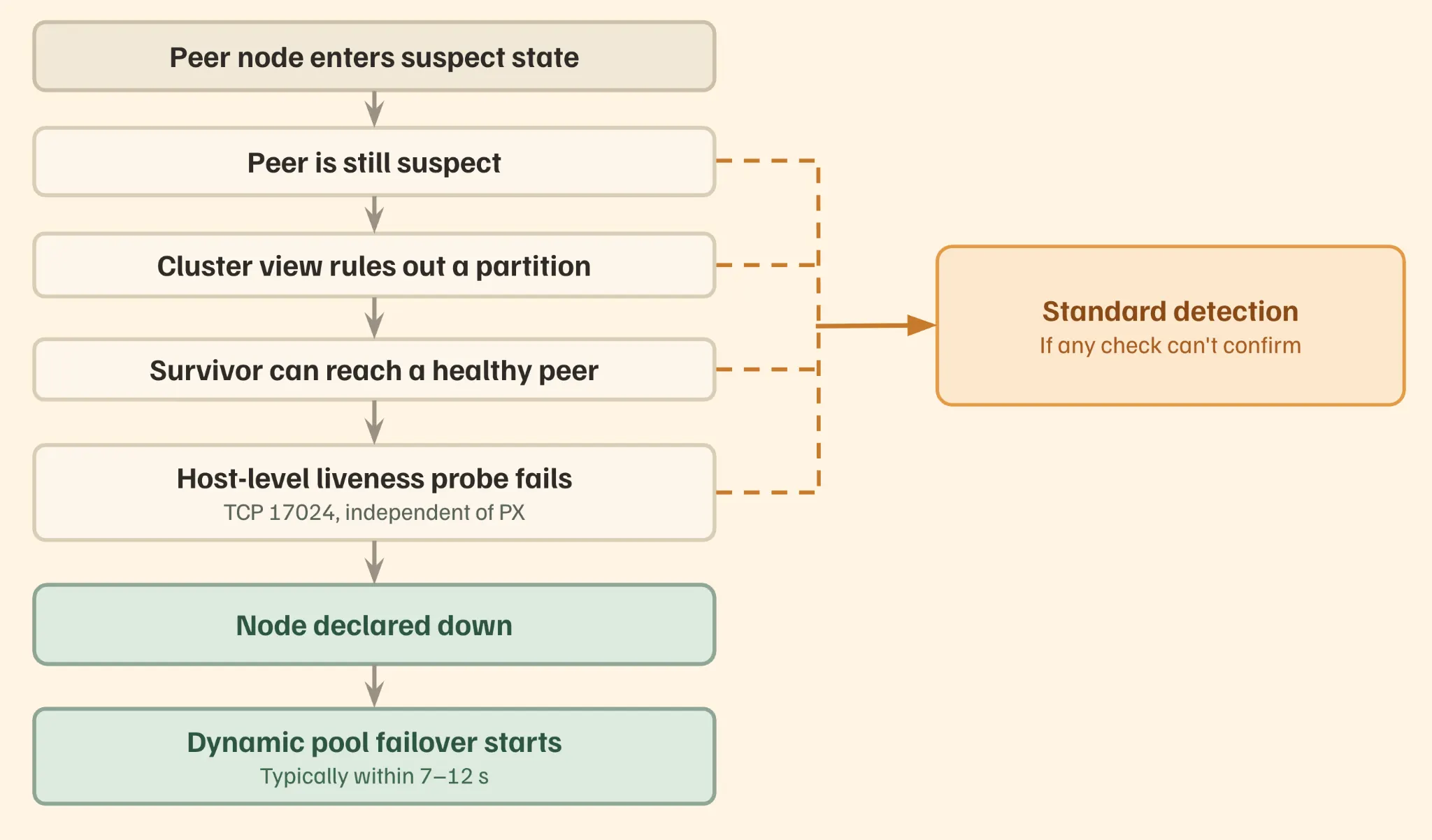
3.7.0 also raises the ceiling on how much you can build this way, up to 5,000 volumes per cluster, up to 4 dynamic pools per node, and up to 100 volumes per pool, so this isn’t just a faster failover for small setups, it’s a faster failover at real scale.
The same 2 AM alert may still show up. But the gap between “node down” and “workloads healthy again” shrinks from a coffee-length wait to something you read about before you even get a chance to pour that first cup.
The maintenance window where you can relax
Now we’re at a different kind of Tuesday: capacity planning flagged a pool that has been quickly growing weeks ago, and you need to expand it before space runs dry. The process to allocate more room renders a timeline and risk that is more than you can afford, with the most critical impact being the need to pause the workloads during the process.
Pool expansion touches the storage layer directly, so historically, Portworx played it safe by moving the pool into maintenance, doing the resize, and bringing it back. This is safe, but disruptive, and disruptive things get scheduled for 11 PM on a Saturday, which is its own kind of tax on whoever’s on call.
3.7.0 introduces non-disruptive pool resize for eligible PX-StoreV2 pools. The expansion happens while the pool keeps serving I/O without that maintenance window interrupting someone’s weekend, and it’s on by default for eligible resize-drive operations. Including the ones Autopilot triggers automatically when it sees a pool getting full. If your volumes have a replication factor of 1 (repl=1), you will especially appreciate this feature, since you already know they don’t have another replica that can serve I/O during a Portworx restart.
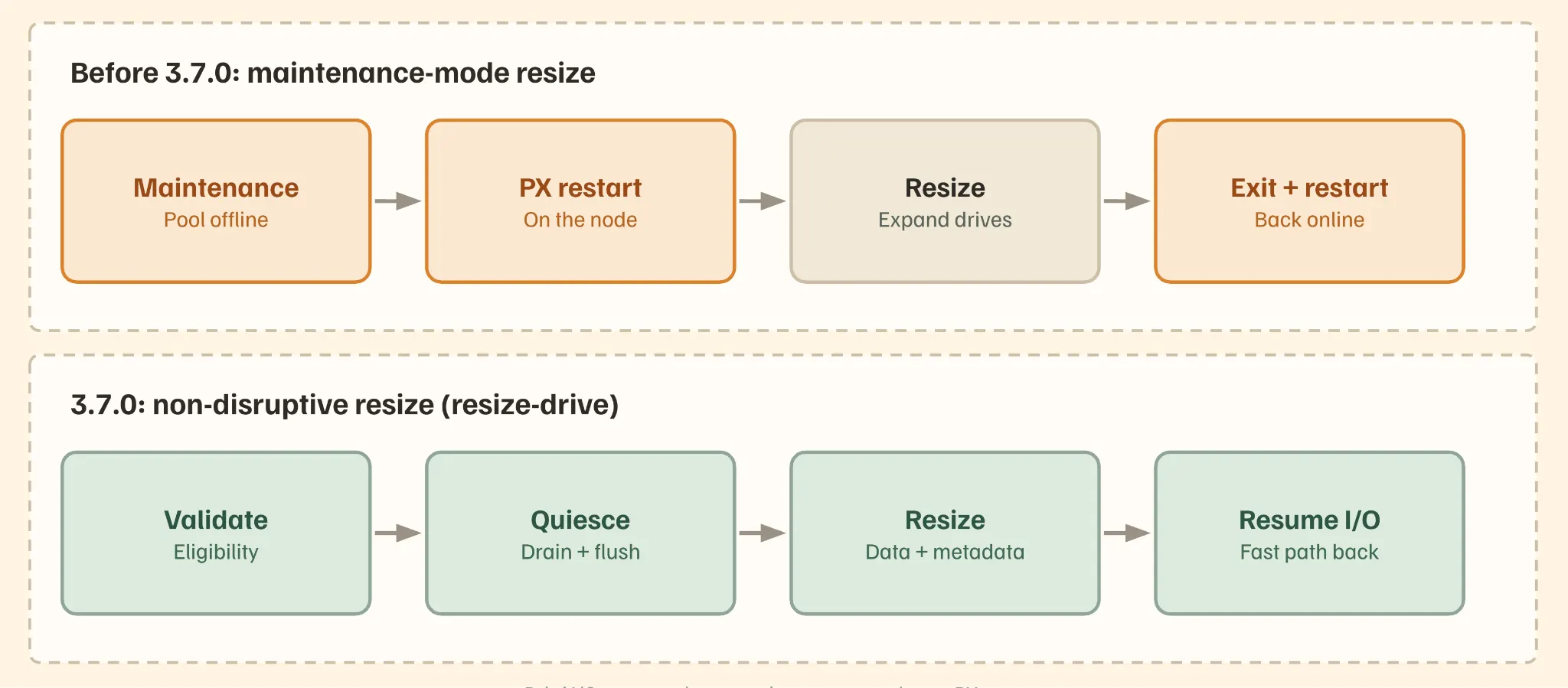
The resize now coordinates directly with in-flight I/O instead of pausing all operations at once. Rather than treating “safe” and “online” as mutually exclusive, the pool expansion is sequenced around active reads and writes, reducing the transient risk that used to justify pulling the pool offline in the first place.
#Expand command

pxctl service pool expand --operation resize-drive --uid <pool-UUID> --size <GiB>

#View the change

pxctl service pool show
When a bad drive stops taking the whole node down with it
A drive fails. Not the node, but just one drive holding one pool. Before you put 3.7.0 in place, that one bad component could end up costing you the entire node’s worth of healthy storage while things are sorted out. As a result, a single failed pool had an unfortunately large blast radius. Having to recover it manually, and cleanly separating “this pool is broken” from “this node is unusable,” took deliberate operator steps.
3.7.0 adds Auto Cordon for PX-StoreV2: when a drive failure takes a pool offline, Portworx automatically moves eligible replicas off the failed pool, cordons it off, and brings the node and its remaining healthy pools back online without waiting on a person to do it by hand.
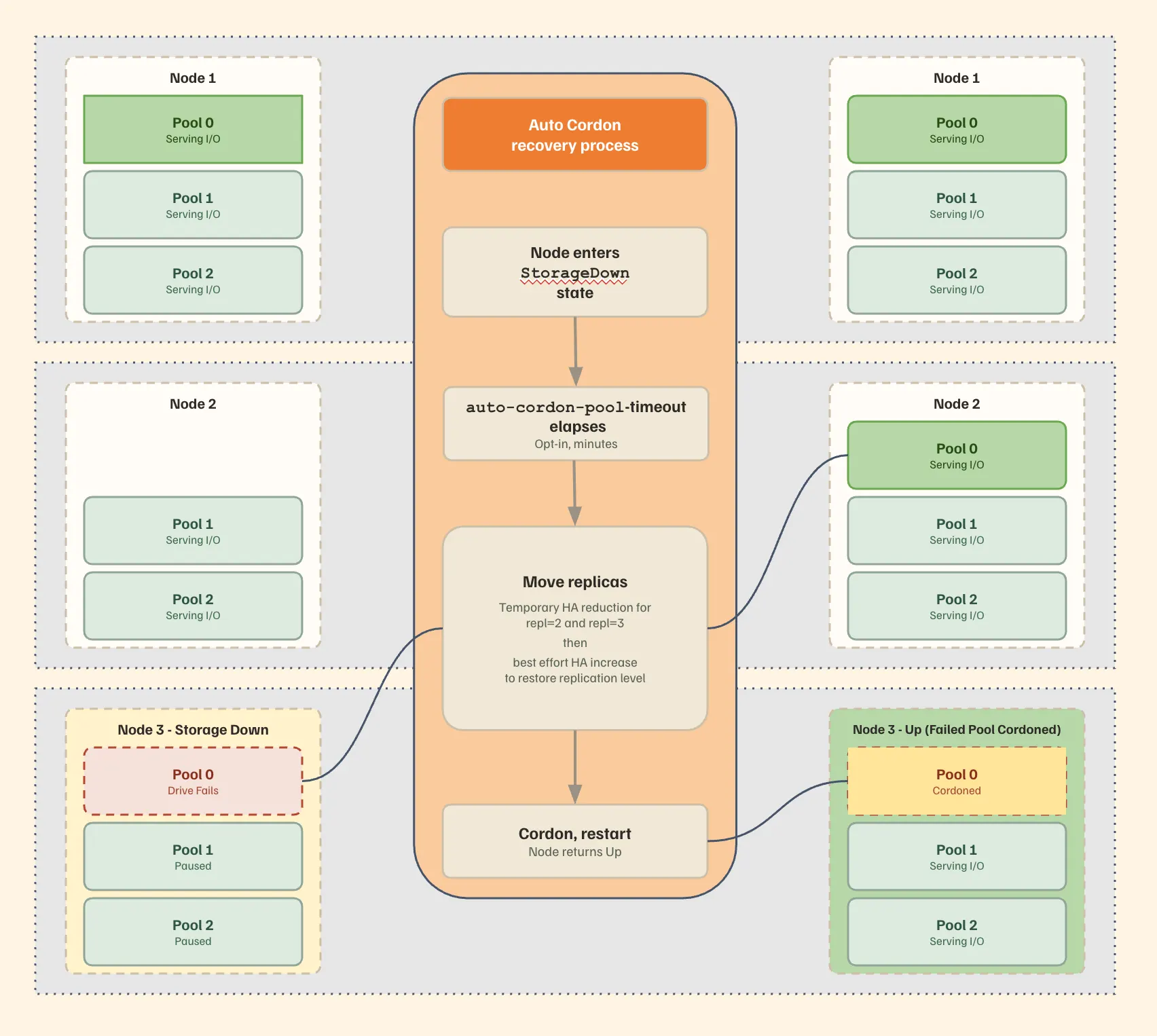
So now instead of treating the whole node as suspect the moment one pool fails, Auto Cordon isolates the failure to exactly the component that caused it. The failed pool gets cordoned automatically and waits for you to recover it. Everything else on that node such as the CPU, memory, the other healthy pools, goes right back to work.
Off by default, you will need to turn it on with the pxctl command and specifying the timeout period:
pxctl cluster options update --auto-cordon-pool-timeout <minutes>
The KubeVirt migration you don’t have to plan around
You need to move a VM’s storage to a different Kube Datastore. Maybe it’s just a rebalance, or maybe the original KDS is being retired. Either way, you can’t just delete the workload and spin up a fresh one. Because this is a running VM with state that can’t be recreated, you block out a maintenance window, map out the cutover step by step, and hope that nothing about the VM’s identity is affected along the way.
Placement and migration for KubeVirt VM storage hasn’t given you a Kubernetes-native lever to pull. So getting a volume onto the right KDS, or moving it later, meant working outside the normal StorageClass-driven workflow admins already use for everything else.
3.7.0 adds two pieces that work together to enhance this experience:
- First, KDS affinity: a kube_datastore_affinity parameter in the StorageClass that pins a volume to a specific Kube Datastore, both at provisioning time and during later rebalancing.
Example placing a volume on the fa-x90-1a KDS:
apiVersion: storage.k8s.io/v1

kind: StorageClass

metadata:

  name: px-kds-fa-x90-1a

provisioner: pxd.portworx.com

parameters:

  repl: "2"

  kube_datastore_affinity: "fa-x90-1a"

volumeBindingMode: WaitForFirstConsumer

allowVolumeExpansion: true
- Second, the Operator now automatically generates KDS-aware versions of the default KubeVirt StorageClasses for each KDS in the cluster.
Put those together and you get VM disk migration between Kube Datastores without recreating the VM. You select the KDS-aware StorageClass for the destination, and that’s the migration.
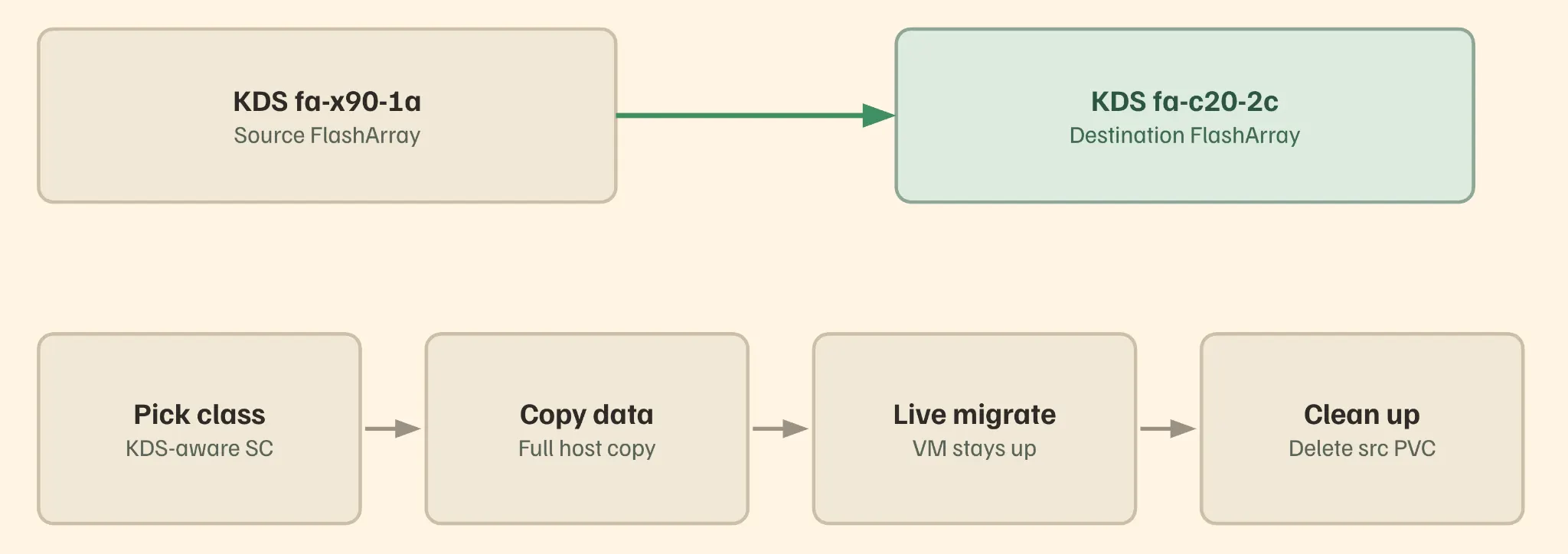
This is the difference between a special-cased storage operation and an ordinary Kubernetes one. Instead of a one-of-a-kind migration procedure, moving a VM’s disk to a different KDS becomes the same mental model as any other StorageClass change: pick the target, apply it, done. The VM’s identity and running state aren’t disturbed because the operation is scoped to where the storage lives, not what’s running on top of it.
An alert that actually names names
An I/O request times out and somewhere a replica isn’t responding. You know that much, but not which replica, which node, or which volume. So you’re pulling core dumps to reconstruct something the system already knew and just didn’t tell you. Finding the actual unresponsive node meant manual digging, under time pressure, for information that existed somewhere in the system the whole time.
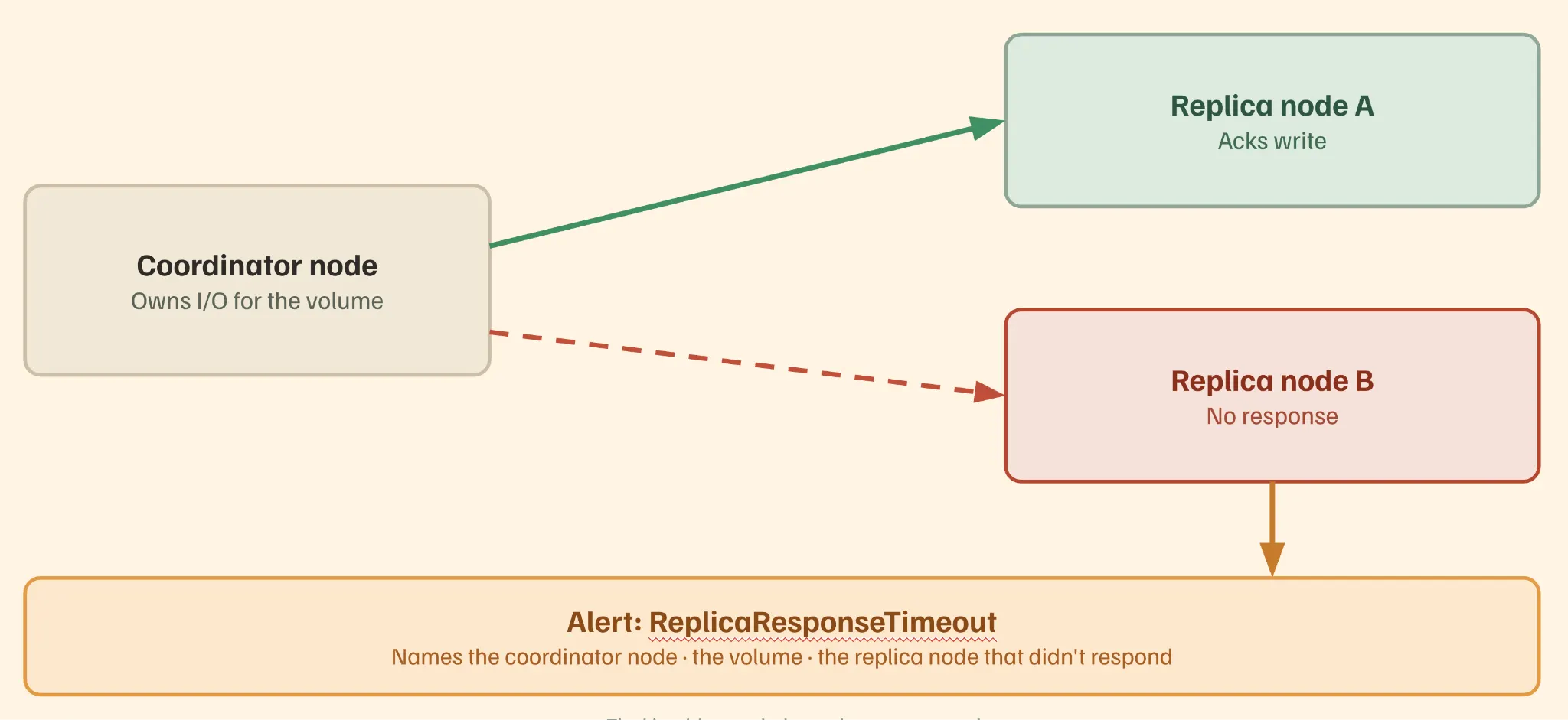
3.7.0 introduces a ReplicaResponseTimeout alert that fires when a storage I/O request times out waiting on a replica and names the coordinator node, the volume, and the specific replica node that didn’t respond. pxctl alerts show –type node gets you straight to it.
Alongside that, there’s a new Grafana dashboard for Non-Blocking Device Delete (NBDD) operations, including completed, in-progress, and queued deletions, discard throughput and errors, reclaimed capacity, and how long discard/release operations are taking. It plugs into your existing Prometheus setup, so it’s not a new tool to stand up, just a new view once you’re already there.
Back to 2 AM
So now we’re back to the same alert, same hyperconverged node, same failed VM. But now the failover finishes before your coffee’s poured, a resize you’d have scheduled around doesn’t need a window, a bad drive stays a bad-drive-sized problem, and if something’s still unclear, the alert tells you exactly where to look instead of making you go find out.
None of this makes the phone stop ringing. It just makes what happens after a lot less interesting. Which, at 2 AM, is exactly what you want.
A few other additions round out the release and are worth knowing about even though they didn’t get their own scene: SSL certificate verification for FlashArray and FlashBlade connections and an enhanced FA/FB driver for anyone running Portworx alongside FlashArray or FlashBlade both focused on tightening the security and compliance posture of those deployments.
For the full list of what shipped, see the Portworx Enterprise 3.7.0 release notes. If you’re planning an upgrade, check system requirements and supported kernels first, then follow the upgrade guide.
Frequently Asked Questions
How much faster is dynamic pool failover in 3.7.0?
Seconds instead of minutes, typically 7 to 12. Because dynamic pools live on shared SAN storage, Portworx reattaches the pool to a healthy node once it confirms the original is down.
Can I expand a pool without taking it offline?
Yes, for eligible PX-StoreV2 pools. Workloads keep reading and writing during the resize, and this applies to Autopilot-triggered expansions too.
How large can a dynamic pool deployment get?
A cluster now supports up to 5,000 volumes, with as many as 4 dynamic pools per node and 100 volumes per pool.
What do I need to do before upgrading?
Open TCP 17204 between nodes and pause pool failovers during the upgrade. Upgrade every node to 3.7.0 before relying on non-disruptive resize or Auto Cordon.