Product Announcements
Introduction to Portworx KDS: Static to Dynamic Mobility

Summarize Blog With
Table of Content
Kubernetes storage has traditionally relied on tightly coupled architectures. You define a Persistent Volume Claim (PVC), and a CSI driver provisions storage on a SAN appliance or cloud provider. This has the effect of tightly coupling our storage to the backend provider (I have vivid nightmares of trying to migrate stateful sets between my first clusters). Additionally, scaling issues and uniformity problems remained: attach/detach operations are administratively expensive (API calls, etc.), and different providers have different implementations.
I’m hesitant to point the finger at the Container Storage Interface (CSI) in general. CSI has a limited set of functions that don’t cover many enterprise use cases—migration, disaster recovery, and resource transformations, to name a few—but it is at least a standard.
Portworx Enterprise went a long way toward solving these problems. By abstracting Persistent Volumes from the underlying storage devices, we introduced significant flexibility to the workload: we can now migrate workloads between different storage systems and automate provisioning and failover operations. This includes my personal favorite feature: being able to migrate a namespace (and all its manifests) between Kubernetes clusters with different underlying storage.
However, a fundamental challenge remained: Portworx Enterprise traditionally relied on multiple software replicas of the data to provide redundancy and mobility. While multiple replicas are the correct architecture for local disks, they introduce unnecessary overhead for high-performance virtual machines backed by an enterprise SAN appliance that is already highly redundant.
What if we could achieve the mobility of a replicated setup with the efficiency of a single replica? What happens when a node goes dark, or when you need to rebalance capacity without the heavy “replication tax” of moving multiple copies of data?
That’s where Kube Datastore (KDS) comes in.
The KDS Concept: Solving the Replica Tax
Before launching into a discussion about KDS, it is important to understand how Portworx Enterprise provides redundancy today.
Portworx Enterprise organizes storage into storage pools, which are logical groupings of disks of the same class and type. Each Kubernetes node that has attached storage will have one or more storage pools, depending on how many different types of disks are attached.
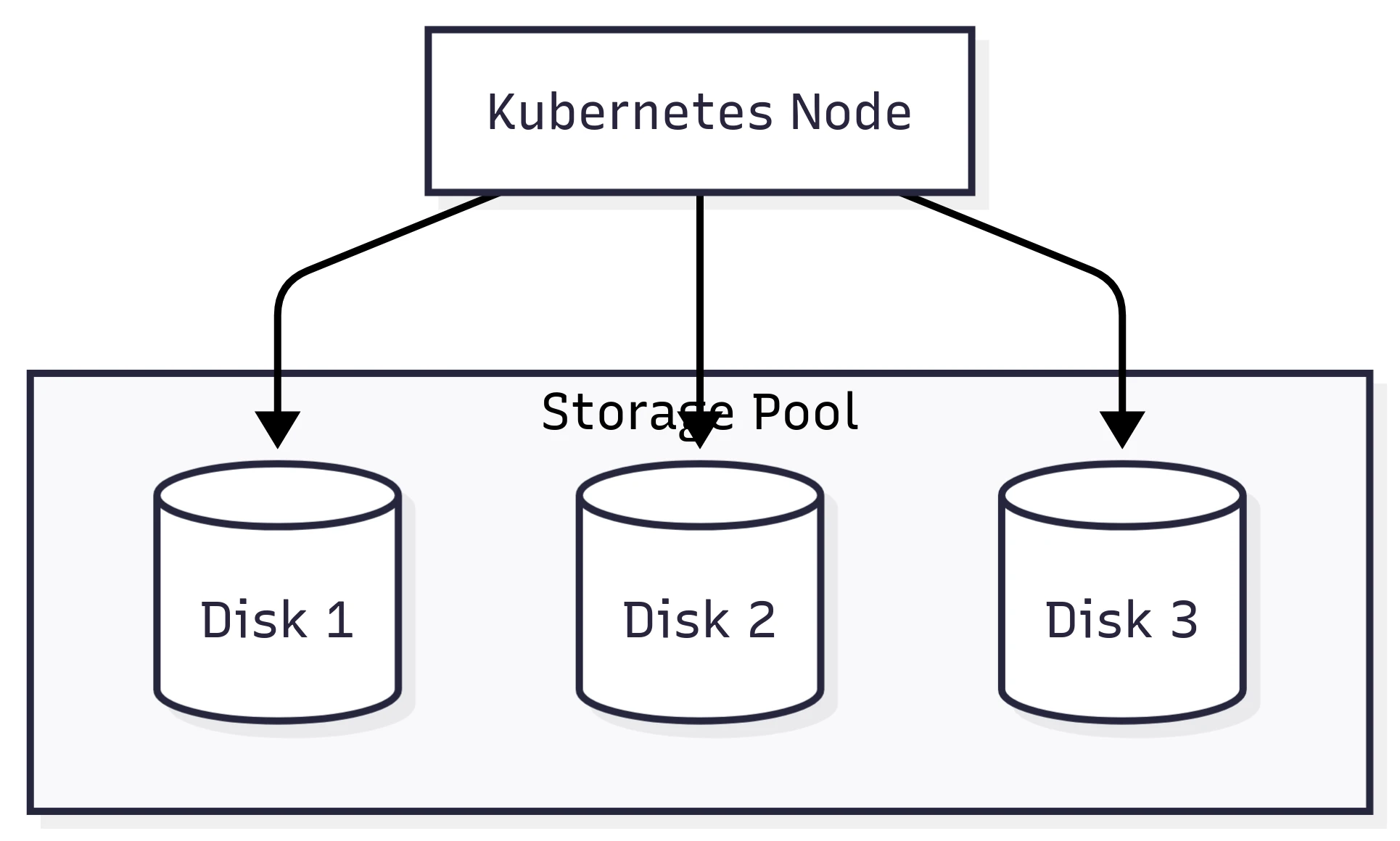
Portworx Enterprise relies on a configurable replication factor. This makes a lot of sense (and still does) when using disks that cannot move between nodes. Imagine a Kubernetes cluster with local disks. If a node failed, the storage would fail with it. Of course, this is why our PVs are replicated between storage pools – to ensure the data remains safe.
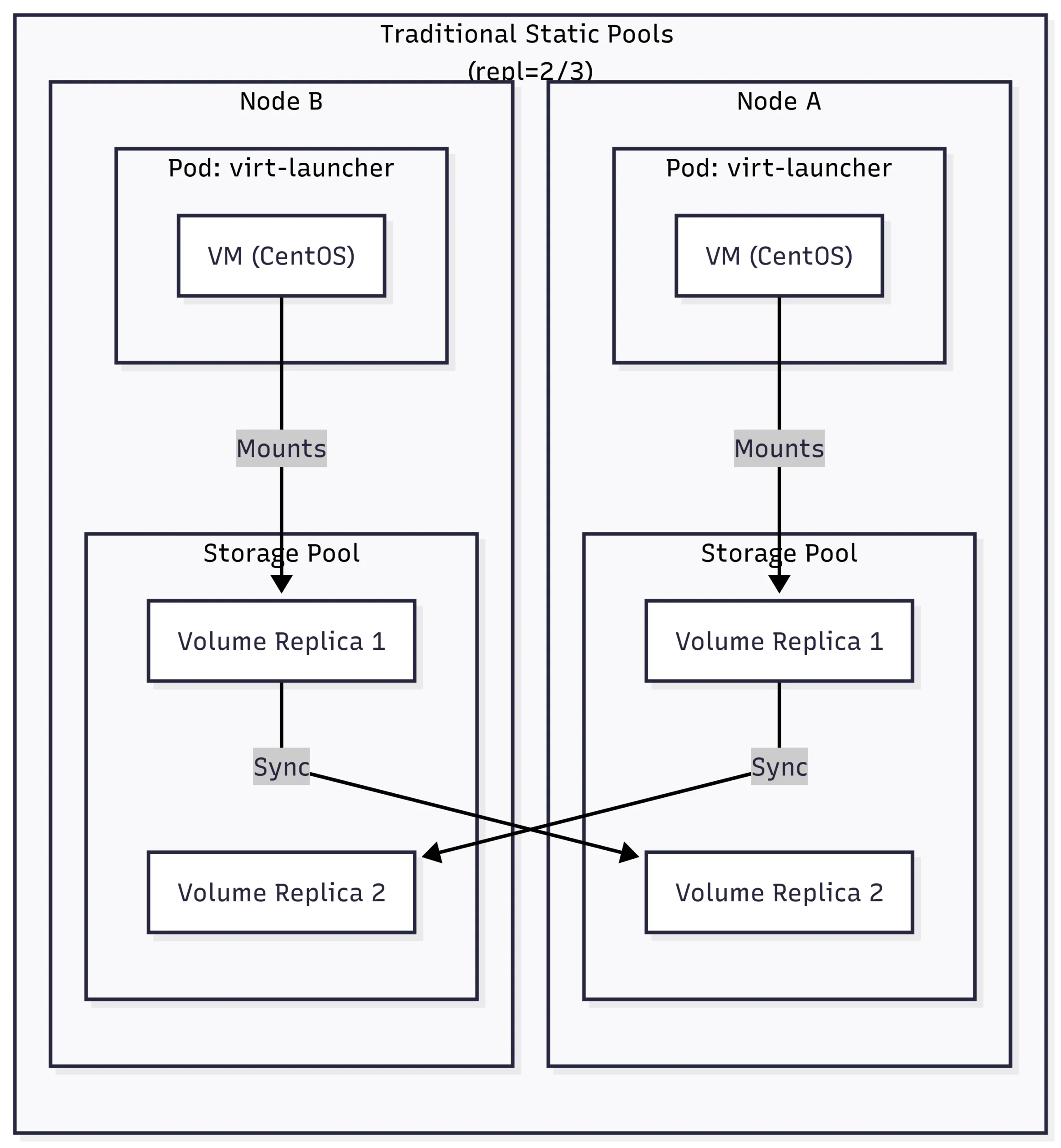
We can see in the diagram above that if we lose Node A, we already have a copy of the data on Node B.
But what happens if our cluster is backed by a Pure FlashArray, which is already redundant? We end up writing extra copies of our data to the array! Although on a FlashArray the extra copies of our data do not take up additional space due to best-in-class data reduction, it does increase the load on the array by writing additional copies—not to mention increasing the latency while we wait for those additional writes to be acknowledged.
Enter Kube Datastore (KDS). KDS is a feature that allows storage pools to be moved between Kubernetes nodes when a node failure is detected, when an administrator non-disruptively moves it, or when the system detects an imbalance.
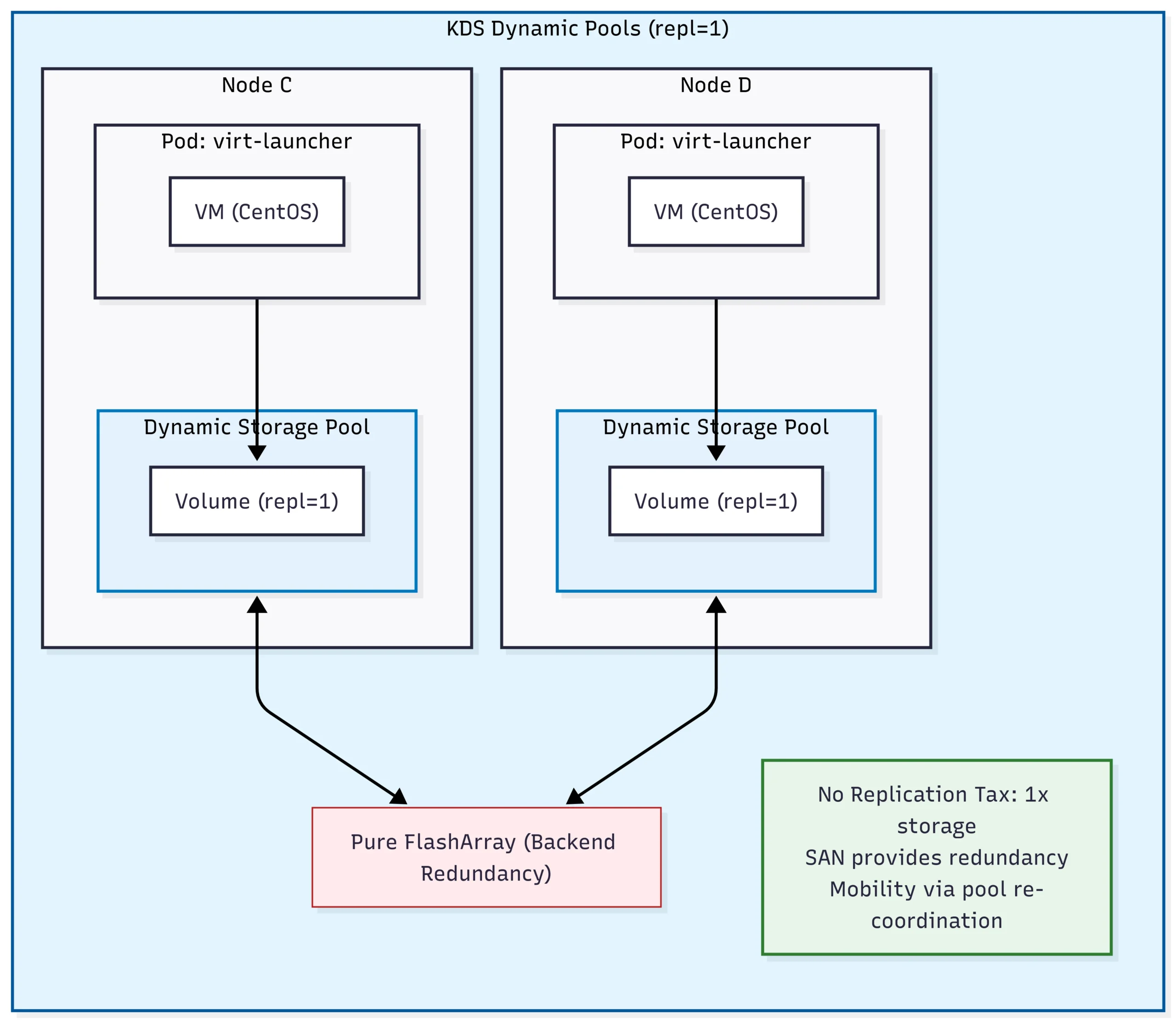
We now have a fully redundant, performant storage system for virtual machines without the “tax” of writing multiple copies to our FlashArray!
When a failure is detected, the storage pool is migrated to a different node, and our virtual machine is restarted. We can also non-disruptively migrate a dynamic pool to a different node for maintenance operations.
Because KDS is backed by Portworx, it can transparently redirect I/O for non-local virtual machines. That makes maintenance easy, as we can migrate a dynamic pool without having to worry about where our virtual machines are located.
Of course, the true value of KDS isn’t felt when things are running smoothly; rather, it is felt during a failure.
By utilizing RWX (ReadWriteMany) access modes and block-level intelligence, KDS allows for a much more fluid relationship between the workload and the storage. This becomes critical when you need to move a running VM from one node to another or when a node suffers an unplanned outage. KDS provides the efficiency of a single-replica volume with the resiliency of a multi-replica system by leveraging the high availability of the underlying SAN.
Technical Deep Dive: Testing Resilience in the Wild
Theory is one thing; a hard power-off is another. To see if KDS actually lives up to the hype, I put a KubeVirt-based environment through its paces. The goal was simple: push the limits of availability by forcing the system to handle both planned migrations and unplanned, “lights-out” node failures.
The environment for these tests was a 6-node OpenShift cluster running Portworx 3.6.0, backed by a Pure Storage FlashArray via iSCSI. Crucially, all test workloads were running on the px-csi-vm StorageClass with repl=1 to leverage the KDS dynamic pool capabilities.
1. The Seamless Transition: Live Migration
The first test was a standard live migration. We took a running CentOS Stream 9 VM and moved it from one worker node to another.
In a traditional storage setup, migration can often be a “stop-and-go” affair as the volume is detached from the source and re-attached to the destination. However, because KDS (combined with our RWX/block configuration) allows both the source and destination nodes to hold concurrent volume access during the transition, the handoff was nearly instantaneous.
The Results:
- Migration Duration: < 10 seconds.
- I/O Interruption: Zero observed.
- VM Status: Remained Running throughout the entire process.
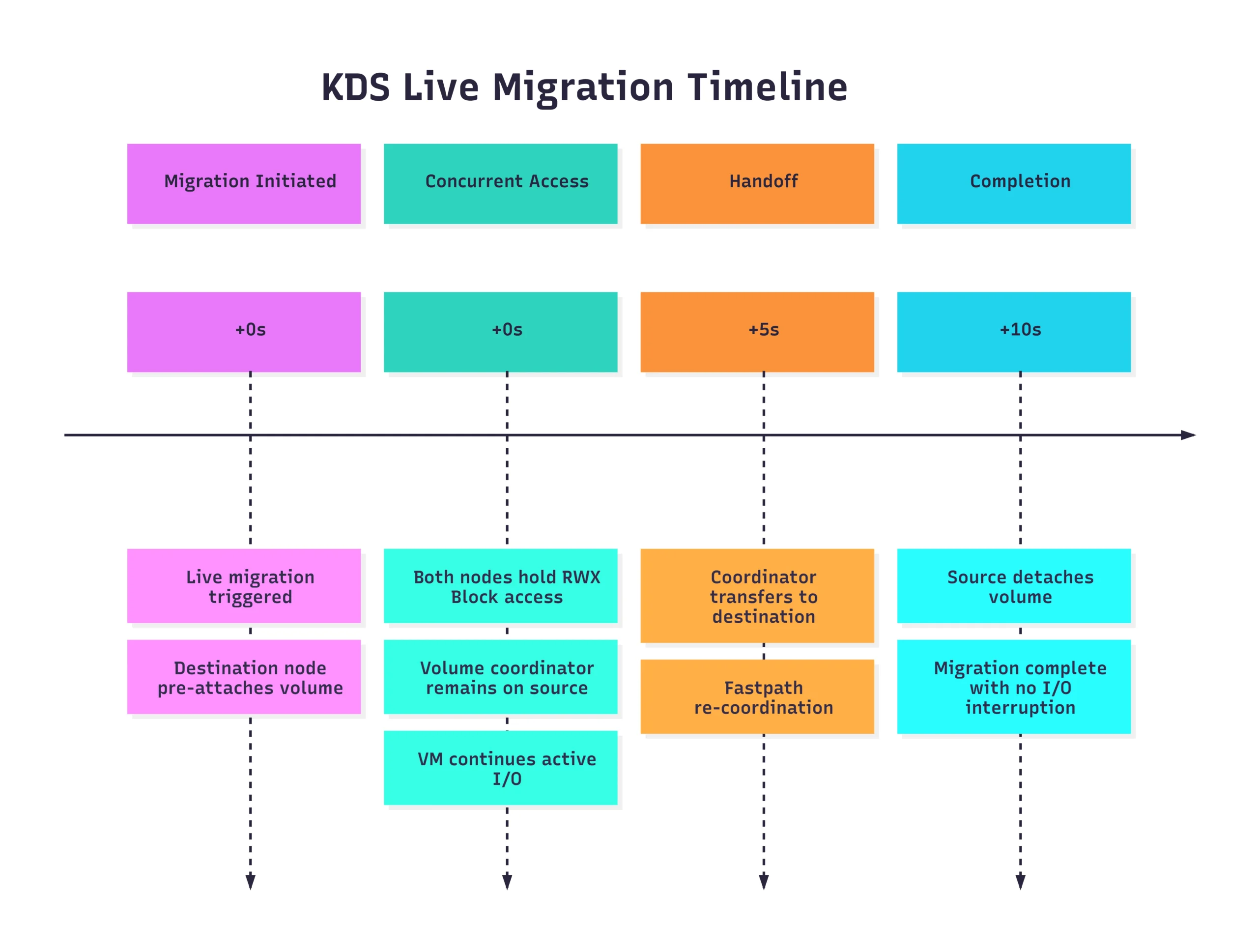
The Key Takeaway: The combination of RWX (ReadWriteMany) access mode and block-level intelligence is the secret sauce here. By allowing the destination node to “pre-attach” and share the volume path during the transition, we eliminate the typical detach/reattach latency that plagues many containerized VM workloads.
2. When the Lights Go Out: Unplanned Node Failure
The real test of KDS isn’t how it handles a graceful migration, but how it handles a catastrophe. We simulated a true unplanned failure by performing a hard power-off on a worker node hosting a critical VM.
When the node went dark, the cluster had to do more than just restart a pod; it had to re-orchestrate the entire storage pool.
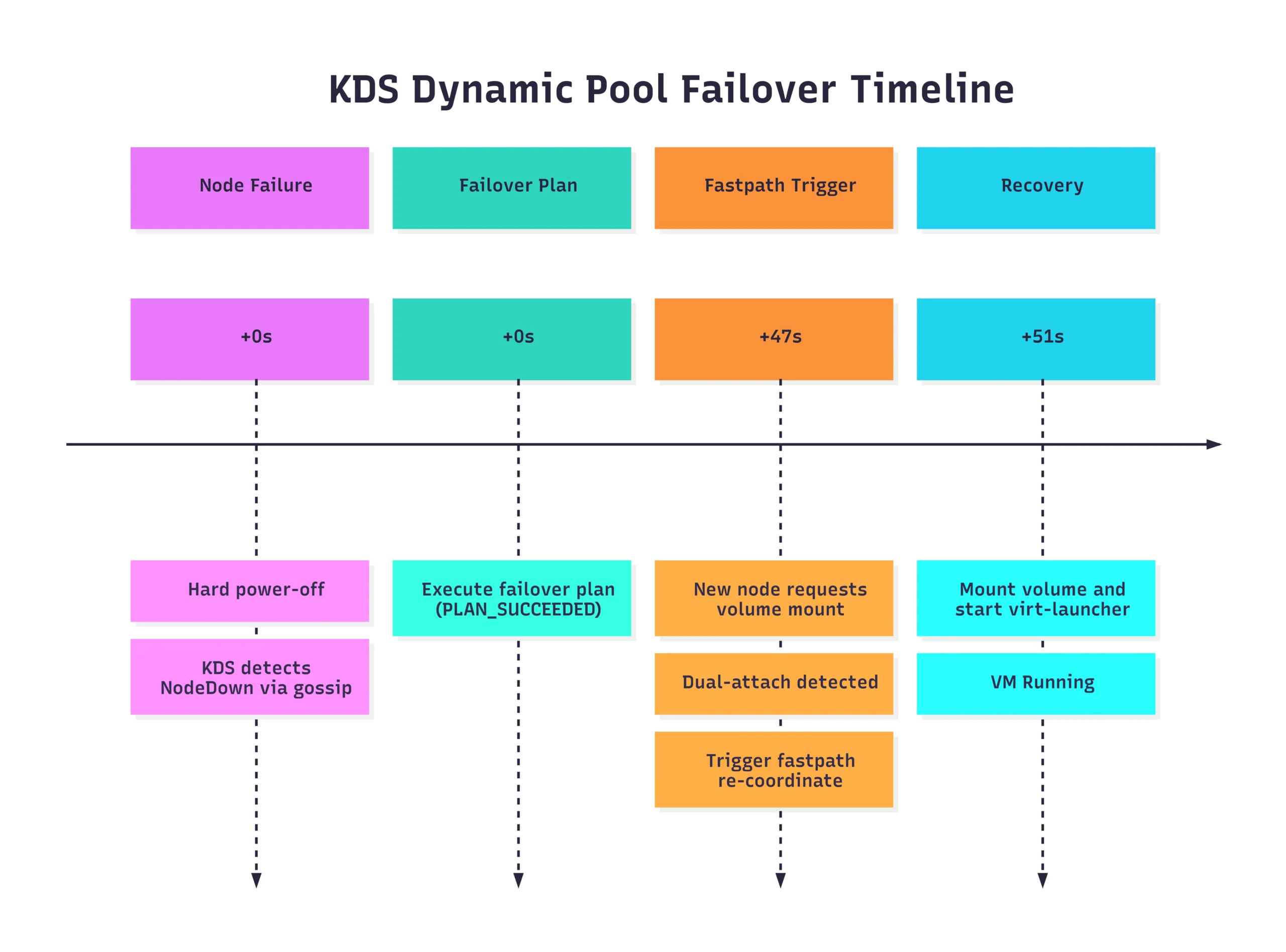
Total Recovery Time: ~51 seconds.
The “Fastpath” Logic
What’s most impressive here is the automation of the failover plan. Instead of waiting for manual intervention or standard timeout-heavy processes, KDS recognized the node loss and immediately prepared the storage for the new host. When the dual-attach was detected (the moment the new node tried to claim the volume while the old one was still technically “active” in the control plane), the system triggered a fastpath failover, forcing the volume to the new coordinator and getting the VM back online in under a minute.
Ready to Try Kube Datastore (KDS)?
Getting hands-on with KDS is the best way to see how dynamic storage pools can streamline your architecture and eliminate the replication tax. If you’re looking to optimize your storage overhead, we highly encourage you to give it a spin!
Before you dive in, just keep a few important caveats in mind regarding the current release:
- Directed Availability: KDS is currently released as a directed availability feature.*
- Infrastructure Requirements: Your environment must be running on OpenShift and utilizing Pure FlashArrays.
- Strictly Replica 1: Any dynamic pool you configure must only contain replica 1 (
repl=1) volumes.
Footnote: Both containers and virtual machines are supported with KDS.
Self-paced Lab
Get Your Self-paced OpenShift + Portworx Hands-on Lab
Conclusion
KDS marks a shift from “managing volumes” to “orchestrating data.” By treating storage pools as dynamic, intelligent entities, we can finally build Kubernetes environments that are as resilient and agile as the applications they host.
Recommended for you