Architect’s Corner
Avoiding Storage Lock-In When You Modernize Across Clouds


Summarize Blog With
Table of Content
A cloud-agnostic application modernization strategy depends on where your data lives, not where your compute runs. Stateless services can move between clouds in minutes, while the data behind stateful workloads cannot. Storage portability across on-premises, public cloud, and edge keeps modernization options open, and a consistent data management layer matters more than any single infrastructure choice.
Cloud stopped being the automatic destination five years ago. Repatriation is rising, sovereignty rules are tightening, and the platform decisions you make now will shape your infrastructure for the next five years. In the Barclays CIO Survey for the fourth quarter of 2024, 83% of CIOs said they planned to move at least some public cloud workloads back to private or on-premises infrastructure. The figure was the highest the survey has recorded. IDC framed the same trend in terms of workload. Around 80% of enterprises expect to repatriate some compute or storage within a year.
None of this signals a cloud exit. Enterprises are recalibrating, routing each workload to the place where cost, performance, and compliance align. That freedom holds only if your data follows the workload. The moment your storage ties you to one provider, every future move carries an exit tax.
Data does not move like compute
Stateless applications gave modernization its early wins. A web tier or an API service runs anywhere a container runs. Kill the pod, reschedule it on another node or another cloud, and nothing breaks, though storage never came that easily.
Stateful workload: an application that stores data which must outlive the process that created it, such as a database or a message broker.
Stored data carries a gravity that stateless compute never does. A database, a message queue, or a model checkpoint holds state that has to survive the process that created it. Moving terabytes between providers costs money and time. By one estimate from 27Virtual, egress fees – the charge to move your own data out – reach 6 to 12% of a migration bill and climb with data volume.
Kubernetes pushed the problem into the mainstream. The Voice of Kubernetes Experts 2024 report, commissioned by Portworx and run by Dimensional Research across 527 practitioners at companies with 500 or more employees, found 98% now run data-intensive workloads on Kubernetes. Databases make up 72%, analytics 67%, and AI/machine learning 54%. Stateful workloads are now the norm on Kubernetes, not the exception. Container-native storage solutions like Portworx, OpenEBS, and Rook, supported by Ceph, have been developed to provide persistent data with the same portability that containers offer.
What actually locks you in
Lock-in rarely comes from the container. It comes from what the container depends on for storage.
Provider block and object storage: Amazon EBS, Azure Managed Disks, and Google Persistent Disk each expose their own APIs and snapshot formats. Build backup and recovery around one, and the runbook does not travel.
Managed database services: Amazon RDS, Aurora, and their peers remove operational work in exchange for a proprietary control plane. The data belongs to you, but the automation around it does not.
Single-cloud disaster recovery: replication built on one provider’s primitives must be rebuilt the day you add a second region or cloud.
The table below maps common storage choices to their portability levels.
| Storage approach | Portability across clouds | Tradeoff |
| Provider block and object storage (EBS, Azure Disk, Google PD) | Low. APIs and snapshot formats are provider-specific. | Deep integration and low friction on day one, high exit cost later |
| Container-native storage layer (Portworx, OpenEBS, Rook/Ceph) | High. One control plane spans on-prem, cloud, and edge. | Adds a layer to operate and needs storage skills on the team |
| Backup-and-restore migration (Velero) | Moderate. Fits periodic moves, not live portability. | Simple and open source, though recovery time grows with data size |
The data management layer matters more than the infrastructure
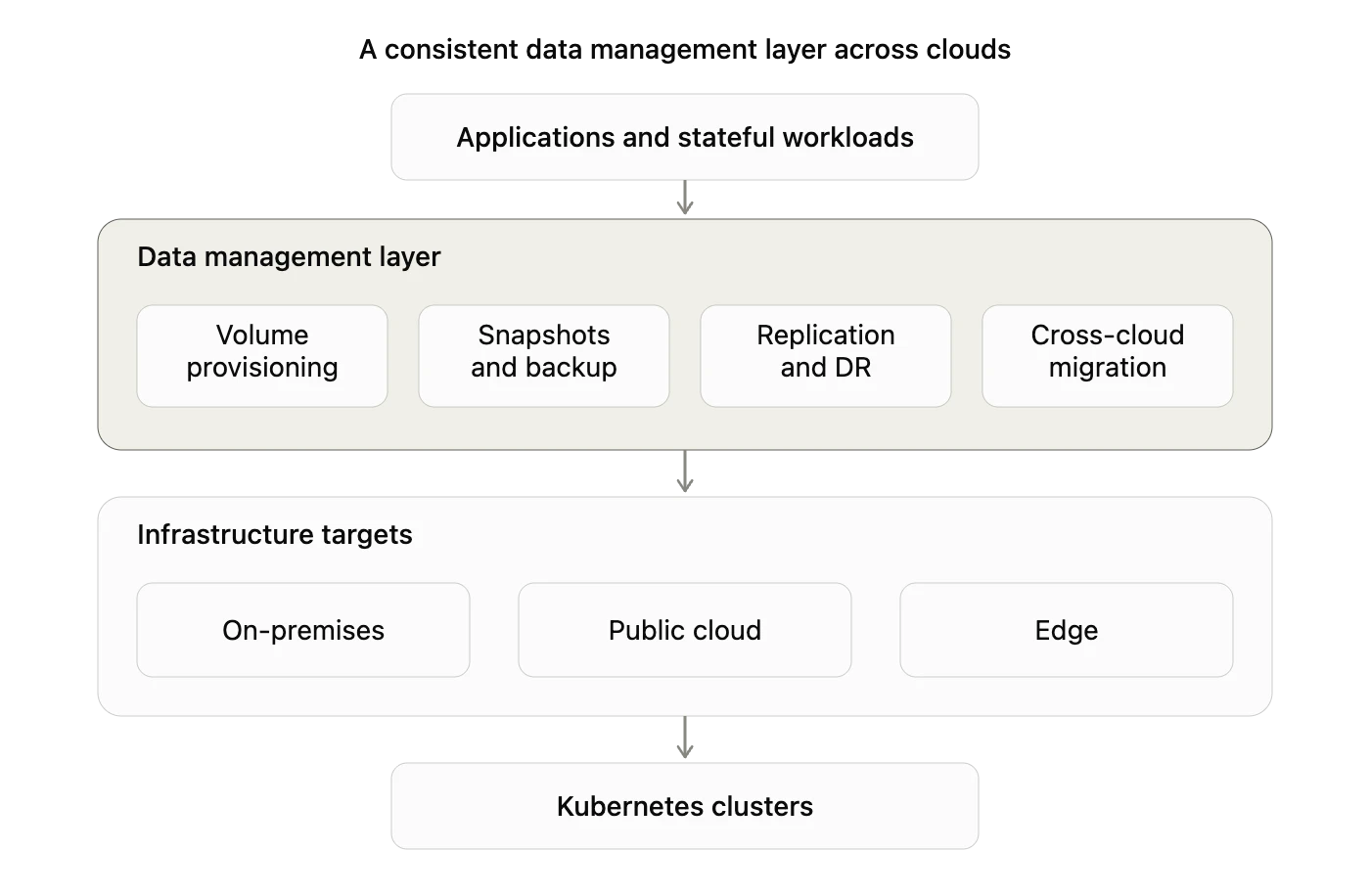
Pick the layer that sits between your applications and the disk, and the underlying infrastructure becomes a detail you can change at will. A consistent data management layer provides every workload with the same provisioning, snapshotting, replication, and migration behavior. The volume lands on a data center SAN, an EBS volume, or an edge node in a factory, and the behavior remains the same.
The Container Storage Interface standardized how Kubernetes communicates with storage, so a portable layer can plug into any conformant backend. Your team writes one set of storage policies, and the layer enforces them everywhere.
Think of the data management layer as an operating system for your storage. Just as an OS lets one application run on many hardware configurations without a rewrite, the storage layer lets one workload run on many infrastructure targets without a re-architecture.
The diagram below shows the shape. Applications and stateful workloads sit on top. A consistent data management layer handles provisioning, snapshots and backup, replication and disaster recovery, and cross-cloud migration. Underneath, the same layer targets on-premises, public cloud, and edge, all running on Kubernetes clusters.
Day-2 is where storage lock-in strikes
Day-1 is deployment, and Day-2 is every operation after it. Day-2 is where storage lock-in shows its cost, because backups, snapshots, disaster recovery, capacity planning, encryption, and migration all run against the storage layer for the life of the application.
A portable layer keeps these operations identical across environments. Restore a snapshot taken on-premises into a public cloud cluster. Fail an application over from one region to another without rewriting the recovery plan. Move a workload to comply with a new residency rule without modifying application code.
Portworx automates these Day-2 operations across hybrid and multi-cloud environments, the specific gap the Voice of Kubernetes Experts survey keeps surfacing. Teams that only need periodic backup and restore get a narrower slice at lower cost from Velero, and cloud-vendor Container Storage Interface (CSI) drivers cover single-cloud estates. The right choice depends on how often data needs to move and how quickly recovery must happen.
The next table connects each modernization driver to the portability it demands.
| Modernization driver | Portability requirement | Example |
| Cost and repatriation | Move steady-state workloads off public cloud without re-architecting storage | 37 signals reported roughly $1.5M a year in savings after leaving AWS |
| Data sovereignty | Keep specific data inside a jurisdiction while apps run elsewhere | EU Data Act, applicable September 2025, adds data portability rights |
| Edge and latency | Run the same storage stack in a data center and at a remote site | Retail or factory nodes with intermittent connectivity |
| Mergers and multi-cloud | Operate one storage model across inherited AWS, Azure, and on-prem estates | Consolidating two clouds after an acquisition |
Sovereignty makes portability non-optional
Cost drove the first wave of repatriation. Sovereignty is driving the next one, and these rules leave little room for workarounds.
Gartner predicts that by 2030 more than 75% of enterprises in Europe and the Middle East will geopatriate workloads. Geopatriation moves data and applications out of global public clouds into sovereign clouds, regional providers, or owned data centers to cut geopolitical risk. The Nutanix Enterprise Cloud Index for 2026 found 57% of IT leaders felt the need to run infrastructure within a single country. The EU Data Act, applicable since September 2025, gives users the right to port data between services and directly restricts vendor lock-in practices.
A residency mandate lands with little warning. When a regulator requires that German customer data remain in Germany, an application built on one cloud’s proprietary storage must be replatformed. An application built on a portable data layer moves the affected volumes and keeps running, turning a compliance scramble into a configuration change.
Storage decides whether modernization stays flexible or hardens into a new form of lock-in. The specific cloud provider, region, and data center will evolve multiple times in the next five years. A consistent data management layer across on-premises, public cloud, and edge lets you keep answering that question without rebuilding your data plane each time. The layer, not the infrastructure beneath it, is the decision that lasts.
Frequently asked questions
What is storage lock-in in cloud modernization?
Storage lock-in happens when your data depends on one provider’s storage APIs, snapshot formats, or managed database services. Moving a workload to another cloud then means rebuilding the storage and recovery around it. The application remains portable, while the data beneath it does not.
Why is stateful data harder to move than stateless applications?
Stateless services hold no persistent data, so any copy behaves like any other and can be rescheduled anywhere within seconds. Stateful workloads carry state that has to survive restarts and migrations, and moving large volumes between providers adds egress fees, downtime, and recovery risk.
What is a data management layer and why does it matter more than infrastructure?
A data management layer sits between your applications and the underlying disk. It gives every workload the same provisioning, snapshot, replication, and migration behavior across on-premises, public cloud, and edge. Because it abstracts the storage backend, you change infrastructure without re-architecting the data plane.
Why is Day-2 the point where storage lock-in shows its cost?
Day-1 is deployment, while Day-2 covers backup, disaster recovery, capacity planning, encryption, and migration, all running against the storage layer for the life of the application. Lock-in forces you to rebuild these operations whenever you add a region or cloud.
How does data sovereignty affect storage portability?
Sovereignty rules dictate where specific data has to reside. A portable storage layer moves the affected volumes into a required jurisdiction while the application keeps running, turning a re-platforming project into a configuration change.
Recommended for you