Architect’s Corner
A Practitioner’s Checklist for Stateful Workloads on Kubernetes


Summarize Blog With
Table of Content
A stateful workloads checklist gives platform engineers a concrete way to move databases, caches, and message queues to Kubernetes without losing data or uptime. This guide covers storage class selection, persistent volume provisioning, backup and disaster recovery, and the Day 2 operations that most migration guides skip.
You moved the easy half first
You containerized the stateless services. The API gateways, the web frontends, the worker pools. They scaled cleanly. The CI/CD pipeline worked. Then you looked at the databases, the Redis instances, and the Kafka clusters still running on virtual machines, and the project slowed down.
This is the normal shape of a modernization effort. The stateless tier moves fast because it carries no data. Lose a pod and Kubernetes reschedules it. Nothing breaks. The stateful tier behaves differently. A pod failure can cause an unclean shutdown, a slow recovery, or data loss if storage and replication are poorly designed. A node drain can strand a persistent volume. A bad upgrade can lose a week of writes.
The data shows this is not a niche problem. The Voice of Kubernetes Experts 2025 report, a Portworx-commissioned survey of more than 500 enterprise practitioners conducted by Dimensional Research, found that 98% of enterprises now run data-heavy workloads in cloud native environments, with databases at 69% and AI/ML workloads at 60%. Stateful workloads are no longer edge cases on Kubernetes. They are common enough that platform teams need first-class storage, backup, and recovery practices.
This article is a checklist. Work through it before you migrate a single production database.
Pick the storage layer before you pick anything else
Storage is the decision that everything else depends on. Get it wrong, and every later step inherits the problem.
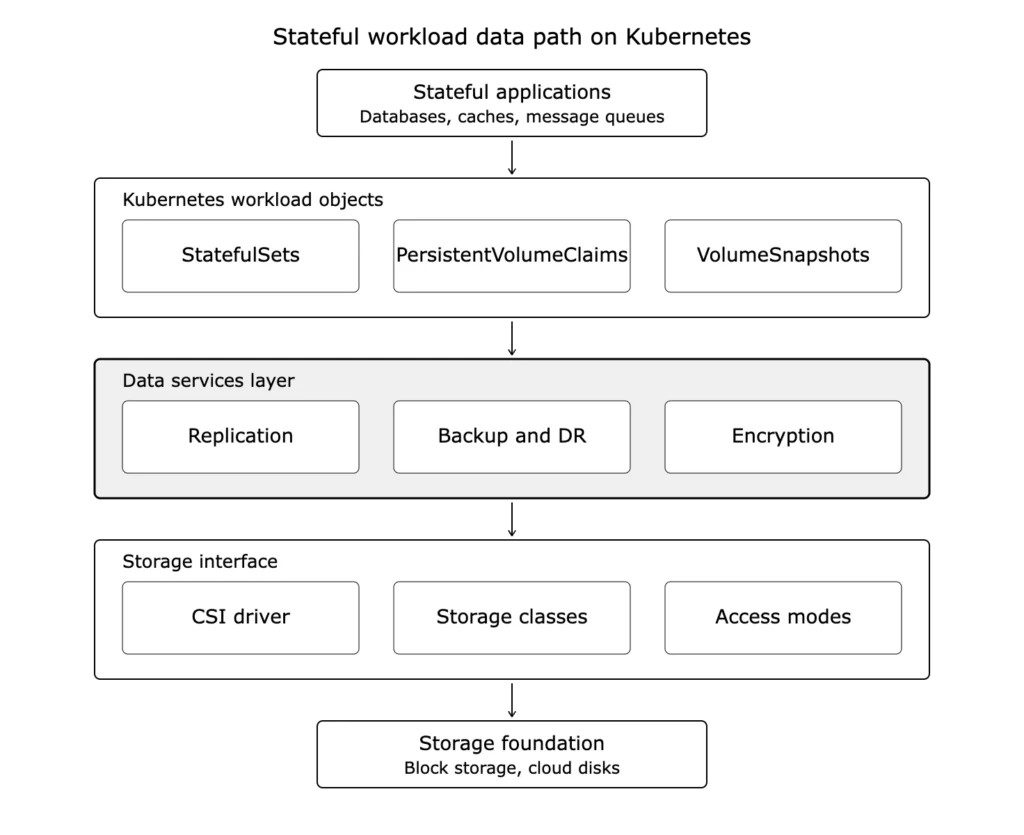
Kubernetes provides storage abstractions and orchestration, not durable storage media or replication by itself. It exposes an interface, the Container Storage Interface, and expects a driver behind it. Your choice of driver and storage class determines whether a volume can move between nodes, whether it can replicate, whether it can snapshot consistently, and how it performs under load.
Access mode matters. Most cloud block storage volumes are ReadWriteOnce. They mount read-write on one node at a time, though multiple pods on that same node can share them. The stricter ReadWriteOncePod mode limits a volume to a single pod. ReadWriteOnce works for a single-replica database, but it becomes a design constraint during failover. The platform has to safely detach, fence, and reattach the volume, or the database itself has to provide replication at the application layer. Confirm the access mode your workload needs before you choose a driver.
Replication is not automatic. The Spectro Cloud State of Production Kubernetes 2025 survey of 455 engineers and architects reports that more than half of respondents describe their clusters as manual snowflakes despite claiming a mature platform function. Storage is often where that manual work hides. Many CSI drivers do not replicate volumes on their own. You either get replication from the underlying cloud disk, from the database itself, or from a storage platform that runs inside Kubernetes.
Performance is workload-specific. A PostgreSQL primary needs low write latency. An analytics store needs throughput. A vector database needs both. One storage class will not serve all of them. Plan for tiered storage classes mapped to workload profiles.
Storage approaches compared
Choosing a data layer is a tradeoff between operational control and operational burden. The table below maps four common approaches to the questions practitioners actually ask.
| Question | Managed cloud database | Database operator | CSI-backed StatefulSet | Distributed storage platform |
| Who runs Day 2 operations | Cloud provider | Your team, via the operator | Your team | Platform team, through the cluster API |
| Lives inside the cluster | No | Yes | Yes | Yes |
| Cross-cluster data mobility | Limited, provider-specific | Depends on the operator | Manual, snapshot and restore | Available in some platforms |
| Replication and failover | Provider-managed | Database-native | Often manual or absent | Available in some platforms, varies by config |
| Best fit | Workloads you want off your plate | Teams wanting database-native control | Single-cloud, single-cluster setups | Hybrid estates and mission-critical state |
The state problem nobody planned for is the gap between a managed service and raw block storage. Teams move databases onto Kubernetes, then discover that block storage gives them a volume but not replication, snapshots, or disaster recovery. Kubernetes storage platforms such as Portworx®, Rook/Ceph, Longhorn, and OpenEBS can close parts of that gap, depending on the replication, snapshot, encryption, and DR model you need. Cloud-vendor CSI drivers cover some of the same ground for single-cloud setups. Capabilities, licensing, and supported topologies differ across all of them, so the right answer depends on how many environments you run and how critical the data is.
A decision path for the data layer
A table compares options side by side. A decision path tells you where to start. Work through these questions in order.
Do you want to run the database at all? If not, and a managed cloud database covers your engine and region requirements, use it. You trade portability, cross-cloud consistency, and often a meaningful cost premium for the provider carrying Day 2 operations. The premium is real, especially compared to self-managed instances on the same cloud, though comparisons to on-prem depend heavily on workload patterns and how you account for staff and hardware refresh. This is the right call for workloads that are not a competitive differentiator.
Do you need database-native control inside the cluster? If you want the database on Kubernetes for consistency with the rest of your stack, and a mature operator exists for your engine, use the operator. It gives you database-native replication, failover, and backup hooks, managed declaratively. PostgreSQL, MySQL, and Kafka all have established operators.
Is this a single cluster in a single cloud? If so, a CSI-backed StatefulSet on cloud block storage is often enough. You provision volumes through a storage class, and the cloud disk handles durability within the zone. Plan replication at the database layer, because the CSI driver alone will not provide it.
Do you run multiple clusters, multiple clouds, or on-prem plus cloud? This is where a distributed storage platform earns its cost. It gives you one operating model for replication, snapshots, encryption, and disaster recovery across environments. The tradeoff is another platform to license, operate, and upgrade.
Most real estates combine these. A managed service for the billing database, an operator for the analytics cluster, a distributed platform for the workloads that move between environments. The decision path applies per workload, not per organization.
Provision persistent volumes for the failure cases
A persistent volume that works in a demo is not a persistent volume that works in production. Production means node failures, zone outages, and rolling upgrades.
Use StatefulSets, not Deployments, for stateful workloads. A StatefulSet gives each pod a stable identity and a stable volume. A Deployment does not. Running a database on a Deployment is a common early mistake that surfaces only when a pod restarts on a different node and cannot find its data.
Set the reclaim policy deliberately. A storage class with a Delete reclaim policy will destroy the underlying volume when the PersistentVolumeClaim is removed. For production data, Retain is the safer default. You can clean up volumes manually. You cannot un-delete them.
Plan for the node drain. When you upgrade a cluster, nodes drain. A stateful pod has to detach its volume, reschedule, and reattach somewhere else. Test this before production. Measure how long the reattach takes. If your storage layer cannot move a volume quickly, your upgrade window becomes an outage window.
Topology awareness is not optional. A volume pinned to one availability zone cannot serve a pod scheduled in another. Configure topology constraints so the scheduler places pods where their data lives, or use a storage layer that replicates across zones.
Build backup and disaster recovery before go-live
This is the step teams defer to phase two. Phase two often arrives as an incident.
Infrastructure as code does not protect you here. You can recreate a cluster from Helm charts and manifests in minutes. You cannot recreate the data in a persistent volume that way. Spectro Cloud makes this point directly. If a cluster holds stateful workloads, that data is gone unless you backed it up separately.
Back up the application, not just the volume. A consistent backup captures the persistent volume, the Kubernetes resource definitions, the ConfigMaps, and the Secrets together. Restore only the volume and you get data with no application around it.
Know the difference between crash-consistent and application-consistent. A volume snapshot taken without coordinating with the database is crash-consistent. It captures the disk as if the power was cut. The database may recover from it, or it may not. For PostgreSQL, MySQL, Kafka, and similar systems, plan for application-consistent backups instead. That means database operators with quiescing hooks, WAL or binlog archiving, or database-native backup tooling that flushes and freezes the data before the snapshot.
Define RPO and RTO per tier. Recovery Point Objective is how much data you can afford to lose. Recovery Time Objective is how long you can afford to be down. A tier-0 payments database and an internal reporting cache do not need the same numbers. Set them per workload and pick tooling that can meet them.
Test the restore, not just the backup. A backup you have never restored is a hypothesis. Run restore drills on a schedule. Measure the actual recovery time. Chaos testing, where you deliberately kill pods and nodes, validates the recovery path under realistic conditions.
Day 2 is where modernization lives or dies. The work of backup, disaster recovery, replication, and data migration is continuous, and it is the work most migration plans underestimate. Tooling in this category includes Velero, the widely used open source project hosted by CNCF, Kasten K10, and the backup and DR functions in storage platforms such as Portworx. Velero backs up Kubernetes API objects and persistent volume data through snapshot or backup integrations. Some platform tools layer application-consistent backup and cross-cluster disaster recovery on top, though the consistency guarantee still depends on coordinating with the database. Match the tool to your RPO and RTO targets rather than the other way around.
Run Day 2 operations as a platform service
Migration ends. Operations do not. The question after go-live is: who carries the operational load, and how?
If every storage request becomes a ticket to the infrastructure team, you have rebuilt the bottleneck that modernization was supposed to remove. The better pattern treats storage as a self-service platform capability. Developers request a storage class. The platform handles provisioning, replication, snapshots, and capacity behind the cluster API.
Monitor capacity before it runs out. A full persistent volume can crash a database. Track volume utilization and set alerts well below the limit. Plan how you’ll expand a volume and test that expansion before you need it.
Standardize on a small set of storage classes. A cluster with twenty ad hoc storage classes is unmanageable. Define a handful that map to clear workload tiers and make those the supported set.
Treat storage upgrades as production changes. CSI drivers and storage operators get updates. Those updates touch the layer your data lives on. Stage them. Test them. Never apply them to production first.
The checklist in one place
Before you migrate a stateful workload to Kubernetes, confirm each of these. Storage approach chosen against the decision path: managed service, operator, CSI-backed StatefulSet, or distributed platform
- Storage class and CSI driver matched to real workload requirements
- Access mode verified
- StatefulSets used for stateful pods
- Reclaim policy set to Retain for production data
- Node drain and volume reattach tested and timed
- Topology constraints configured
- Backup type confirmed, crash-consistent versus application-consistent, with database-native tooling where the engine needs it
- RPO and RTO defined per tier
- Restore drill completed and recovery time measured
- Capacity monitoring and alerts live
- Storage classes standardized
- A self-service path for developers in place
If any item is unchecked, that is your next task, not a phase-two item.
Frequently asked questions
Why move stateful workloads to Kubernetes at all?
Running stateful and stateless workloads on two separate platforms means two operating models, two toolchains, and two on-call rotations. Consolidating onto Kubernetes removes that split. The Voice of Kubernetes Experts 2025 survey found that 98% of enterprises already run data-heavy workloads in cloud native environments, so the platform skills and tooling are already in place for most teams.
What is the difference between provisioning a persistent volume for a demo and for production?
A demo volume needs to exist. A production volume needs to survive node failures, zone outages, and rolling upgrades. That means StatefulSets for stable identity, a Retain reclaim policy so data is not destroyed on claim deletion, topology constraints so pods schedule near their data, and tested volume reattach during node drains.
Why build backup and disaster recovery before go-live instead of after?
Because infrastructure as code does not restore data. You can rebuild a cluster from manifests, but the contents of a persistent volume are gone unless backed up separately. Teams that defer this to phase two often meet phase two as an incident. Define RPO and RTO per tier and test restores on a schedule.
What does it mean to run Day 2 operations as a platform service?
It means developers request storage through a self-service interface rather than filing a ticket. The platform team owns provisioning, replication, snapshots, capacity monitoring, and storage upgrades behind the cluster API. This keeps developers out of undifferentiated infrastructure work, which is the outcome modernization is supposed to deliver.
How do I choose a storage layer for stateful workloads?
Match the approach to your environment. A managed cloud database suits workloads you want off your team’s plate. A database operator suits teams that want database-native control inside the cluster. A CSI-backed StatefulSet on cloud block storage suits single-cloud, single-cluster setups. A distributed storage platform suits hybrid estates and mission-critical data that need replication and disaster recovery across clusters. Compare options like cloud-vendor CSI drivers, OpenEBS, Rook/Ceph, Longhorn, and Portworx against your real requirements for mobility, replication, encryption, and recovery, since capabilities and licensing differ across them.
Recommended for you