Technical Insights
AI-Ready Infrastructure Starts with Data, Not GPUs


Summarize Blog With
Table of Content
An AI-ready infrastructure strategy starts with the data layer, not the GPU layer. Enterprises pour billions into accelerated compute while training datasets, vector indexes, and inference caches sit on storage that was never designed for the access patterns AI workloads generate. The result is idle hardware, stalled pipelines, and projects that miss their targets.
The GPU you bought is mostly idle
Most enterprises measure AI readiness in GPU count. The numbers tell a different story.
Cast AI analyzed tens of thousands of clusters across AWS, Azure, and Google Cloud and reported average GPU utilization of 5% across AI and ML workloads. CPU utilization sat at 8%, down from 10% the year before. Memory utilization fell from 23% to 20%. The vendor sells optimization software, so factor in the bias, but the consistency across providers points to a real pattern. Capacity is sitting idle.
Field data from enterprise AI deployments tells a similar story. Introl’s December 2025 analysis found that poorly planned AI infrastructure faces 40%-70% resource idle time and project failure rates exceeding 80%. Well-planned deployments hit 85% to 96% utilization. The variable is not the GPU. The variable is everything around it.
VentureBeat captured the same pattern in early 2026. Enterprises locked in GPU capacity during the AI scramble; utilization now sits near 5%, and the bill has come due. Teams bought accelerators before defining workloads, and the spend outstripped the data infrastructure needed to use them. The teams that win do not buy more GPUs. They fix the data path.
Why the data layer breaks first
A training run looks simple from outside. Load data, run forward pass, run backward pass, update weights, checkpoint, repeat. Inside the cluster, that loop generates a workload pattern that legacy storage cannot serve.
The Everpure analysis of AI training pipelines captures the issue. Median training dataset sizes grew from forty-two billion data points in 2021 to over seven hundred fifty billion in 2023. The mix of access patterns spans small files, large files, random reads, sequential reads, low concurrency, and high concurrency, often inside the same job. Storage built for steady transactional workloads chokes on this mix.
Hammerspace characterized the failure mode in a November 2025 post. I/O bottlenecks, distributed data silos, and legacy storage frameworks contribute to underutilized GPUs and delayed training cycles. The compute is fine. The data feed is the constraint.
On Kubernetes, the problem compounds. Training jobs, serving pipelines, and preprocessing compete for the same storage fabric. A single large checkpoint write can saturate the cluster and trigger spikes in inference latency on production pods. The CNCF took this seriously enough to make workload-aware scheduling, which prevents resource deadlocks during distributed training, a mandatory requirement in its Kubernetes AI Conformance program, launched in November 2025. Without storage-level QoS isolation, one training run takes down customer-facing services on the same cluster.
Well-engineered pipelines reduce some of this pressure. Teams pack small files into columnar containers like Parquet, TFRecord, or WebDataset shards, then shuffle at the batch level so the GPU reads large sequential blocks instead of thousands of small files. That shifts the load rather than removing it. Someone still has to write those shards at high throughput during preprocessing, and the storage layer still has to serve them fast enough to keep the accelerators fed. The table below reflects the access pattern each stage produces once the pipeline is built properly.
| Workload stage | Data access pattern | What breaks if storage cannot keep up |
| Data preparation | Heavy sequential writes as shards are built, large sequential reads when shards are consumed | Shard generation stalls, downstream training waits on preprocessing |
| Model training | Burst writes for checkpoints, sequential reads for data loading | GPU utilization drops to near zero during checkpoint windows |
| Vector database | Small random reads and writes, high IOPS per query | RAG response latency spikes, query timeouts |
| Inference serving | Low latency reads on shared models | Cold starts extend, p99 latency violates SLAs |
The state problem nobody planned for
When Kubernetes launched, most workloads were stateless. A Node.js or NGINX pod could die and respawn anywhere. AI workloads are the opposite. Training data, model weights, checkpoints, vector indexes, and embedding stores all need persistent state that survives pod restarts, node failures, and cluster moves.
The CNCF Data on Kubernetes report found that nearly half of organizations now run 50% or more of their data workloads on Kubernetes in production. Leading organizations exceed 75%. The platform that started as a stateless orchestrator now hosts the most stateful workloads enterprises run.
Portworx-commissioned research from the Voice of Kubernetes Experts 2024, conducted by Dimensional Research with 527 platform engineers, found that 98% of respondents run data-intensive workloads on cloud-native platforms. 54% run AI/ML workloads on Kubernetes. The 2025 follow-up showed AI/ML adoption climbing to 60%, with persistent storage cited by 31% of respondents as a top challenge alongside security, observability, and resilience.
This is where data services purpose-built for Kubernetes change the equation. Portworx® provides container-native storage with dynamic provisioning, replication, and QoS controls that let platform teams give every training job a dedicated performance tier without rebuilding the cluster. Alternatives like OpenEBS and cloud-vendor CSI drivers cover parts of this surface, but the design point matters. Storage built for stateless web apps cannot serve a workload where checkpoint writes and inference reads collide on the same fabric. You can find more on the Portworx approach to AI/ML data services in their reference materials.
A reference architecture for AI-ready data infrastructure
Three architectural decisions separate the AI infrastructures that work from the ones that stall.
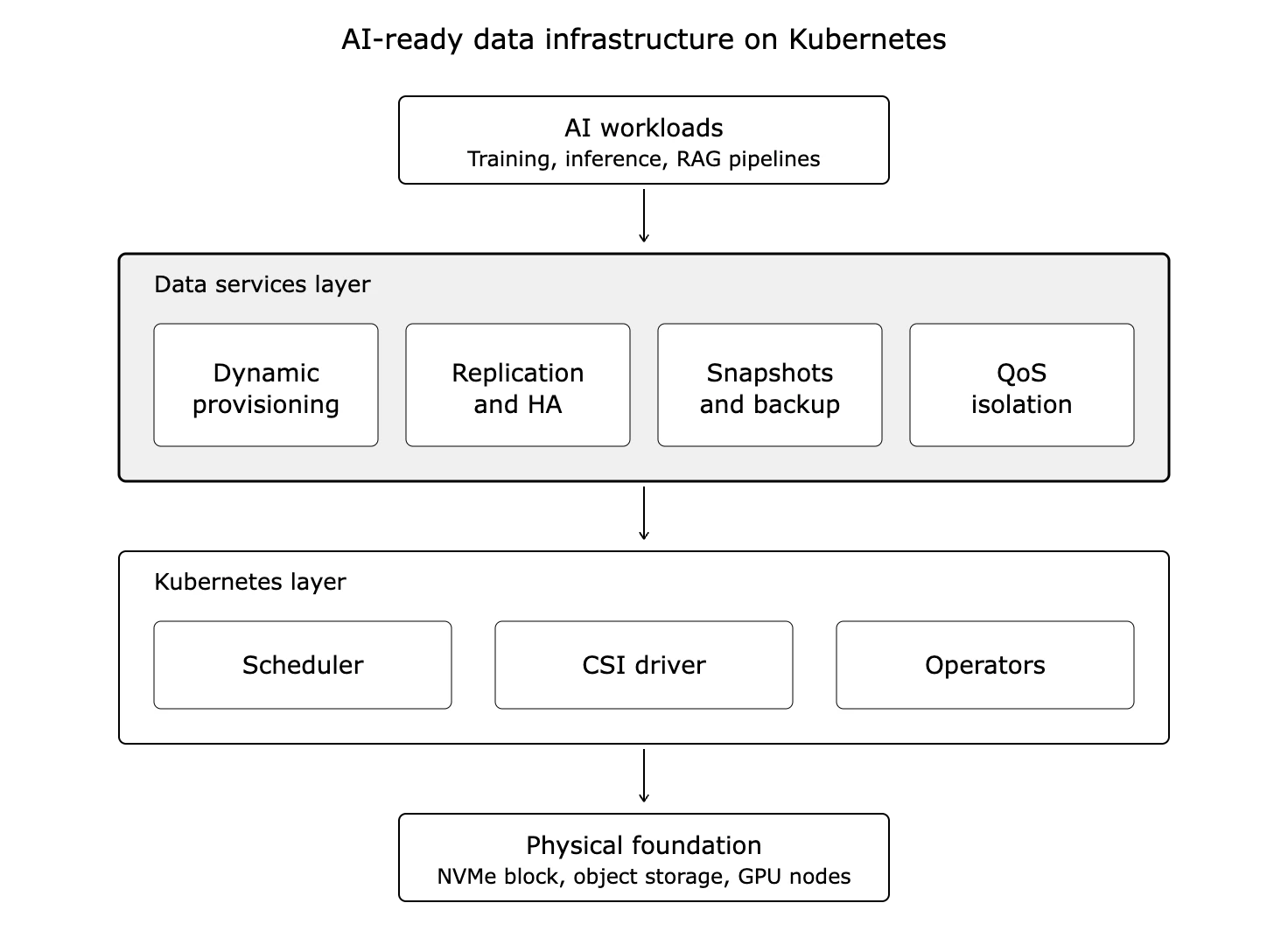
Figure 1. A reference architecture for AI-ready data infrastructure on Kubernetes. The data services layer sits between AI workloads and the Kubernetes control plane, providing the provisioning, replication, backup, and QoS isolation that stateful AI workloads need.
Decouple compute from storage: Local NVMe on each GPU node sounds fast until a node fails mid-training run and you lose the checkpoint. Disaggregated block storage with NVMe-over-Fabrics gives you NVMe latency without binding data to a single node. Training jobs survive node failures. Checkpoints reload in seconds, not hours.
Enforce QoS at the storage layer: A training job with a fifty-gigabyte checkpoint write can saturate the storage fabric and stall every other workload on the cluster. Per-volume IOPS and bandwidth limits prevent one greedy job from breaking inference SLAs. Set throughput guarantees per training job, matched to expected checkpoint frequency and model size.
Treat data placement as a scheduling decision: GPUs and storage need to be co-located in the topology. A training pod scheduled on a node three hops from its data spends more time waiting on the network than computing. Use topology-aware scheduling, NUMA awareness, and storage-aware pod placement so the data path stays short.
| Architectural choice | Wrong default | What AI workloads need |
| Storage location | Local NVMe per node | Disaggregated block storage with NVMe-oF |
| Resource isolation | Shared storage fabric, no limits | Per-volume QoS with IOPS and bandwidth caps |
| Scheduling | Random pod placement | Topology-aware, storage-aware scheduling |
| Checkpoint strategy | Single replica, periodic snapshot | Replicated volumes with synchronous mirroring |
Day 2 is where modernization lives or dies
Most AI infrastructure plans stop at Day 1. Provision GPUs, install Kubernetes, deploy a training framework, run a pilot. The pilot works. Then the team tries to run ten pilots, and Day 2 begins.
Day 2 problems compound fast. A training job from team A drops a five-hundred-gigabyte checkpoint and inference latency for team B’s production model jumps from twenty milliseconds to two hundred. A node fails during a multi-day training run and the team loses three days of compute because the checkpoint was on local disk. A new dataset arrives and copying it across three environments takes longer than the actual training run. A compliance audit asks for proof that customer data has not been replicated to an unsanctioned region.
These are not training problems. They are data services problems, and they are the ones that decide whether your AI initiative scales beyond the first pilot.
The capabilities you need at Day 2 include automated snapshots and backups for training data and model artifacts, synchronous replication across availability zones for disaster recovery, dynamic provisioning so data scientists do not file tickets to get a PVC, encryption at rest with enterprise key management, and storage-level QoS to keep tenants from breaking each other.
Portworx, Velero, and cloud-vendor backup services each handle parts of this Day 2 surface. The right choice depends on your environment. Self-managed Kubernetes on bare metal needs different tooling than EKS or AKS. The point is to plan for Day 2 before you write the first PVC manifest. Retrofitting data protection into a running production AI platform is harder than building it in from the start. The Portworx Day 2 capabilities for Kubernetes data services are one entry point if your platform team is evaluating options.
What practitioners should do this quarter
Three actions move the needle in ninety days.
Audit your current GPU utilization with real metrics, not vendor dashboards. If your average sits below 30%, the bottleneck is not compute. It is somewhere upstream, almost always in the data path.
Map your AI workloads to storage requirements. Training jobs, inference serving, and vector databases need different storage profiles. A single shared NFS mount for all three guarantees that one will starve the others.
Build a Day 2 plan before scaling past your first production AI workload. Snapshots, replication, QoS, and backup are infrastructure features, not afterthoughts. Adding them after a production incident costs more than building them in from the start.
The teams that win at AI in 2026 are not the teams with the most GPUs. They are the teams whose data infrastructure keeps those GPUs fed.
FAQ
Q: Why does GPU utilization stay so low even with modern AI workloads?
GPU utilization averages around five percent across enterprise clusters because the data path cannot keep accelerators fed. Storage latency, network bottlenecks, and inefficient data loading pipelines leave GPUs waiting for the next batch. The fix is in the data layer, not in adding more GPUs.
Q: Why is the data layer the bottleneck for AI infrastructure?
AI workloads generate a mix of access patterns that traditional storage was not designed for. Training jobs need burst write throughput for checkpoints. Vector databases need high IOPS for small random reads. Inference serving needs low-latency model loading. A single storage tier serving all three creates contention that stalls every workload on the cluster.
Q: What is the state problem in Kubernetes for AI workloads?
Kubernetes was designed for stateless workloads where pods could die and respawn anywhere. AI workloads need persistent state for training data, checkpoints, model weights, and vector indexes. Without container-native storage that handles dynamic provisioning, replication, and QoS, training jobs lose data on node failures and inference services break under load.
Q: How should you architect data infrastructure for AI on Kubernetes?
Decouple compute from storage using disaggregated block storage with NVMe-over-Fabrics. Enforce per-volume QoS so one workload cannot saturate the fabric. Use topology-aware scheduling to keep data paths short. Plan for Day 2 from the start, including snapshots, replication, and backup.
Q: Why does Day 2 matter more than Day 1 for AI infrastructure?
Day 1 problems are about getting a pilot running. Day 2 problems are about running ten pilots without breaking each other. Snapshots, replication, disaster recovery, multi-tenant QoS, and dynamic provisioning are the capabilities that decide whether your AI initiative scales past the first proof of concept or stalls in production.