Knowledge Hub
The Guide to Kubernetes Storage Solutions

Summarize Blog With


Table of Content
What are Kubernetes storage solutions?
Kubernetes storage solutions are software platforms that manage persistent data for containerized applications running on Kubernetes. They provide automated provisioning of persistent volumes, data replication, backup, disaster recovery, and security controls — enabling stateful workloads such as databases and transaction systems to maintain data integrity across container restarts, rescheduling, and infrastructure failures.
Importance of Kubernetes Storage Solutions
Kubernetes storage solutions are essential for managing persistent data within containerized applications. By using them, you ensure data consistency and availability, allowing your application’s state to be reliably maintained even across container restarts or system crashes. We detail this importance below:
Improves Data Management and Migration: Storage solutions provide necessary capabilities like backup, disaster recovery, and data replication. This ensures high availability, fault tolerance, and application uptime during hardware failures or migration events.
Enables Scalability and Flexibility: Features such as auto-scaling dynamically manage storage capacity to meet high-demand periods. This flexibility supports resilient infrastructure strategies, including hybrid and multi-cloud deployments.1
Enhanced Security: Built-in security options, including Role-Based Access Control (RBAC), secret store management, and authorization, help developers tightly manage and control access to storage resources. This enhances overall application and data security.1
By leveraging these key features, organizations gain the agility, scalability, and efficiency required for successful containerized application deployments.
Types of Storage in Kubernetes
Kubernetes offers multiple types of storage options depending on the application’s requirements.
Persistent Storage
Persistent storage retains data beyond the lifecycle of a pod. This type of storage is essential for stateful applications that must maintain data integrity across restarts and rescheduling. Services like user accounts and order processing, where data durability and reliability are crucial find this helpful.
Ephemeral Storage
Ephemeral storage is temporary storage that is portable but not durable. It is ideal for workloads that do not require data persistence beyond the pod’s lifecycle. It is used for components like a cache for data in persistent storage where data is temporary, and performance is critical.
Projected Storage
Projected storage maps multiple existing storage sources into the same directory. The only pre-requisite here is that all the sources should be in the same namespace as the Pod. Keys from multiple secrets or config maps can be stored in a single storage using projected storage.
Kubernetes Storage Architecture
One needs to understand Kubernetes storage operations for effective data management in Kubernetes. This section explores key concepts that form the foundation of Kubernetes storage architecture enabling efficient data management.
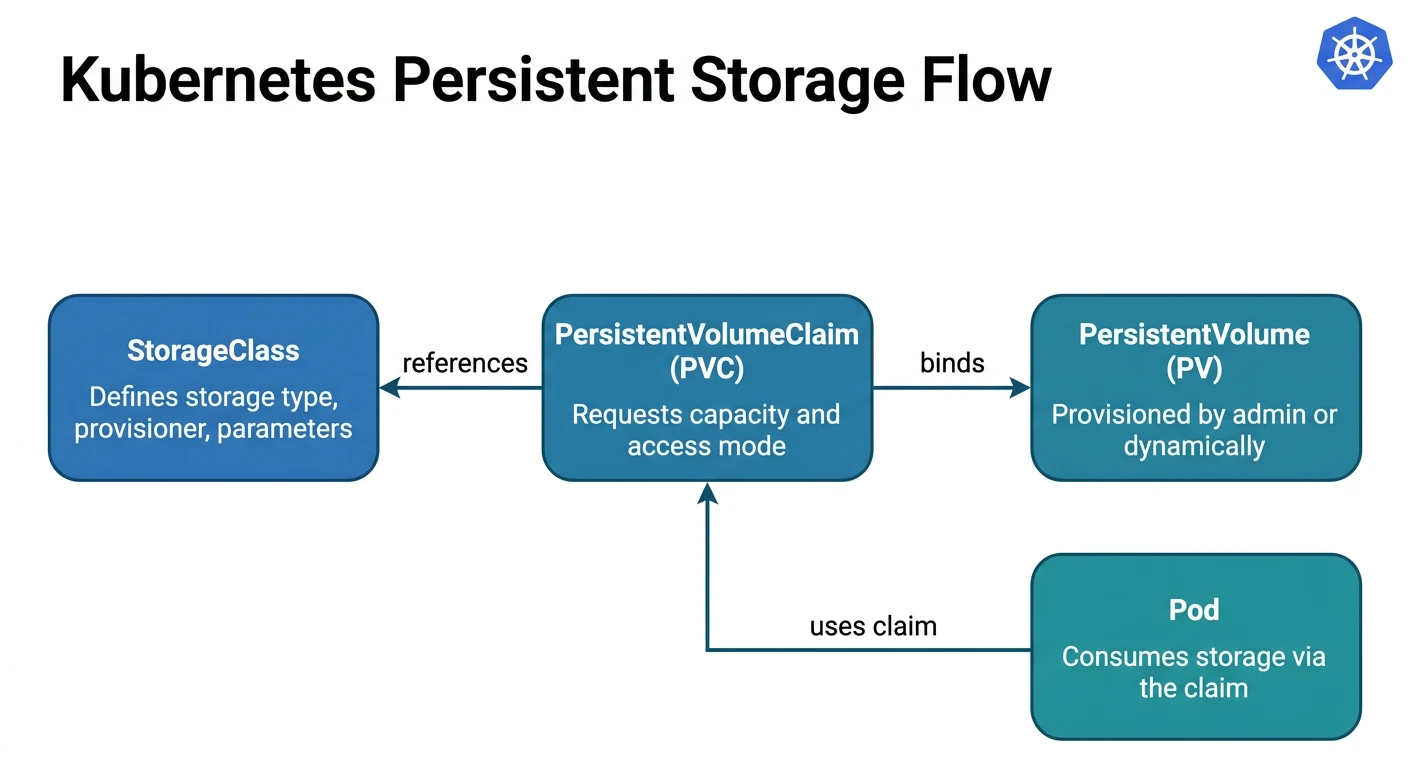
Storage Classes
Storage Classes in Kubernetes provide a way to define different types of storage available in a cluster, allowing for automated and flexible
provisioning of storage resources based on varying application requirements. For example, the `fast` Storage Class defines high-performance SSD storage.
apiVersion: storage.k8s.io/v1
kind: StorageClass
metadata:
name: fast
provisioner: pxd.portworx.com
parameters:
repl: 2
io_profile: db_remote
priority_io: high
reclaimPolicy: Delete
allowVolumeExpansion: true
Persistent Volumes (PV)
Persistent Volumes (PVs) represent a piece of storage in the cluster that has been provisioned by an administrator or dynamically provisioned. PVs persist beyond the lifecycle of any Pod that uses them. Read the Persistent Storage for Kubernetes: Definition and Examples to learn more. For a pre-provisioned workflow, an admin first creates the backing volume, then exposes it through a PersistentVolume
apiVersion: v1
kind: PersistentVolume
metadata:
name: pv-fast-20g
spec:
capacity:
storage: 20Gi
accessModes:
- ReadWriteOnce
persistentVolumeReclaimPolicy: Retain
storageClassName: fast
portworxVolume:
volumeID: testvol
Persistent Volume Claims (PVC)
Persistent Volume Claims (PVCs) are requests for storage by a user. PVCs enable users to request specific storage sizes and access modes without knowing the storage provider’s details. For example: An application requests 5GB storage via a PVC, which binds to the 20GB PV of the `fast` class that was created above.
apiVersion: v1
kind: PersistentVolumeClaim
metadata:
name: my-app-data
spec:
accessModes:
- ReadWriteOnce
storageClassName: fast
volumeName: pv-fast-20g
resources:
requests:
storage: 5Gi
Kubernetes Storage Solutions Categories
Kubernetes supports a variety of storage solutions and types, which gives administrators the ability to choose the right option for their application’s requirements. Let us compare various storage options to help administrators make better decisions.
Container Storage Interface (CSI) vs. Specialized Kubernetes Storage
The Container Storage Interface abstracts core Kubernetes code and makes the Kubernetes volume layer extensible. This allows storage providers to expose new storage systems in Kubernetes easily.
Kubernetes storage platforms from specific storage providers can make storage management easier, and come packaged with features that enhance security, monitoring, and fault tolerance.
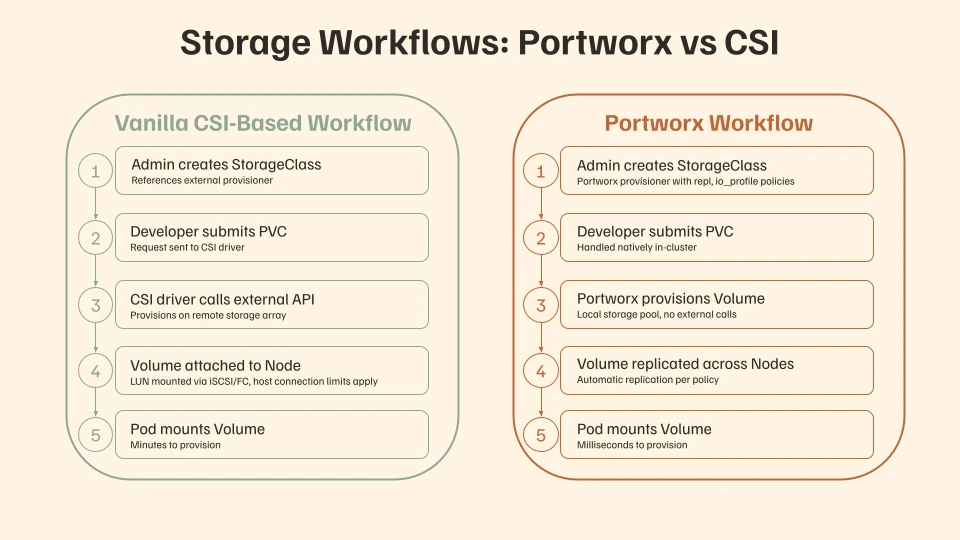
Key Differences Between CSI and Specialized Kubernetes Storage Solutions
Flexibility and Extensibility
The Container Storage Interface (CSI) specifies standard functionalities for Kubernetes CSI drivers, facilitating integration between Kubernetes and various storage systems. It supports hyper-converged and disaggregated implementations and allows for parallel deployment of multiple drivers.
Specialized Kubernetes storage solutions offer custom features, such as automatic storage provisioning and simplified integration. They provide advanced performance tuning options and robust data management features, offering greater flexibility and ease of extension.
Vendor Lock-In and Compatibility
CSI is a standardized interface. However, storage vendors build on top of the interface to expose their own unique storage array management capabilities. One vendor’s CSI driver is not compatible with another vendor’s driver. Managing those siloed storage solutions can be challenging as each has different capabilities, runbooks, vendor relationships and roadmap
Performance and Scalability
The Container Storage Interface (CSI) offers basic performance and scalability but relies on older provisioning methods, resulting in slower provisioning times in large environments. Integrating CSI with external monitoring and management tools can also reduce performance at the Kubernetes control plane.
In contrast, specialized Kubernetes storage solutions manage these operations internally, which eliminates the need for external API calls and maintains a self-contained system within the cluster.
The leading 3 trends in Kubernetes storage emphasize that enterprises require solutions capable of maximizing Kubernetes’ potential to enable seamless innovation, deployment, and scaling of modern applications
CSI has a basic performance and scalability but relies on legacy provisioning methods. This causes slower provisioning times in larger environments. Integration with external tools for monitoring and management could degrade performance at the Kubernetes control plane.
In contrast, Kubernetes storage solutions can handle these operations internally, avoiding external API calls and maintaining a self-contained system within the cluster.
The top 5 Tech Trends suggest that enterprises require solutions that maximize Kubernetes’ capabilities and allow seamless innovation, deployment, and scale of modern applications.
Ease of Management and Operations
CSI drivers often require extensive manual operations for capacity management and struggle with enterprise-level workloads, leading to performance bottlenecks. They have difficulty handling large, complex applications’ storage and performance needs, especially in hybrid and multi-cloud environments.
In contrast, specialized Kubernetes storage solutions are optimized for diverse environments, offering flexible I/O and bandwidth controls at the volume level, with settings defined as policies in the StorageClass.
Community and Ecosystem Support
As a Kubernetes project, CSI receives contributions from various vendors and developers enhancing its features – but those features may not always align with a given organization’s needs. Furthermore, as a community, open source solution, CSI-based solutions require commercial support from a vendor.
Enterprises need storage solutions that offer specialized lifecycle support policies to deploy and maintain their infrastructure. Specialized Kubernetes storage solutions allow enterprises to plan effectively with the benefit of commercial support, ensuring smooth operations.
When to Consider Container Storage Interface (CSI)
In scenarios where application development is minimal and the application is neither mission-critical nor requires large-scale operations, organizations can consider managing their Kubernetes storage using CSI solutions. However, they would still need to manually manage and configure integrations with external storage management tools. Read more about the pros and cons of managing Kubernetes storage via CSI vs using cloud-native storage solutions.
When to Consider Specialized Kubernetes Storage Solutions
Specialized Kubernetes storage solutions simplify container operations and provide a comprehensive data management platform, making them ideal for large enterprises. They automate capacity management, prevent overprovisioning, and offer robust disaster recovery and container data security for mission-critical workloads. Portworx by Everpure is one such solution.
Traditional Storage vs. Specialized Kubernetes Storage Solutions
Containerized applications have become the norm and the limitations of traditional storage solutions like network-attached storage (NAS) are becoming apparent. In this section, we look at how specialized Kubernetes storage solutions differ from traditional approaches and help optimize storage for modern applications.
Key Differences Between Traditional Storage and Specialized Kubernetes Storage
Scalability
Traditional storage solutions with CSI drivers struggle with scalability in cloud-native or dynamic environments, requiring manual intervention to adjust to workload changes. In contrast, specialized cloud-native, Kubernetes storage solutions automatically scale with workload demands, making them ideal for environments where scalability is crucial.
Management and Automation
Traditional storage solutions have limited automation, leading to inefficiencies and higher operational overhead. Specialized solutions offer automated
provisioning, backup, recovery, and monitoring, streamlining operations and reducing manual intervention and human error.
Performance
Traditional storage solutions can offer robust performance but are limited by their hardware and static infrastructure. Scaling up typically requires adding more hardware, which is costly and time-consuming. In contrast, specialized storage solutions improve performance by reducing latency and efficiently managing applications in heterogeneous environments.
Integration with Kubernetes
For the traditional storage systems to integrate with Kubernetes, they would require additional software layers by building custom integrations. Kubernetes storage solutions are natively integrated with Kubernetes. They support the provisioning of Persistent Volumes (PVs) and Persistent Volume Claims (PVCs) that align with Kubernetes’ native resource management.
When to Consider Traditional Storage
Traditional storage is ideal for applications with predictable storage needs, and stable workloads that do not frequently require scaling, such as during peak usage.
Enterprises using legacy systems not designed for containerized environments may prefer this approach. Common use cases include small office workstations needing high-performance local data storage and enterprise applications with fixed data sizes and usage patterns, such as accounting software or internal reporting systems.
When to Consider Specialized Kubernetes Storage Solutions
In today’s environment, where e-commerce platforms experience peak sales days and billions of banking transactions occur in seconds, applications face fluctuating traffic. These specialised storage solutions provide dynamic scaling and resource optimization to minimize costs and offer features like automated snapshots, backups, and disaster recovery for business continuity and data protection.
Managed Cloud vs. Self-Managed Kubernetes Storage Solutions
With managed cloud storage solutions, a third party is responsible for managing resources. Depending on the contract, this includes the deployment, maintenance, management, and operations of the infrastructure.
In contrast, self-managed Kubernetes storage solutions require organizations to handle their infrastructure independently. While this eliminates dependency on a service provider, it can be complex to configure for large-scale deployments. Let’s explore the differences between these approaches.
Key Differences Between Managed Cloud and Self-Managed Kubernetes Storage Solutions
Managed cloud storage solutions offer minimal administrative overhead, with the cloud provider handling upgrades, 24/7 support, and automatic scaling to meet application needs. These solutions utilize high-performance infrastructure to deliver consistent service, but often at higher cost.
In contrast, self-managed storage solutions require organizations to handle updates, patches, and scaling themselves, which can be resource-intensive. Troubleshooting and scaling necessitate in-house expertise and manual setup. Automation involves complex, time-consuming integration and requires significant technical skill.
When to Consider Managed Cloud Kubernetes Storage Solutions
In an environment where applications and data are distributed across on-premises, private cloud, and public cloud infrastructures, they require a storage solution for seamless management and migration of data across these settings. Managed cloud storage would provide high availability and fault tolerance services to support such applications.
When to Consider Self-Managed Kubernetes Storage Solutions
Organizations handling sensitive data and seeking complete ownership of their information should prefer self-managed storage solutions. This approach allows for the implementation of advanced encryption techniques and custom access controls to ensure data confidentiality. While this requires an upfront investment in hardware and infrastructure, it also involves ongoing operational expenses.
Non-Cloud-Native VS Cloud-Native Kubernetes Storage Solutions
Kubernetes demands a highly dynamic and scalable storage system to meet the needs of a containerized environment. Traditional storage solutions, typically designed for virtualized workloads, often struggle to handle the rapid changes required for running containerized applications on Kubernetes. These legacy systems can only integrate with Kubernetes through a plugin based on the CSI specification. This connector-based approach requires extensive manual configuration and presents its own set of challenges.
Using CSI drivers, traditional storage systems bind Kubernetes volumes to specific hardware devices, complicating container portability in a cloud-native environment. Additionally, the CSI driver can become a single point of failure for new apps deployed on your cluster. It also imposes connection limits when mounting physical LUNs to a Kubernetes worker node. Traditional storage arrays were designed for hosts with full operating systems, where mounting datastores was infrequent and could take several minutes. In contrast, containers need to stop and restart rapidly, and this connector-based approach cannot match the efficiency of a storage platform purpose-built for containers.
Kubernetes Storage Solutions Based on Deployment Environment
When choosing Kubernetes storage solutions, it is essential to ensure that they align with your organization’s specific infrastructure and application requirements. Different deployment models offer various advantages and challenges. Here’s an in-depth look at the key considerations for each deployment scenario:
On-premises Kubernetes Storage
With on-premises solutions, organizations have complete control over hardware and data management. Some of the factors to consider are:
- Compatibility with existing on-premises storage
- Complexity in managing, maintaining, and scaling storage
- Cost for hardware, operation, and maintenance
Public Cloud
Public cloud Kubernetes storage utilizes the cloud provider’s infrastructure with automated scaling and maintenance. Factors to evaluate before going for this are:
- Seamless integration with the chosen cloud provider’s ecosystem
- Availability of cost-effective price models such as pay-as-you-go
- Compliance with regulatory standards
Hybrid Cloud
The combination of on-premise and cloud-based resources enables workload portability across environments. This involves some crucial factors to consider, such as:
- Secure and seamless data migration capabilities with the ability to synchronize on-premises and cloud storage
- Robust security policies and compliance across both environments
- Optimize costs by balancing workloads between on-premises and cloud, leveraging cloud-native features and on-premises infrastructure
Edge environments
Edge environments require storage solutions close to data generation points, reducing latency and bandwidth usage. Some of the factors to consider while going for edge solutions include:
- Support for low latency and high throughput to handle real-time data
- Scalability and adaptability to various edge locations and data volumes
- Built-in redundancy and failover mechanisms with built-in data synchronization support for cloud or on-premises systems
By carefully considering these factors, organizations can select the most appropriate Kubernetes storage solution tailored to their needs.
Third Party Kubernetes Storage Solutions Integration Considerations
With careful planning and consideration of key factors, third-party Kubernetes storage solutions can be integrated with your existing systems to ensure smooth integration and optimal performance. Let’s take a detailed look at these key considerations.
Transformational Needs
Organizations must assess whether storage solutions meet their transformational needs, such as enhancing automation and scalability. Key features to consider include automated data protection, disaster recovery, and cross-cloud storage mobility, which drive innovation and operational efficiency.
Use Cases and Workloads
Different types of applications have different storage needs. To identify specific needs and determine whether the workload is I/O-intensive, requires high availability or real-time data processing could be challenging. The storage solution must provide high performance with low latency, high throughput, and efficient IOPS for demanding workloads.
Costs
The recommended practice is to evaluate the total cost of ownership associated with hardware, software licenses, operations and integration with existing systems. Conducting a detailed analysis comparing the costs of traditional storage solutions with Kubernetes-specific options, considering both upfront and long-term expenses should be helpful.
Expertise
Deploying, managing, and maintaining a Kubernetes storage solution requires some expertise. Assess whether your team has the necessary skills or if additional training or new hires are needed. Also, evaluate the vendor’s support resources, including documentation, training programs, and customer support services.
Choosing Portworx for your Kubernetes Storage Needs
Portworx manages Kubernetes storage across on-premises, cloud, and edge environments, simplifying large-scale deployments with minimal overhead. It efficiently manages high-density workloads and container operations on commodity servers, utilizing NVMe, SSD, and advanced networking, offering significant advantages for ease of management, efficiency, and performance over CSI-driver based options.
Learn more about Kubernetes storage with Portworx, or contact us to learn how we can support your organization.
Frequently Asked Questions
Q: What are Kubernetes storage solutions and why are they important?
Kubernetes storage solutions manage persistent data for containerized applications, ensuring state is maintained across container restarts and rescheduling. They provide backup, disaster recovery, data replication, auto-scaling, and security controls like RBAC – enabling organizations to run stateful workloads reliably in production with high availability and fault tolerance.
Q: What are the different types of Kubernetes storage?
Kubernetes supports three storage types: Persistent Storage retains data beyond the pod lifecycle for stateful applications like databases. Ephemeral Storage provides temporary, high-performance storage that is deleted when the pod terminates. Projected Storage combines multiple sources – such as Secrets and ConfigMaps – into a single directory within the same namespace.
Q: What is the difference between CSI and specialized Kubernetes storage solutions?
CSI is a standardized interface that connects Kubernetes to external storage arrays via plug-in drivers, handling basic provisioning through API calls. Specialized Kubernetes storage solutions like Portworx operate natively inside the cluster, delivering automated capacity management, built-in data protection, disaster recovery, and millisecond-level provisioning without external dependencies – ideal for mission-critical workloads at scale.
Q: How do I choose the right Kubernetes storage solution for my deployment environment?
Evaluate Kubernetes storage solutions based on your deployment model. On-premises requires hardware compatibility and manual scaling. Public cloud needs ecosystem integration and cost-effective pricing. Hybrid cloud demands seamless data migration and unified security. Edge environments require low-latency, high-throughput storage with built-in redundancy. The best solution delivers consistent data management across all environments.
Q: What is the difference between traditional storage and cloud-native Kubernetes Storage?
Traditional storage – NAS and SAN – was designed for static, virtualized workloads and connects to Kubernetes through CSI plug-ins, often creating bottlenecks and connection limits as scale increases. Cloud-native Kubernetes storage such as Portworx is purpose-built for containers, offering native integration with Persistent Volumes and Persistent Volume Claims, automated provisioning, and dynamic scaling without external hardware dependencies.