
Platform Engineering
Running Tenant Kubernetes Clusters on Red Hat OpenShift Virtualization with Portworx and FlashArray


Summarize Blog With
Table of Content
Delivering Kubernetes Cluster Granular Multi-Tenancy Without Dedicated Bare Metal Nodes
Introduction
As organizations modernize their application platforms, many are looking for ways to provide Kubernetes environments to multiple teams without significantly increasing infrastructure footprint.
A common requirement is the ability to provision dedicated Kubernetes clusters for individual teams, projects, development environments, CI/CD pipelines, training labs, or proof-of-concept work. In many cases, these clusters are temporary or lightly utilized, making it difficult to justify dedicating physical servers to every Kubernetes node.
For customers operating virtualization platforms, running Kubernetes worker nodes as virtual machines offers a practical alternative. By deploying Kubernetes clusters on virtual machines, organizations can improve utilization of their existing infrastructure while still providing the isolation and autonomy that individual teams require.
This pattern has become increasingly popular with Red Hat® OpenShift® Virtualization, where organizations can run virtual machines and containers on the same platform. Tenant Kubernetes clusters can be deployed as virtual machines while sharing the underlying physical infrastructure.
The challenge then becomes storage.
Tenant clusters still require enterprise-grade capabilities such as dynamic provisioning, shared storage, snapshots, Kubernetes disaster recovery, and high availability. Traditional storage approaches often become difficult to manage or lack the functionality expected by modern Kubernetes platforms.
This is where Portworx® by Everpure and Everpure FlashArrayTM work together particularly well. Portworx has deep integration with FlashArray, allowing organizations to extend enterprise storage services into Kubernetes clusters running inside OpenShift Virtualization virtual machines.
This article covers two deployment patterns that enable tenant Kubernetes clusters on OpenShift Virtualization using Portworx and FlashArray.
Why Run Kubernetes Clusters Inside Virtual Machines?
While running Kubernetes directly on bare metal remains popular for large-scale production environments, many organizations have requirements that make virtual machine-based Kubernetes clusters attractive.
Some common examples include:
- Providing cluster-level multi-tenancy for different business units or teams
- Creating short-lived development or testing clusters
- Running isolated Kubernetes environments for customers or partners
- Supporting platform engineering initiatives where each team receives its own cluster
- Improving utilization of expensive bare metal infrastructure
For many of these use cases, Kubernetes workloads are not compute intensive enough to justify dedicating physical servers to every cluster. Running Kubernetes nodes as virtual machines allows organizations to consolidate infrastructure while maintaining strong operational boundaries between tenants.
OpenShift Virtualization provides the platform foundation, while Portworx and FlashArray provide the storage services needed by the tenant clusters.
Solution 1: Portworx Enterprise at Both Layers with FlashArray Cloud Drives
Recommended for environments using iSCSI or NVMe over TCP connectivity to FlashArray
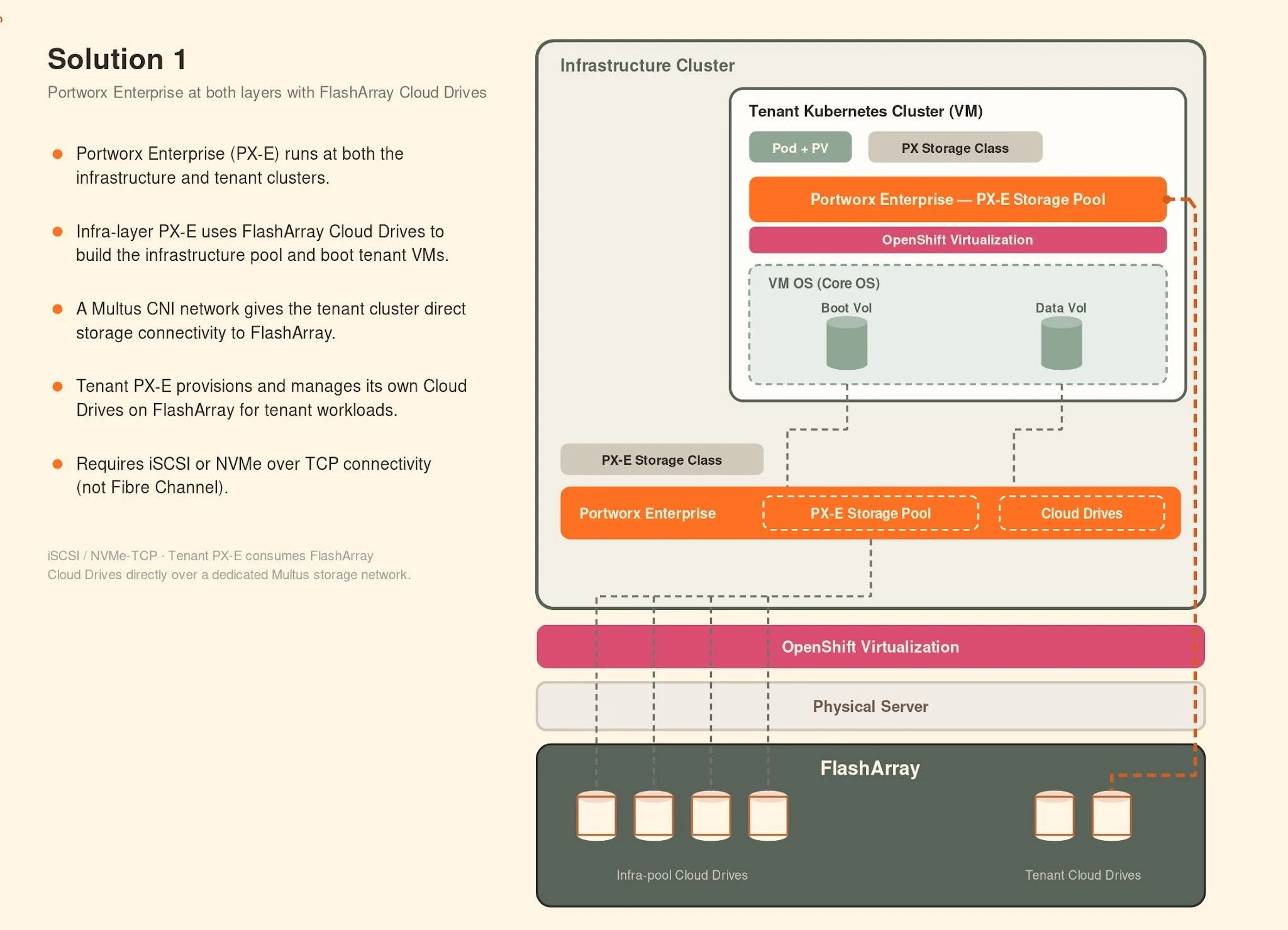
In this architecture, deployed on Red Hat OpenShift Virtualization, Portworx Enterprise runs at both layers:
- The infrastructure OpenShift cluster running on bare metal
- The tenant Kubernetes cluster running as virtual machines on OpenShift Virtualization
The infrastructure cluster uses FlashArray-backed Cloud Drives as the storage foundation. Tenant cluster virtual machines are provisioned from this infrastructure layer and receive persistent storage for their operating system and boot volumes.
Inside the tenant Kubernetes cluster, Portworx Enterprise is deployed again and establishes its own connectivity to FlashArray using a dedicated storage network delivered through Multus CNI.
This allows the tenant cluster to directly consume FlashArray Cloud Drives and build its own Portworx storage pools.
Architecture
How It Works
- Portworx Enterprise runs on the infrastructure OpenShift cluster.
- FlashArray Cloud Drives are provisioned and used to build the infrastructure storage pool.
- OpenShift Virtualization provisions virtual machines that become nodes in the tenant Kubernetes cluster.
- Portworx Enterprise is installed inside the tenant cluster.
- A Multus network provides direct storage connectivity from the tenant cluster to FlashArray.
- Portworx automatically provisions and manages Cloud Drives on FlashArray for tenant workloads.
Key Advantages
Automated Storage Provisioning
Cloud Drives provide a fully automated storage lifecycle. Portworx dynamically creates, expands, and manages FlashArray volumes without requiring administrators to manually provision LUNs or storage devices.
Full Portworx Data Services Inside the Tenant Cluster
Many KubeVirt storage approaches rely on CSI passthrough volumes. While functional, they typically do not provide the full set of Kubernetes-native storage services available through Portworx.
With Portworx deployed inside the tenant cluster, teams gain access to:
- RWX shared volumes
- Volume snapshots
- Storage expansion
- High availability
- Disaster recovery
- Backup integration
- Storage policy management
This gives tenant clusters the same storage experience they would expect from a native Portworx deployment.
Independent Cluster Operations
Each tenant cluster maintains independent storage operations, policies, and lifecycle management while sharing the same underlying infrastructure.
This model aligns particularly well with platform engineering teams that want to offer Kubernetes-as-a-Service internally.
Connectivity Requirements
Solution 1 requires:
- iSCSI connectivity to FlashArray, or
- NVMe over TCP connectivity to FlashArray
Because FlashArray Cloud Drives rely on IP-based storage connectivity, this architecture does not support Fibre Channel environments.
Solution 2: FlashArray Direct Access Volumes for Tenant Clusters
Recommended for Fibre Channel environments
Many enterprise customers continue to standardize on Fibre Channel storage networks and are not planning to move away from them in the near future.
For these environments, Portworx provides a second deployment pattern using FlashArray Direct Access (FADA) volumes, which are consumed as pre-provisioned drives by the tenant cluster.
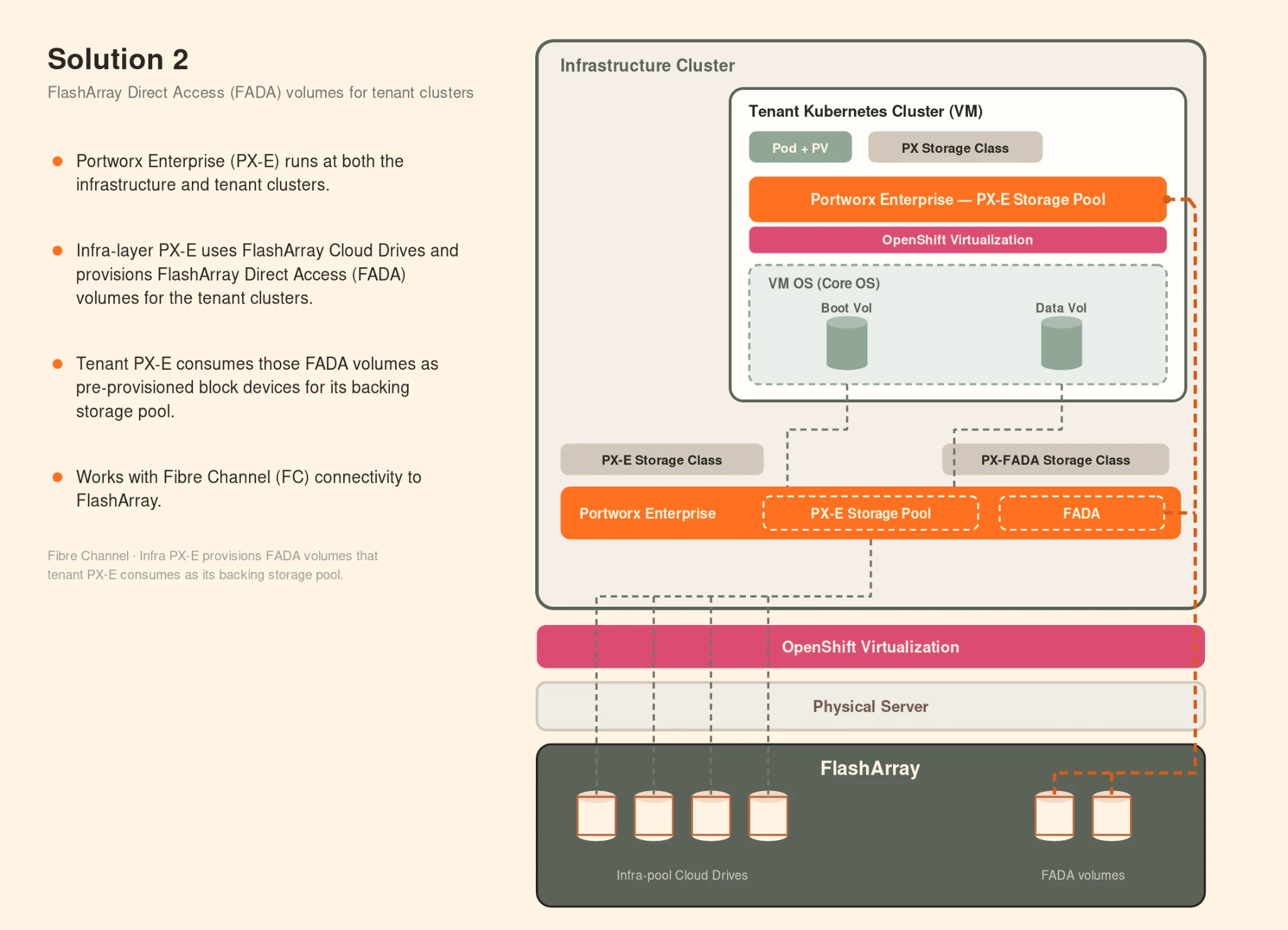
Similar to the first approach, this architecture is designed for Red Hat OpenShift Virtualization environments where tenant Kubernetes clusters are deployed as virtual machines running on top of the infrastructure OpenShift cluster.
Instead of Cloud Drives, storage is delivered through pre-provisioned FlashArray Direct Access volumes.
Architecture
How It Works
- Portworx Enterprise runs on the infrastructure OpenShift cluster.
- The infrastructure cluster provisions FlashArray Direct Access volumes.
- These FADA volumes are attached to the virtual machines that form the tenant Kubernetes cluster.
- Portworx Enterprise is deployed inside the tenant cluster.
- Portworx in the tenant consumes the FADA volumes as pre-provisioned block devices.
- These devices become the backing storage pool for the tenant cluster.
In this model, the infrastructure layer provides storage and presents it to the tenant cluster, where Portworx takes over management and data services.
Key Advantages
Fibre Channel Compatibility
This architecture works seamlessly with existing FlashArray Fibre Channel deployments.
Organizations can leverage existing SAN investments while still enabling tenant Kubernetes clusters on OpenShift Virtualization.
Enterprise Data Services
Once Portworx builds its storage pool using the FADA devices, tenant clusters gain access to the same advanced data services available in Solution 1:
- RWX shared volumes
- High availability
- Disaster recovery
- Snapshots
- Backup integration
- Policy-driven storage management
Better Infrastructure Efficiency
Teams receive dedicated Kubernetes clusters while sharing the same underlying infrastructure resources.
This approach allows organizations to increase density and utilization without sacrificing cluster-level isolation.
Connectivity Requirements
Solution 2 supports:
- Fibre Channel connectivity to FlashArray
This makes it the preferred option for customers operating traditional enterprise SAN environments.
Conclusion
For organizations standardizing on Red Hat OpenShift Virtualization, tenant Kubernetes clusters provide an effective way to deliver cluster-level multi-tenancy without dedicating physical infrastructure to every environment.
Whether the goal is supporting individual application teams, creating ephemeral development environments, enabling platform engineering initiatives, or improving overall infrastructure utilization, running Kubernetes clusters as virtual machines offers a practical balance between flexibility and efficiency.
Portworx and FlashArray extend this model by bringing enterprise data services directly into the tenant cluster. Customers gain capabilities such as RWX shared storage, disaster recovery, snapshots, and policy-driven storage management while maintaining the operational independence expected from a dedicated Kubernetes cluster.
For environments using iSCSI or NVMe over TCP, FlashArray Cloud Drives provide a fully automated storage experience. For organizations standardized on Fibre Channel, FlashArray Direct Access volumes offer an equally compelling path.
Together, Portworx and FlashArray provide a storage foundation that complements OpenShift Virtualization and enables organizations to build scalable, multi-tenant Kubernetes platforms without sacrificing storage functionality, operational simplicity, or infrastructure efficiency.
Frequently Asked Questions
Why should organizations run Kubernetes clusters inside virtual machines on OpenShift Virtualization?
Running Kubernetes worker nodes as virtual machines improves infrastructure utilization by allowing multiple teams to share underlying physical hardware, avoiding the need for dedicated bare metal nodes for every cluster. This provides necessary isolation and autonomy for different business units, CI/CD pipelines, or development environments while maintaining operational boundaries.
Which deployment pattern is recommended for iSCSI or NVMe over TCP connectivity?
For environments using iSCSI or NVMe over TCP, the recommended architecture utilizes FlashArray Cloud Drives. In this model, Portworx Enterprise runs at both the infrastructure OpenShift layer and the tenant Kubernetes layer, enabling the tenant cluster to directly consume Cloud Drives and manage its own storage pools.
How can organizations support Fibre Channel storage in tenant Kubernetes clusters?
Organizations standardized on Fibre Channel can use FlashArray Direct Access (FADA) volumes. These pre-provisioned volumes are attached to the tenant virtual machines and consumed by the Portworx instance inside the tenant cluster to serve as the backing storage pool.
What enterprise-grade storage services are available to tenant clusters using Portworx and FlashArray?
Regardless of the connectivity pattern used, tenant clusters gain access to robust data services, including RWX shared volumes, volume snapshots, storage expansion, high availability, disaster recovery, backup integration, and policy-driven storage management.
What is the primary challenge addressed by using Portworx and FlashArray for tenant clusters?
The primary challenge is managing enterprise-grade storage requirements, such as dynamic provisioning, shared storage, and high availability, within a virtualized environment. Portworx and FlashArray solve this by extending enterprise storage services directly into the Kubernetes clusters, allowing them to maintain the operational independence expected from native Kubernetes deployments.
Recommended for you