
Technical Insights
Running PostgreSQL on Kubernetes with Confidence: A Practical Guide to EDB and Portworx

Summarize Blog With
Table of Content
If you work in financial services you know the shape of this conversation. The application team wants PostgreSQL on Kubernetes because it ships faster. Risk and audit want to know who can touch the data, how it’s encrypted, how fast you recover, and whether you’ve proven any of it rather than drawing it on a slide. Both sides are being reasonable. Getting them to agree is the work.
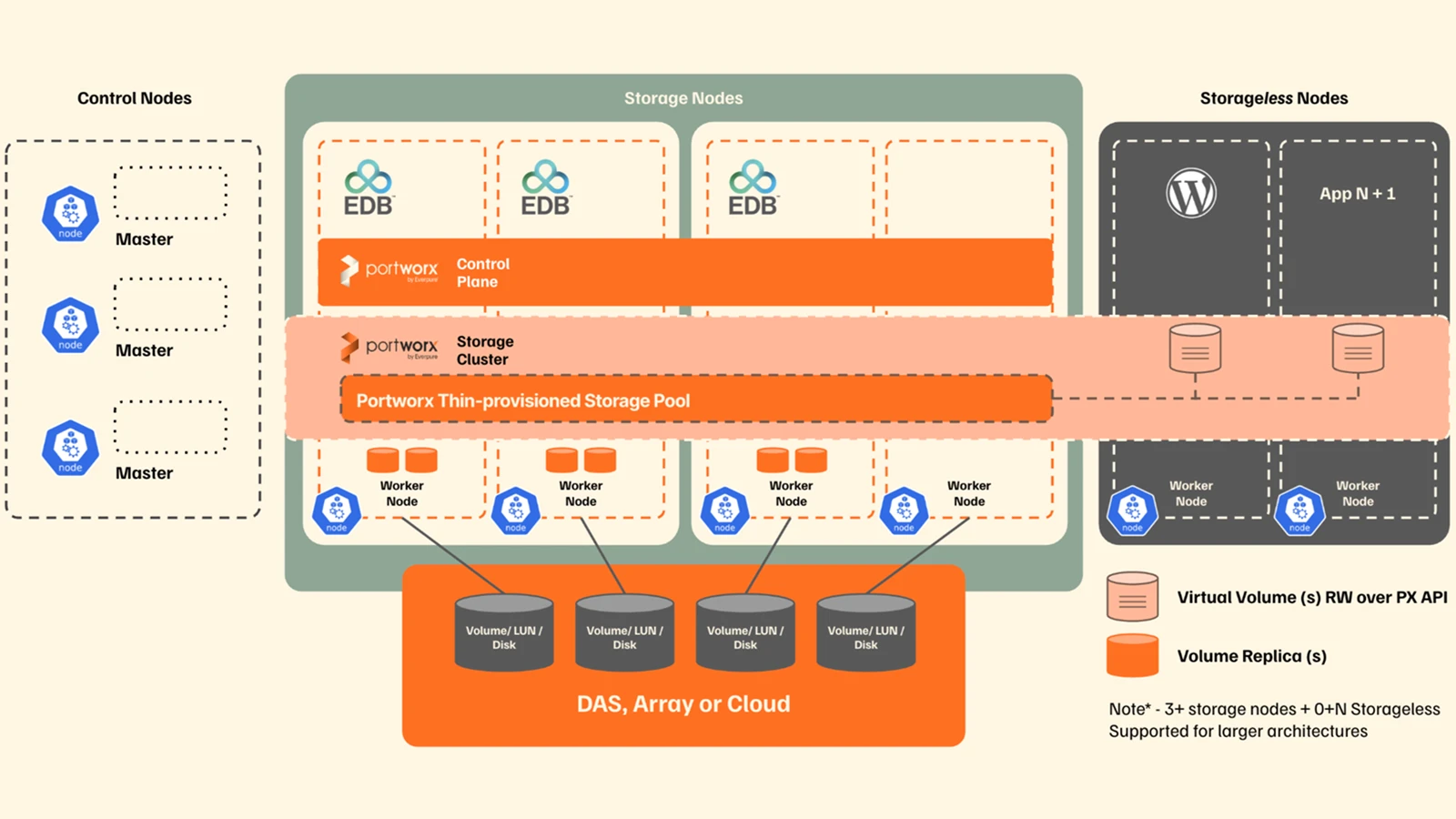
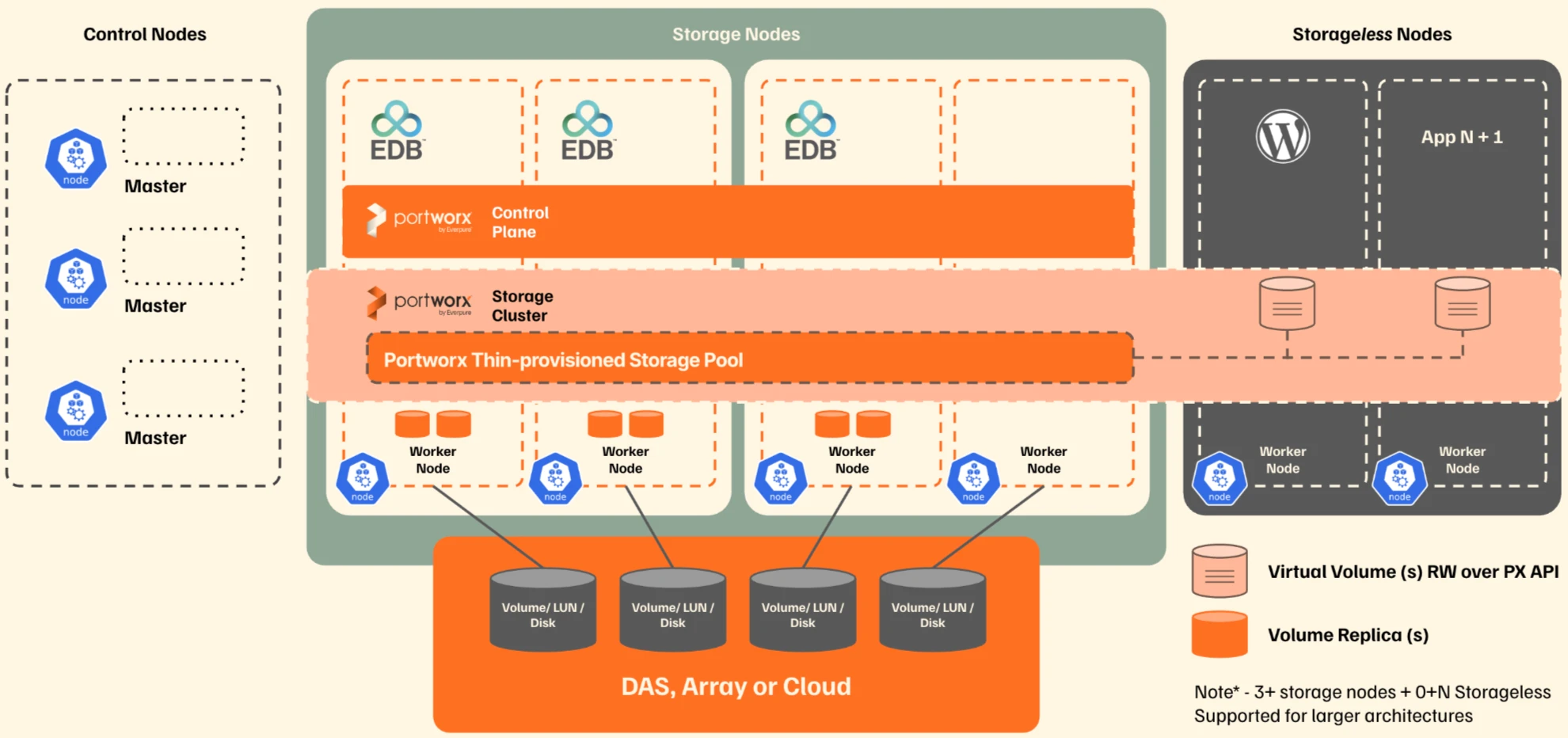
EDB and Portworx divide it sensibly. EDB runs the database service: lifecycle, replicas, failover, and the operator keeping it consistent. Portworx runs the storage underneath, with replicated volumes, policy-driven provisioning, encryption, snapshots, and expansion. Worth remembering that the two protect different things. Portworx replication keeps the block volume available when a node dies; PostgreSQL replication keeps the database service available and consistent. Swap one for the other in a design review and somebody finds out the hard way.
Make storage policy explicit
StorageClasses are the contract between the database manifest and the storage platform. They provide details for what type of storage EDB will get, rather than inheriting whatever the cluster default happens to be, because “whatever the default was” is a poor answer to an audit question.
A portworx replication factor two (repl=2) is a sensible production baseline: storage-layer HA without paying the capacity and write-path cost of a third replica on every volume. Split PGDATA from WAL while you’re at it. EDB supports a dedicated WAL volume, so the two paths tune separately. PGDATA does well on the db_remote I/O profile, WAL on journal-backed behaviour if your nodes have journal devices and your benchmarks back it up. You can optionally set the I/O Profile to auto to let Portworx automatically tune the volume for the system.
Worth knowing
With PX-Security switched on, a StorageClass needs token references or Portworx refuses to provision, mount, or resize anything at all. Those parameters are missing from most published examples, so what you actually see is a PVC stuck in Pending against a cluster that looks perfectly healthy.
apiVersion: storage.k8s.io/v1
kind: StorageClass
metadata:
  name: px-edb-data
provisioner: pxd.portworx.com
allowVolumeExpansion: true
volumeBindingMode: WaitForFirstConsumer
parameters:
  repl: "2"
  io_profile: "db_remote"
  io_priority: "high"
  fs: "ext4"
  secure: "true"
  # Required when PX-Security is enabled
  openstorage.io/auth-secret-name: px-user-token
  openstorage.io/auth-secret-namespace: portworx
  csi.storage.k8s.io/provisioner-secret-name: px-user-token
  csi.storage.k8s.io/provisioner-secret-namespace: portworx
  csi.storage.k8s.io/node-publish-secret-name: px-user-token
  csi.storage.k8s.io/node-publish-secret-namespace: portworx
  csi.storage.k8s.io/controller-expand-secret-name: px-user-token
  csi.storage.k8s.io/controller-expand-secret-namespace: portworx
The WAL class is the same shape, with io_profile: “journal” and journal: “true“.
apiVersion: storage.k8s.io/v1
kind: StorageClass
metadata:
  name: px-edb-wal
provisioner: pxd.portworx.com
allowVolumeExpansion: true
volumeBindingMode: WaitForFirstConsumer
parameters:
  repl: "2"
  io_profile: "journal"
  io_priority: "high"
  fs: "ext4"
  journal: "true"
  secure: “true”
  # Required when PX-Security is enabled
  openstorage.io/auth-secret-name: px-user-token
  openstorage.io/auth-secret-namespace: portworx
  csi.storage.k8s.io/provisioner-secret-name: px-user-token
  csi.storage.k8s.io/provisioner-secret-namespace: portworx
  csi.storage.k8s.io/node-publish-secret-name: px-user-token
  csi.storage.k8s.io/node-publish-secret-namespace: portworx
  csi.storage.k8s.io/controller-expand-secret-name: px-user-token
  csi.storage.k8s.io/controller-expand-secret-namespace: portworx
Bind the cluster to those classes
With the classes in place, the EDB Cluster names both of them explicitly. That keeps the storage decision in the database manifest, where a reviewer can see it, instead of buried in a cluster default nobody remembers setting.
apiVersion: postgresql.k8s.enterprisedb.io/v1

kind: Cluster

metadata:

  name: edb-cluster

  namespace: edb

spec:

  instances: 3

  imageName: docker.enterprisedb.com/k8s/edb-postgres-advanced:<supported-version>

  imagePullSecrets:

    - name: edb-pull-secret

  # Defaults to 180. See the failover section: this is an RTO setting.

  smartShutdownTimeout: 30

  storage:

    storageClass: px-edb-data          # PGDATA: db_remote, replicated

    size: 100Gi

  walStorage:

    storageClass: px-edb-wal           # WAL: journal-backed, tuned separately

    size: 50Gi
Pin the operand image to a real version rather than a floating tag. A cluster you cannot rebuild to the same version is a cluster you cannot restore predictably, which is the sort of detail that only becomes interesting during an incident.
Two more things save time. On OpenShift, install the operator from OperatorHub rather than applying the raw manifest, because the certified catalog handles SecurityContextConstraints that a hand-applied manifest doesn’t. And you need two registry pull secrets, not one: the operator’s namespace needs it for the operator image, and the database namespace needs its own, which is the edb-pull-secret referenced above. Forgetting the second one is the usual reason pods sit in ImagePullBackOff.
Why the security layer earns its keep
Storage security on Kubernetes usually gets treated as a checkbox: encryption at rest, tick, move on. That isn’t the question auditors are actually asking. They want to know who can provision, mount, or resize a database volume, and how you’d prove it afterwards. “Anyone with cluster admin” is a common honest answer and a bad one.
That’s the job of those token parameters in the StorageClass. PX-Security validates every storage operation against a user token, so provisioning and resizing become permissions you grant deliberately rather than side effects of holding a kubeconfig. Namespace-scoped secrets give you a workable tenant boundary too, which matters when one platform hosts a trading application and a customer records database that must not reach each other’s volumes.
Encryption is a separate decision, and secure: “true” alone does nothing. It needs a cluster-wide key: create the px-vol-encryption secret, register it with pxctl secrets set-cluster-key, then back it up somewhere you’d happily describe in a key custody review. Lose that key and every volume from a secure class goes with it.
Where the boundary sits deserves a real argument. On FlashArray, encryption at rest is always on, so adding Portworx volume encryption gives you a second cryptographic boundary and costs you array-side data reduction. Sometimes that’s the right trade, say when a control requires the storage layer to hold keys the array team can’t reach. Often it isn’t. Decide before you provision, alongside EDB TLS for database and inter-node traffic and, where you need it, EDB Transparent Data Encryption.
Why automation matters more here than elsewhere
Think about what “extend a database volume” costs you today. A ticket. A change record. Someone in a CAB meeting asking whether it can wait until Saturday. Meanwhile the volume is at 94% and the batch window starts in four hours. Manual storage management doesn’t scale, and in a regulated environment it fails for process reasons as much as technical ones.
Portworx Autopilot turns that from an incident into a policy. You approve it once, it lives in Git with everything else, and it applies itself. You also get to start right-sized instead of provisioning three years of forecast growth on day one, which finance will notice.
Handily, EDB already labels every PVC by role, so you don’t need to invent labels to treat PGDATA and WAL differently:
apiVersion: autopilot.libopenstorage.org/v1alpha1

kind: AutopilotRule

metadata:

  name: edb-pgdata-grow

spec:

  selector:

    matchLabels:

      k8s.enterprisedb.io/cluster: edb-cluster

      k8s.enterprisedb.io/pvcRole: PG_DATA      # PG_WAL for the WAL volumes

  namespaceSelector:

    matchLabels: { data-platform: edb }

  conditions:

    expressions:

      - key: "100 * (px_volume_fs_usage_bytes / px_volume_capacity_bytes)"

        operator: Gt

        values: ["20"]

  actions:

    - name: openstorage.io.action.volume/resize

      params:

        scalepercentage: "100"

        maxsize: "500Gi"
Push a 5Gi PGDATA volume past 20% and the rule walks through Normal, Triggered, ActiveActionsTaken. The volume doubles while the database keeps running. No pod restart, no downtime, and WAL stays where it is on its own policy. Always set maxsize, because without it a runaway writer will grow the volume until the storage pool is gone and take everything else on that pool with it.
Worth knowing
Autopilot resizes the PVC directly, so the Cluster’s spec.storage.size still holds the old figure, and Kubernetes can’t shrink a PVC to reconcile the two. The operator notices on every reconcile and logs it at info level, while the cluster carries on reporting healthy:
"msg":"cannot decrease storage requirement","from":"10Gi","to":"5Gi","pvcName":"edb-cluster-1"
Raise spec.storage.size to match after Autopilot acts, and alert on that log line. It’s the only place the drift shows up, and unexplained config drift between declared and actual state is exactly the sort of thing that becomes an audit finding.
Failover you’ve actually tested
Nobody is impressed by a resilience diagram any more. Regulators increasingly want evidence you exercised the failure, and frameworks like DORA have made “we tested it in March, here are the numbers” the expected answer. Build the test into the platform work instead of treating it as a one-off before go-live.
Two failures are worth separating. Deleting the primary pod is the quick one: the operator promotes a standby and repoints the -rw service within seconds, because no volume has to move. Draining the node is harder, adding rescheduling, volume reattachment, and Stork trying to place the replacement pod where a replica of its data already lives.
Kill the primary and the operator narrates what it’s doing:
$ kubectl delete pod edb-cluster-1 -n edb --wait=false

pod "edb-cluster-1" deleted

$ kubectl get events -n edb --field-selector involvedObject.kind=Cluster

REASON           MESSAGE

FailingOver      Current primary isn't healthy, initiating a failover from edb-cluster-1

FailoverTarget   Failing over from edb-cluster-1 to edb-cluster-2
Watching .status.currentPrimary and .status.readyInstances gives you the shape of it, and those two numbers are your RTO evidence:
ELAPSED   PRIMARY         READY

6s        edb-cluster-2   2/3     <- promoted; the -rw service is writable again

22s       edb-cluster-2   2/3

38s       edb-cluster-2   2/3

54s       edb-cluster-2   3/3     <- old instance rebuilt and rejoined as a replica
Six seconds to a writable primary, and under a minute back to full redundancy, with all 7.5 million rows of the test table intact and both standbys streaming from the new primary. The useful part is that these are two separate numbers. The first is what your application felt. The second is how long you ran without a spare, which is the window a second failure would have hurt in.
Worth knowing
EDB’s default pod anti-affinity is preferred, which is sensible: it stops an instance sitting in Pending for the length of an outage. The side effect is that recovery can leave two instances on the same node and nothing moves them apart afterwards, so you end up quietly running two or three instances in one failure domain. If your design depends on one instance per domain, and in FSI it usually does, set podAntiAffinityType: required and accept that an instance may stay Pending until capacity returns.
Your connection pool sets your RTO
This deserves its own section, because it is invisible until you measure it and it can cost you three minutes.
Deleting the primary makes the operator begin a smart shutdown of PostgreSQL, and a smart shutdown waits for every client backend to disconnect voluntarily. A connection pool never does. So the outgoing primary sits there refusing to die, and no new primary can be elected, until smartShutdownTimeout expires and the operator escalates to a fast shutdown. The default is 180 seconds. The operator says so in its log, if you know to look for Waiting for all WAL receivers to be down to elect a new primary.
Same cluster, same kubectl delete pod, measured minutes apart:
Time to a promoted primary
| smartShutdownTimeout | Client connections | Promotion |
| 180 (default) | 3, from a pooled app | 204s |
| 180 (default) | 0, app scaled to zero | 38s |
| 30 | 3, from a pooled app | 47s |
A three-minute failover, caused entirely by an application holding three idle connections. Nothing was wrong with the storage, the replication or the operator. That is why the manifest above sets the timeout to 30.
It is a real trade rather than a free win. A fast shutdown rolls back in-flight transactions, so the 180 second default is optimized for letting a long transaction commit, at the cost of your recovery time. Which side you want depends on the workload, and for a payment or settlement path it deserves an actual decision. The problem with the default is not that it is wrong, it is that it makes that decision for you quietly.
One more reason to measure the application rather than the cluster: .status.currentPrimary is a lagging indicator. Sampling the app’s own endpoint through its Route once a second during the same failovers showed it serving every single request, because the read/write Service moved before the status field caught up. The number your users experienced and the number in the CR are not the same number, and only one of them is the RTO you can defend.
Worth knowing
EDB’s default pod anti-affinity is preferred, which is sensible: it stops an instance sitting in Pending for the length of an outage. The side effect is that recovery can leave two instances on the same node and nothing moves them apart afterwards, so you end up quietly running two or three instances in one failure domain. If your design depends on one instance per domain, and in FSI it usually does, set podAntiAffinityType: required and accept that an instance may stay Pending until capacity returns.
Backup and DR are a different problem
High availability is not backup, HA handles a node falling over and it does nothing about a bad migration, a logical corruption, or someone encrypting your volumes on purpose.
Portworx DR moves Kubernetes resources and volume data between clusters, asynchronously on a schedule or synchronously across sites where the latency budget allows. PX-Backup holds retained recovery points, and with an S3-compatible target plus Object Lock those become immutable. That’s the control that actually helps in a ransomware event, because an attacker can’t delete what they can’t overwrite. Given the retention rules in this industry, it’s also how you hold seven years of recovery points without running seven years of infrastructure.
Where to start
Size Portworx for quorum and failure domains. Define separate classes for PGDATA and WAL with the security parameters your cluster actually requires. Settle the encryption boundary and key custody before you provision anything. Automate growth, with a ceiling. Test failover twice and keep the timings. Then benchmark under something near real load: pod sizing, StorageClass behaviour, replica placement, and how PGDATA and WAL interact when it’s busy. Portworx uses the worker-node network for volume access and replica sync, so give it a dedicated bonded network. 10 Gbps is the recommendation, 1 Gbps and sub-5 ms latency the floor.
Do that and PostgreSQL on Kubernetes stops being a workload you worry about and becomes a platform service you can defend in a review.
Two things this post deliberately skipped. If you need PostgreSQL across regions or multiple Kubernetes clusters, EDB Postgres Distributed handles the active-active and multi-site topology side. And Portworx DR and PX-Backup both deserve more than the four sentences above. The white paper covers all of it properly.
Whitepaper
Portworx with Enterprise DB
Recommended for you