
Organizations are caught between two worlds: legacy virtual machines (VMs) workloads that power critical business operations, and modern containerized applications that promise agility and scalability. SUSE Virtualization, formerly known as Harvester, is a modern, open-source hyperconverged infrastructure (HCI) solution built specifically on a Kubernetes foundation for this exact challenge.
SUSE Virtualization combines virtualization technology (KVM), Kubernetes-native orchestration (via KubeVirt), and distributed storage (SUSE Storage powered by Longhorn). The result is an HCI platform that removes dependency on external SANs while aligning infrastructure operations with modern cloud-native and GitOps workflows. For architects, SUSE Virtualization is a solution that supports lift-and-shift VM migrations today while enabling a gradual transition toward Kubernetes-native architectures.
In this article, we examine its cloud-native HCI architecture and explain how Kubernetes and KubeVirt work together to run VMs and containers. We also walk through the core infrastructure capabilities administrators need to evaluate SUSE Virtualization for modern data center and hybrid cloud environments.
Understanding Modern Hyperconverged Infrastructure (HCI)
HCI is a software-defined infrastructure that virtualizes at least three components: computing through a hypervisor, storage through software-defined abstractions, and networking through software-defined networking (SDN). The storage area network(SAN) and the storage abstractions are implemented virtually rather than physically in the hardware for the hyper-converged architecture.
Traditional HCI emerged as a response to the complexity and cost of conventional three-tier architectures, where compute, storage, and networking existed as separate physical layers, each requiring specialized expertise and management. They were designed primarily for virtual machine workloads and often struggle to accommodate the containerized applications that now dominate modern development practices.
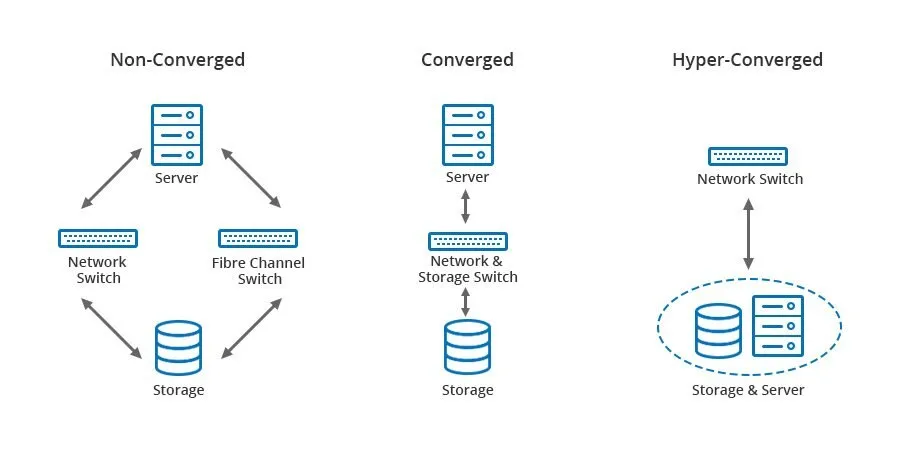
Comparison of Non-Converged and Converged infrastructure with Hyper-Converged
Source: WIKI (https://en.wikipedia.org/wiki/Hyper-converged_infrastructure)
Unlike converged infrastructure, where compute and storage are integrated but remain discrete systems, hyperconverged infrastructure converges all functional elements in software at the hypervisor layer, running on commercial Off-The-Shelf servers with direct-attached storage to simplify operations, reduce data centre footprint, and Total Cost of Ownership (TCO).
The Architecture: Under the Hood of SUSE Virtualization and KubeVirt
The power of SUSE Virtualization lies in how it combines multiple open-source technologies into a cohesive, production-ready platform. Kubernetes manages the full spectrum of enterprise workloads, from traditional VMs to cloud-native applications. It uses SUSE’s Kubernetes distribution as the underlying engine for infrastructure management and automation. Along with this, KubeVirt extends Kubernetes with custom resources and controllers specifically designed to manage virtual machine workloads using KVM (Kernel-Based Virtual Machine).
SUSE Virtualization has the following components:
- Operating system: SUSE Linux Enterprise Micro (Elemental-based), an immutable Linux OS designed to minimize maintenance in Kubernetes environments
- Control plane: Kubernetes serves as the underlying infrastructure and orchestration layer
- Virtualization: KubeVirt manages virtual machines using KVM on top of Kubernetes
- Storage: SUSE Storage, formerly known as Longhorn, provides distributed block storage and volume tiering
- Observability: Prometheus and Grafana deliver integrated monitoring and logging
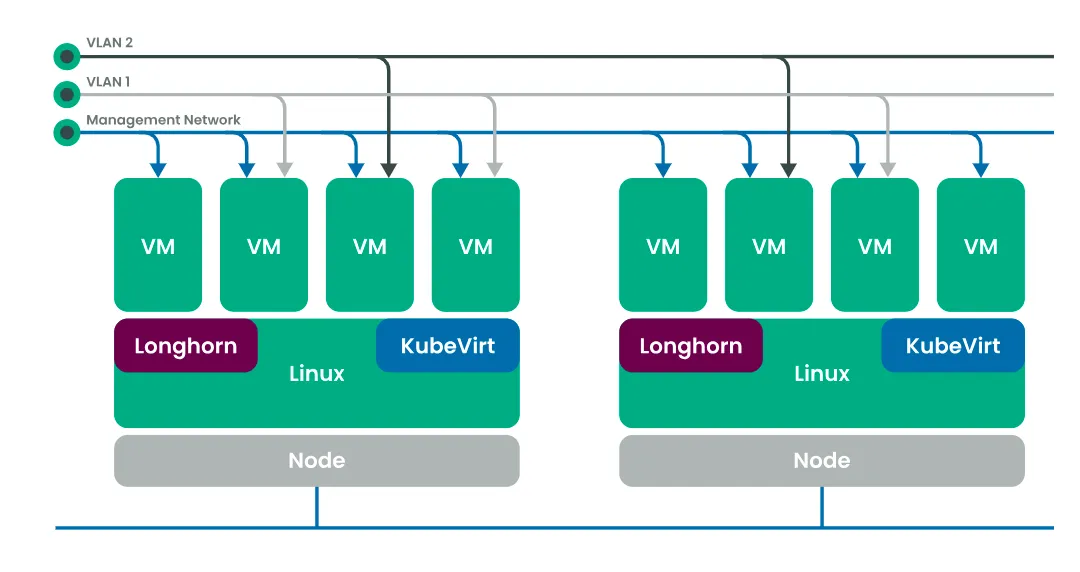
Architecture Diagram of SUSE Virtualization. Source SUSE Virtualization Documentation
The Role of SLE Micro and KubeVirt
SUSE Linux Enterprise Micro (SLE Micro) serves as the host operating system. It is an immutable, minimal OS designed for containerized and Kubernetes-based workloads. Updates are transactional, reducing configuration drift and minimizing operational overhead.
KubeVirt is the key component that enables virtualization. It allows virtual machines to be defined, scheduled, and managed as Kubernetes custom resources while using KVM under the hood for hardware virtualization.
This approach provides several advantages:
- VMs participate in Kubernetes scheduling and lifecycle management
- VM definitions are declarative and API-driven
- Infrastructure automation can be unified across VM and container workloads
- Standard Kubernetes tooling can be used for visibility and operations
From an architectural perspective, this removes the distinction between “virtualization tooling” and “container orchestration tooling.” Both operate through the same control plane.
Unified Management with SUSE Rancher
SUSE Rancher is an open source multi-cluster management platform that integrates with SUSE Virtualization to allow central management of VMs and containers. With this integration, you can :
- Provision and manage SUSE Virtualization clusters
- Create and manage virtual machines
- Manage Kubernetes clusters and workloads
- Apply RBAC, authentication, and access controls consistently
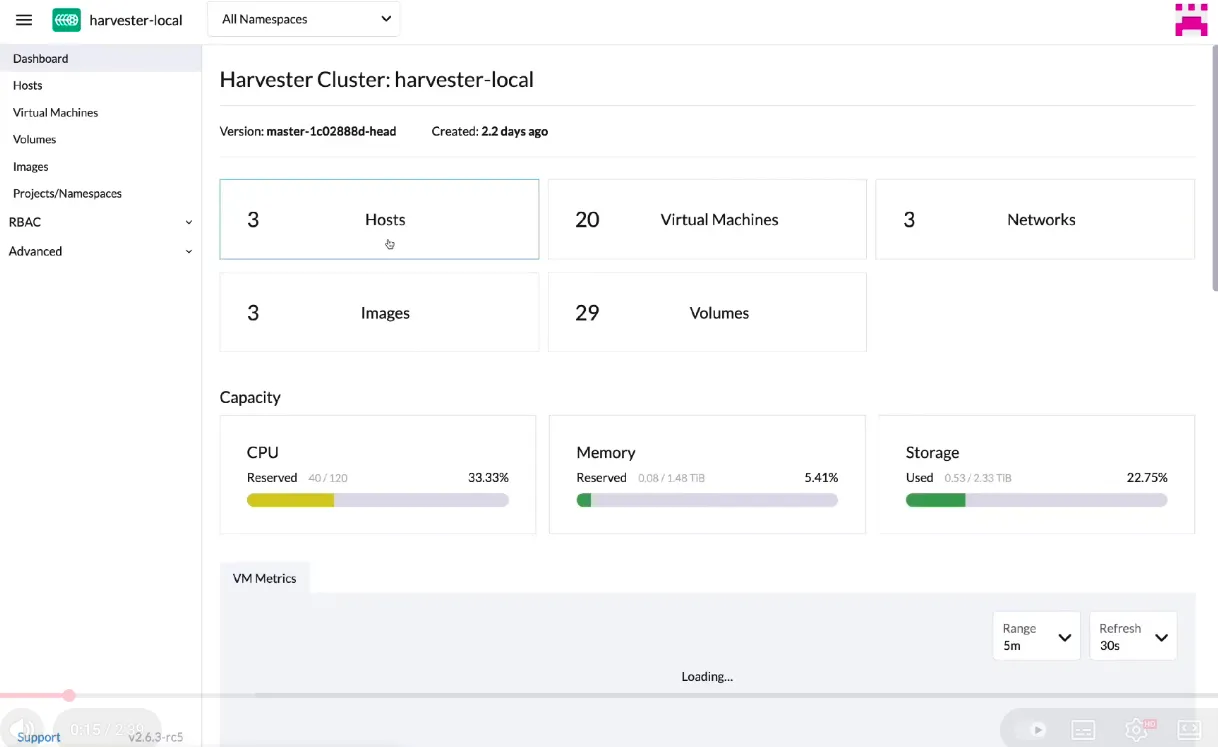
This unified management model is important for platform teams operating mixed environments. Instead of maintaining separate consoles for virtualization and Kubernetes, this provides a single interface and API surface.
For organizations already using SUSE Rancher Prime, SUSE Virtualization fits naturally into existing operational workflows without introducing a parallel management stack. You can access SUSE Virtualization directly through SUSE Rancher Prime’s Virtualization Management page and manage your VM workloads alongside your Kubernetes clusters. Read more about SUSE Rancher Prime integration with SUSE Virtualization.
Third-Party Storage Management
By default, SUSE Virtualization uses SUSE Storage (Longhorn), to provide distributed block storage. Longhorn aggregates local disks from cluster nodes into a shared and replicated storage pool. This enables distributed block storage with no single point of failure, incremental snapshot of block storage, Kubernetes-native storage management, and backup capabilities.
For environments with advanced storage requirements, SUSE Virtualization is not limited to its built-in storage. Because it is CSI-compliant, it supports integration with third-party enterprise storage platforms. This allows architects to:
- Integrate existing third-party storage using vendor-specific CSI drivers.
- Leverage validated storage solutions from top-tier vendors such as Dell Technologies, NetApp, HPE, Oracle, and Portworx by Pure Storage.
- Utilize advanced storage features like native snapshots, volume clones, and the creation of different storage classes to match specific hardware architectures (e.g., SSDs or NVMe)
The CSI drivers need to support volume expansion, snapshot creation and cloning. Read more about Third-Party Storage Support with SUSE Virtualization.
Key Features for IT Administrators
For IT administrators, SUSE Virtualization provides core virtualization capabilities implemented in a Kubernetes-native way. Let us understand these features in detail.
Live Migration and VM Management
Live migration in SUSE Virtualization is implemented through KubeVirt and relies on Kubernetes scheduling, shared storage availability, and consistent network configuration across nodes. During migration, the VM’s memory state is transferred incrementally while the workload continues to run, with a brief switchover phase to complete execution on the target node. For configuration requirements, supported migration modes, and operational constraints, refer to the SUSE Virtualization live migration.
Virtual Machines can be created using SUSE Virtualization UI, Kubernetes API or Harvester Terraform Provider. VM management operations are handled through Kubernetes custom resources, where changes to CPU topology, memory allocation, disks, firmware (BIOS/UEFI), and network interfaces are reconciled declaratively. Advanced options such as CPU pinning allow administrators to bind vCPUs to dedicated host cores, reducing scheduler noise for latency-sensitive workloads while trading off cluster-level scheduling flexibility. Read more about virtual machines in SUSE Virtualization.
Networking and Storage Basics
Networking in SUSE Virtualization is built primarily at Layer 2 and integrates KubeVirt, Multus, and Linux bridge networking to connect virtual machines to the host and external networks. Each VM interface is backed by a pod interface, with Harvester managing bridge networks that map VM traffic to physical NICs. Administrators can define management networks, VLAN-backed networks, or untagged bridges, and attach bonded NICs as uplinks to provide redundancy and higher throughput. Administrators can refer to networking best practices to leverage these features.
Storage provided through SUSE Storage uses CSI-based distributed block volumes backed by local, direct-attached disks. SUSE Virtualization uses StorageClasses for describing how volumes are provisioned by SUSE Storage. Volumes are synchronously replicated across nodes for availability and can be dynamically created, attached, expanded, snapshotted, or cloned. While local storage is the default, the CSI abstraction allows integration with third-party enterprise storage platforms when performance, compliance, or disaster recovery requirements demand it.
Backup and Restore
Backup and restore in SUSE Virtualization are implemented as Kubernetes-native workflows that operate at the VM and volume level. Administrators can configure scheduled or on-demand backups targeting NFS, S3-compatible object storage, or NAS systems using the SUSE Virtualization UI. Backups capture VM metadata and persistent volume data, enabling full VM restores or recovery into a different namespace or cluster.
Volume snapshots provide point-in-time consistency and serve as the foundation for restore and cloning operations. This allows administrators to roll back failed changes, recover from data corruption, or rapidly provision new environments from existing workloads without manual disk handling. SUSE Virtualization is unable to create backups of volumes in external storage.
For supported backup targets, snapshot limitations, and restore workflows, see the official SUSE Virtualization backup, restore, and volume snapshot documentation.
Comparison: SUSE Virtualization vs. Traditional Hypervisors
Understanding the distinctions between SUSE Virtualization and traditional platforms like VMware vSphere or Microsoft Hyper-V is essential for architects evaluating their infrastructure roadmap.
| Parameter | SUSE Virtualization | Traditional Hypervisors |
| Architecture | Cloud‑native first, treating VM and container orchestration as co‑equal workloads | Hypervisor-based; VMs abstract hardware and containers require additional orchestration layer |
| Storage Architecture | Distributed block storage with volume resizing capability using SUSE Storage | External SAN/NAS or proprietary converged storage solutions with manual overhead for volume management |
| Networking | Software-defined (SDN) utilizing bridges and Virtual Private Clouds (VPC) for logical isolation | Often requires physical configuration of hardware-defined networking and specialized switches |
| Live Migration | Supported via KubeVirt; integrates with Kubernetes scheduling | Supported in VMware and Hyper-V; vendor-specific implementation |
| Licensing Model | open source with optional enterprise support | Per-socket, per-core, or per-VM licensing with feature-based tiers |
| Automation & Integration | Cloud-native tooling (Terraform, Ansible, FluxCD) works natively | Requires vendor-specific modules, plugins, or PowerShell libraries |
Benefits for DevOps and Cloud Architects
SUSE Virtualization provides capabilities that align naturally with modern development and operational practices. The benefits extend beyond cost savings into areas that directly impact team velocity, reliability, and organizational agility.
- Infrastructure as Code and GitOps Integration: VM definitions, network policies, storage configurations, and backup schedules can all be expressed declaratively as YAML manifests. These manifests can be stored alongside application code in Git repositories and reconciled automatically using GitOps workflows with CI/CD tools. This eliminates the manual configuration drift and ensures a full audit trail of changes.
- API-Driven Automation: All SUSE Virtualization operations are exposed through standard Kubernetes APIs, making infrastructure automation consistent with modern cloud-native practices. Every VM, network configuration, and storage volume is represented as a KubeVirt custom resource (CRD), allowing DevOps teams to manage VMs the same way they manage Kubernetes workloads.
- Observability and Debugging: SUSE Virtualization UI delivers observability through integrated Prometheus metrics and Grafana dashboards. This provides visibility into cluster health, node resource utilization, storage performance, and VM-level metrics like CPU, memory, network throughput, and disk I/O.
- Security and Compliance: SUSE Virtualization’s Kubernetes foundation provides robust security primitives that align with least privilege access, and comprehensive audit trails. Role-based access control enables fine-grained permissions for developers and operations teams. Security policies defined at the Kubernetes level apply uniformly across the infrastructure, eliminating the gaps that often emerge when managing security separately for VM and container environments.
Summary: When to Choose SUSE Virtualization
By treating VMs as Kubernetes-native resources, SUSE Virtualization removes the traditional boundary between legacy and cloud-native workloads. enabling a gradual and controlled modernization rather than a forced rewrite. Organizations should consider SUSE Virtualization (Harvester) in the following scenarios:
- Replacing Proprietary Stacks: When seeking a cost-effective, open-source alternative to expensive, proprietary hypervisors like VMware.
- Bare-Metal Performance: When high-performance workloads (such as AI or transactional databases) require direct access to bare-metal hardware rather than running through a traditional hypervisor layer.
- Kubernetes Adoption: When an organization is already committed to Kubernetes and wants to use its API and ecosystem to manage all IT infrastructure.
Organizations that have standardized on Kubernetes APIs, GitOps workflows, and cloud-native tooling can extend those same patterns to VM management, infrastructure automation, security, and disaster recovery. Instead of operating virtualization as a parallel system, teams manage the entire stack through a single API and ecosystem.
SUSE Virtualization is suited for teams that want to unify legacy and modern workloads, simplify infrastructure operations, and align virtualization with cloud-native practices, without compromising on performance or control.
SUSE Virtualization FAQ
Q. Is SUSE Virtualization a direct replacement for traditional hypervisors like VMware?
Yes. SUSE Virtualization is designed as a complete Hyperconverged Infrastructure (HCI) solution. It provides the core functionality IT teams expect—such as VM lifecycle management, live migration, and monitoring—allowing organizations to modernize their infrastructure and potentially reduce licensing costs associated with legacy proprietary hypervisors.
Q. Do I need to be a Kubernetes expert to use SUSE Virtualization?
No. While the platform is powered by Kubernetes and KubeVirt under the hood, it is designed with a user-friendly interface that mimics traditional virtualization consoles. Administrators can create, manage, and monitor Virtual Machines without writing code. However, for DevOps teams, it offers the flexibility to manage VMs using standard Kubernetes tools if desired.
Q. Can I run Windows and Linux VMs on this platform?
Absolutely. SUSE Virtualization supports standard x86 operating systems, including all major versions of Windows Server, RHEL, Ubuntu, and SUSE Linux Enterprise. It uses proven KVM technology to ensure broad compatibility with your existing workloads.
Q. How does SUSE Virtualization handle storage?
The platform uses a built-in distributed block storage system (Longhorn) that aggregates the local disks across your servers into a shared storage pool. This eliminates the need for expensive external SANs for most workloads. Additionally, the platform is CSI-compatible that enables integration with third-party enterprise storage solutions from vendors like Dell, HPE, NetApp, and Pure Storage. This allows you to leverage existing storage investments while benefiting from the platform’s unified management approach.
Q. Is it possible to migrate existing VMs to SUSE Virtualization?
Yes. You can import VMs from existing environments (like vSphere) into SUSE Virtualization. The platform includes tools to facilitate the migration of disk images (QCOW2, RAW, VMDK) and configurations, allowing you to lift-and-shift workloads to the new environment.