
Chapter 10: What's Next: Building Your Cloud-Native Future

This blog is part of Demystifying Kubernetes for the VMware Admin, a 10-part blog series that gives VMware admins a clear roadmap into Kubernetes. The series connects familiar VMware concepts to Kubernetes—covering compute, storage, networking, security, operations, and more—so teams can modernize with confidence and plan for what comes next.
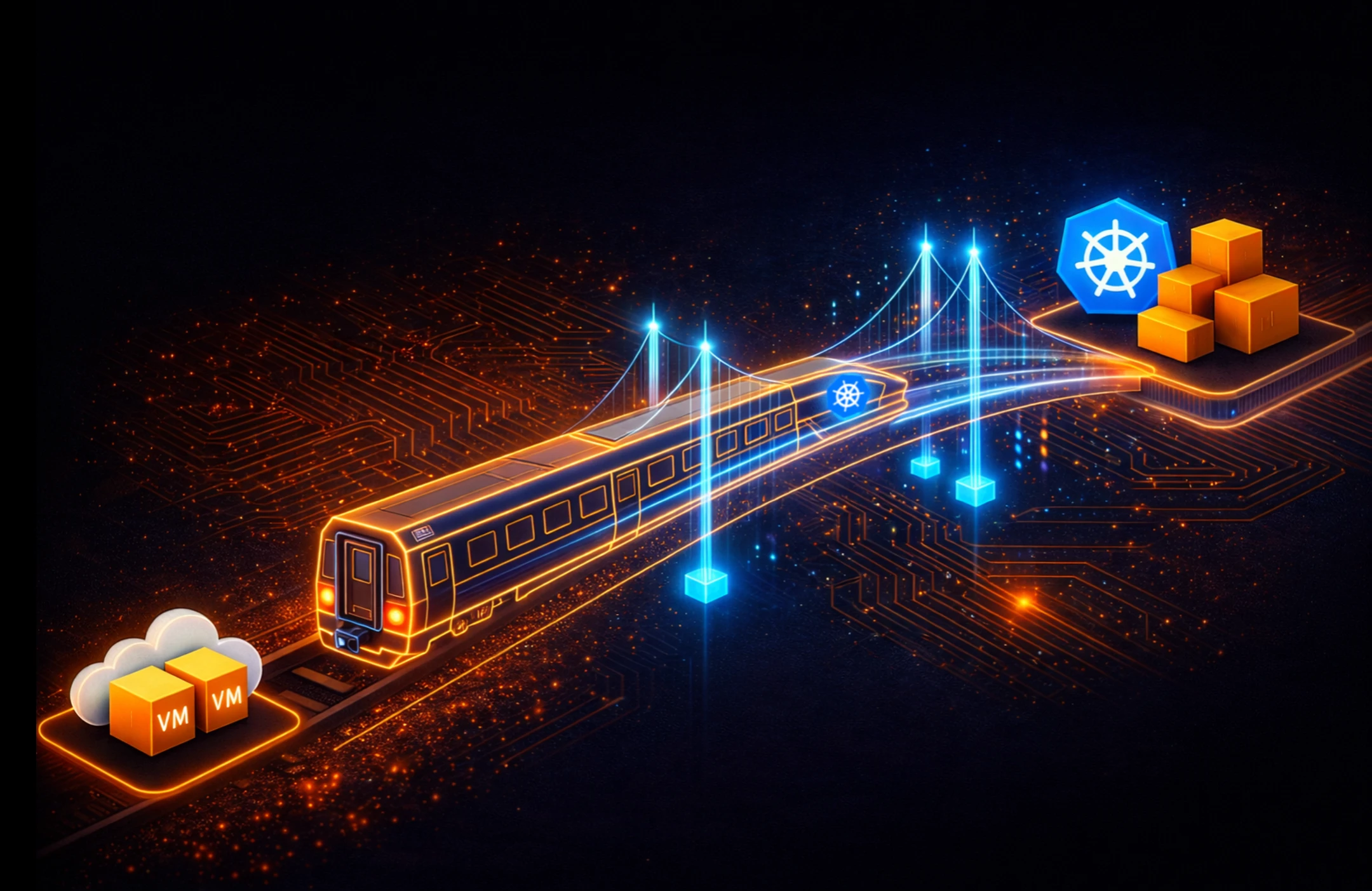
You made the transition. You understand how Kubernetes maps to VMware across compute, storage, networking, security, and operations. You assessed your workloads and planned your migration. The question now is what comes after Day 2.
Kubernetes is a platform for building platforms. The clusters you deploy today serve as the foundation for an internal developer platform, GitOps workflows, and AI infrastructure. VMware gave you a complete stack with defined boundaries. Kubernetes gives you a programmable substrate with an ecosystem of tools you assemble to match your organization’s needs.
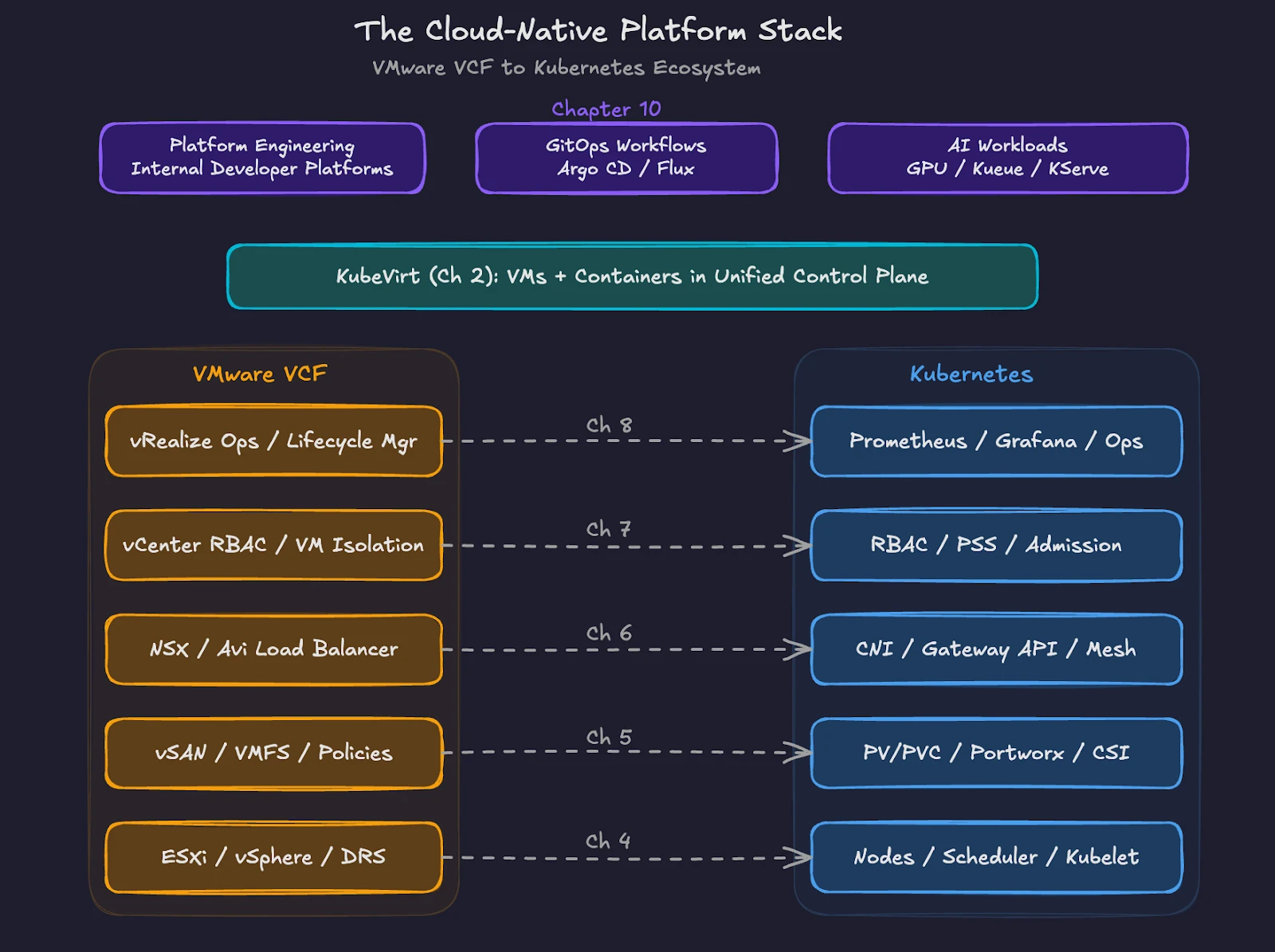
This final chapter covers the capabilities and practices waiting beyond your initial migration.
Platform Engineering and Internal Developer Platforms
VMware administrators served their organizations as a platform team, even without the title. You provisioned VMs on request. You configured networks and storage. You maintained templates and golden images. You were the platform.
Kubernetes formalizes this role through platform engineering. The DORA 2025 research program (Accelerate State of DevOps Report) found adoption of internal developer platforms has accelerated significantly across enterprises. Industry surveys consistently show a large and growing share of organizations now operate dedicated platform teams.
An internal developer platform (IDP) provides self-service capabilities to development teams. Developers request resources, deploy applications, and observe their workloads without submitting tickets or waiting for infrastructure teams. The platform team builds and maintains the IDP. Development teams consume services through defined interfaces.
Backstage, originally built by Spotify and now a CNCF incubated project, is one of the most widely adopted developer portal frameworks. Port and Cortex offer commercial alternatives. These portals provide a unified view of services, ownership, documentation, deployment status, and security posture.
Your VMware experience transfers directly to this model. You already think in terms of standardized templates, resource policies, and operational guardrails. In Kubernetes, those same concepts become golden paths. A golden path is a pre-approved, well-documented workflow for a common task. Deploying a new microservice, provisioning a database, or creating a CI/CD pipeline all follow golden paths defined by the platform team.
The shift from VMware to platform engineering changes the interface, not the mission. You still provide reliable infrastructure. You still enforce policies. The difference is that the delivery model moves from ticket-based provisioning to self-service consumption.
GitOps Workflows with Argo CD and Flux
Chapter 1 of this series introduced the shift from ClickOps to GitOps. Here is where GitOps becomes operational.
GitOps treats Git repositories as the single source of truth for your infrastructure and application state. Every change goes through a pull request. An automated agent running inside your cluster watches the repository and reconciles the live environment to match the declared state. Drift gets corrected automatically.
Two CNCF graduated projects dominate GitOps tooling. Argo CD has wider adoption. The CNCF 2025 Argo CD End User Survey found 97% of respondents running Argo CD in production, with nearly 60% of Kubernetes clusters using Argo CD for application delivery. Platform engineers account for 37% of Argo CD users, underscoring the tool’s role in internal developer platforms.
Argo CD provides a web UI for visualizing application state across clusters. Teams transitioning from GUI-driven workflows will find the dashboard familiar. You see sync status, health checks, and deployment history in a single view.
Flux takes a different approach. Built entirely around Kubernetes controllers and Custom Resource Definitions, Flux operates without a built-in dashboard. Every configuration is a Kubernetes resource. Flux supports Git, Helm repositories, OCI images, and S3 buckets as sources. The modular design appeals to teams building custom platform tooling where GitOps serves as one component of a larger automation system.
For VMware professionals, Argo CD offers the gentler transition. The visual interface maps to the operational model you know. As your team matures, you adopt more declarative patterns and automated reconciliation, regardless of which tool you select.
Both tools enforce a principle that VMware environments often lack. In vSphere, administrators make changes through vCenter, and the running state becomes the source of truth. Configuration drift happens silently. GitOps reverses this relationship. Git holds the desired state. The cluster conforms. Every change is auditable, reversible, and reviewable before deployment.
The Kubernetes Ecosystem. Helm, Operators, and Custom Resources
VMware ships a complete, integrated stack. Kubernetes ships a core orchestration engine and relies on an ecosystem of projects to deliver full functionality.
Helm is the package manager for Kubernetes. A Helm chart bundles all the Kubernetes manifests needed to deploy an application into a single, versioned, configurable package. Helm charts exist for databases, monitoring stacks, ingress controllers, storage platforms, and hundreds of other components. When you deploy Portworx on a Kubernetes cluster, you use a Helm chart. When you install Prometheus and Grafana for monitoring, you use Helm charts.
Helm solves a similar problem to VMware templates and OVF files. You define a standard deployment pattern once and reuse the pattern across environments with different configurations. Helm goes further by managing versioned upgrades, rollbacks, and parameterized values across the full application lifecycle.
Operators extend Kubernetes with application-specific operational logic. An Operator is a custom controller paired with a Custom Resource Definition (CRD). The controller watches for custom resources and takes automated action based on the declared state. The Portworx Operator manages the entire lifecycle of your storage platform, including installation, upgrades, node replacement, and capacity expansion. Database operators such as the CloudNativePG Operator or the Percona Operator for MySQL automate backup schedules, failovers, scaling, and version upgrades.
Think of Operators as the Kubernetes equivalent of VMware vCenter plugins. They extend the platform with domain-specific management capabilities. The difference is that the Operator model is standardized. Any vendor or open source project delivers an Operator through the same Kubernetes API patterns.
Custom Resource Definitions (CRDs) extend the Kubernetes API itself. When you install Portworx, new resource types like StorageCluster and VolumeSnapshot become available alongside native Kubernetes objects. When you install Argo CD, ApplicationSet resources appear. CRDs allow Kubernetes to manage resources and workflows far beyond containers and pods.
This extensibility is Kubernetes’ greatest strength and the reason the ecosystem continues to expand. The CNCF hosts over 200 projects spanning every layer of cloud-native infrastructure, from networking and storage to observability and security.
Extending Kubernetes for Your Organization
Every organization deploys Kubernetes differently. A financial services firm enforces strict compliance policies using admission controllers and policy engines such as Kyverno or OPA Gatekeeper. A media company optimizes for content delivery with custom ingress configurations. A healthcare provider encrypts persistent volumes and restricts network egress to comply with HIPAA.
Your Kubernetes platform should reflect your organization’s requirements. Build golden paths for your most common workloads. Encode your security policies as code through admission webhooks and network policies. Define resource quotas and limit ranges per namespace to prevent runaway consumption.
Portworx fits into this organizational customization at the storage layer. Different teams get different storage classes with distinct performance profiles, replication factors, and encryption settings. Portworx storage policies enforce data protection requirements without relying on individual teams to configure storage correctly. This mirrors the storage policy approach in VMware vSAN, where administrators define policies, and VMs automatically inherit the correct protection level.
KubeVirt, introduced in chapter 2 of this series, extends Kubernetes to run VMs alongside containers. Organizations with legacy workloads use KubeVirt to bring VMs under Kubernetes management without requiring immediate containerization. Combined with Portworx for persistent storage and data mobility, KubeVirt provides a migration path where VMs and containers share infrastructure, networking, and operational tooling.
AI Workloads and the Next Frontier
Kubernetes is becoming the default platform for AI and machine learning workloads. The CNCF Annual Survey 2025 (released January 2026) found 82% of container users running Kubernetes in production. Among organizations hosting generative AI models, 66% use Kubernetes for some or all inference workloads.
This shift matters for your platform strategy. AI workloads demand GPU scheduling, high-throughput storage, and specialized networking. The Kubernetes ecosystem is responding. Kueue, a Kubernetes SIG project for batch workload management, provides quota enforcement, fair-share scheduling, and gang semantics where all workers in a distributed training job start together or not at all. KServe, a CNCF project for model serving, delivers a standardized inference layer with autoscaling, versioning, and traffic splitting.
GPU management in Kubernetes goes beyond allocating a GPU to a pod. NVIDIA Multi-Instance GPU (MIG) technology partitions a single H100 into multiple isolated instances, each with dedicated memory and compute resources. Topology-aware scheduling places workloads near-optimal PCIe or NVLink lanes to maximize throughput.
Storage-aware scheduling matters equally for data-intensive AI pipelines. Portworx’s STORK (STorage Orchestrator Runtime for Kubernetes) extends the native Kubernetes scheduler to co-locate pods with their data replicas. STORK uses a scheduler extender to filter and prioritize nodes based on volume locality, ensuring pods run on hosts where their data already resides. This reduces latency for training data access and checkpoint writes. STORK also provides failure-domain awareness, automatically managing anti-affinity to distribute stateful workloads across availability zones.
For storage, AI workloads generate massive datasets and require high-bandwidth access to training data, model checkpoints, and inference caches. Portworx provides the persistent storage layer for these workloads, delivering consistent performance across training and inference pipelines while maintaining data protection and portability across clusters.
Your VMware resource management skills translate directly to AI workload management on Kubernetes. DRS balanced compute loads across hosts. Kubernetes schedulers and tools like Kueue balance GPU workloads across nodes. Storage policies in vSAN enforce protection levels. Storage classes in Kubernetes with Portworx enforce performance and replication for AI data pipelines.
Your Continued Learning Path
This series mapped nine VMware domains to their Kubernetes equivalents. You understand the parallels. Now build hands-on experience.
Start with a managed Kubernetes service. AWS EKS, Azure AKS, and Google GKE each offer free tiers or credits for learning. Deploy a simple application. Install Portworx to experience cloud-native storage. Set up Argo CD to practice GitOps workflows. Run a sample KubeVirt VM alongside a containerized workload.
The CNCF and Linux Foundation provide free introductory training courses. For formal credentials, the Certified Kubernetes Administrator (CKA) and Certified Kubernetes Application Developer (CKAD) exams each cost $445 through the Linux Foundation. Both exams are hands-on, practical tests, not multiple-choice questionnaires. The CKA validates the operational skills VMware professionals need most.
Join the community. KubeCon, the CNCF’s flagship conference, draws thousands of practitioners and vendors. Regional Kubernetes meetups provide local connections. The Kubernetes Slack workspace hosts active channels for every topic covered in this series, from storage to networking to security.
The Broadcom acquisition forced a conversation about infrastructure strategy. Kubernetes answers the technical questions. Platform engineering answers the organizational questions. GitOps answers the operational questions. The tools and practices exist. The ecosystem is mature. The community is active.
You spent years mastering VMware. The skills you built, resource management, storage architecture, network design, security policy, and operational discipline, all apply to Kubernetes. The interface changes. The principles remain.
Your cloud-native future starts with the next cluster you deploy.
Demystifying Kubernetes – Blog series
Share
Subscribe for Updates
About Us
Portworx is the leader in cloud native storage for containers.
Thanks for subscribing!
Chapter 1: From ClickOps to GitOps: Why the Paradigm Is Shifting
Economic pressure, operational philosophy changes, and what this means for VMware professionals.
Read MoreChapter 2: KubeVirt: Running Virtual Machines in a Kubernetes World
How VMs and containers coexist—and why KubeVirt is the practical bridge forward.
Read MoreChapter 3: Mapping the Stack: From VMware SDDC to Cloud-Native Architecture
A mental model that translates vSphere, vSAN, and NSX into Kubernetes equivalents.
Read MoreChapter 4: Compute Reimagined: ESXi Hosts vs Kubernetes Nodes
How scheduling, abstraction, and control planes differ between hypervisors and Kubernetes.
Read MoreChapter 5: Storage Evolution: From Datastores to Persistent Volumes
Translating vSAN concepts into container-native storage and CSI-driven architectures.
Read MoreChapter 6: Networking Translated: NSX and the Kubernetes Networking Model
CNI plugins, services, ingress, and service meshes explained for VMware practitioners.
Read MoreChapter 7: Security Models Compared: vSphere Security vs Kubernetes Security
RBAC, isolation, policy enforcement, and shared responsibility in a cloud-native world.
Read MoreChapter 8: Day 2 Operations: Monitoring, Lifecycle, and Reliability
How observability, upgrades, backup, and DR work once Kubernetes is in charge.
Read MoreChapter 9: Planning the Migration: From VMware Estate to Kubernetes Platform
Assessment frameworks, migration strategies, team structure, and common pitfalls.
Read MoreChapter 10: Beyond Migration: Building a Cloud-Native Operating Model
Platform engineering, GitOps, extensibility, and preparing for what comes next.
Janakiram MSV
Industry AnalystJanakiram MSV (Jani) is a practicing architect, research analyst, and advisor to Silicon Valley startups. He focuses on the convergence of modern infrastructure powered by cloud-native technology and machine intelligence driven by generative AI. Before becoming an entrepreneur, he spent over a decade as a product manager and technology evangelist at Microsoft Corporation and Amazon Web Services. Janakiram regularly writes for Forbes, InfoWorld, and The New Stack, covering the latest from the technology industry. He is an international keynote speaker for internal sales conferences, product launches, and user conferences hosted by technology companies of all sizes.