
Chapter 9: The Migration Journey: Planning Your Transition
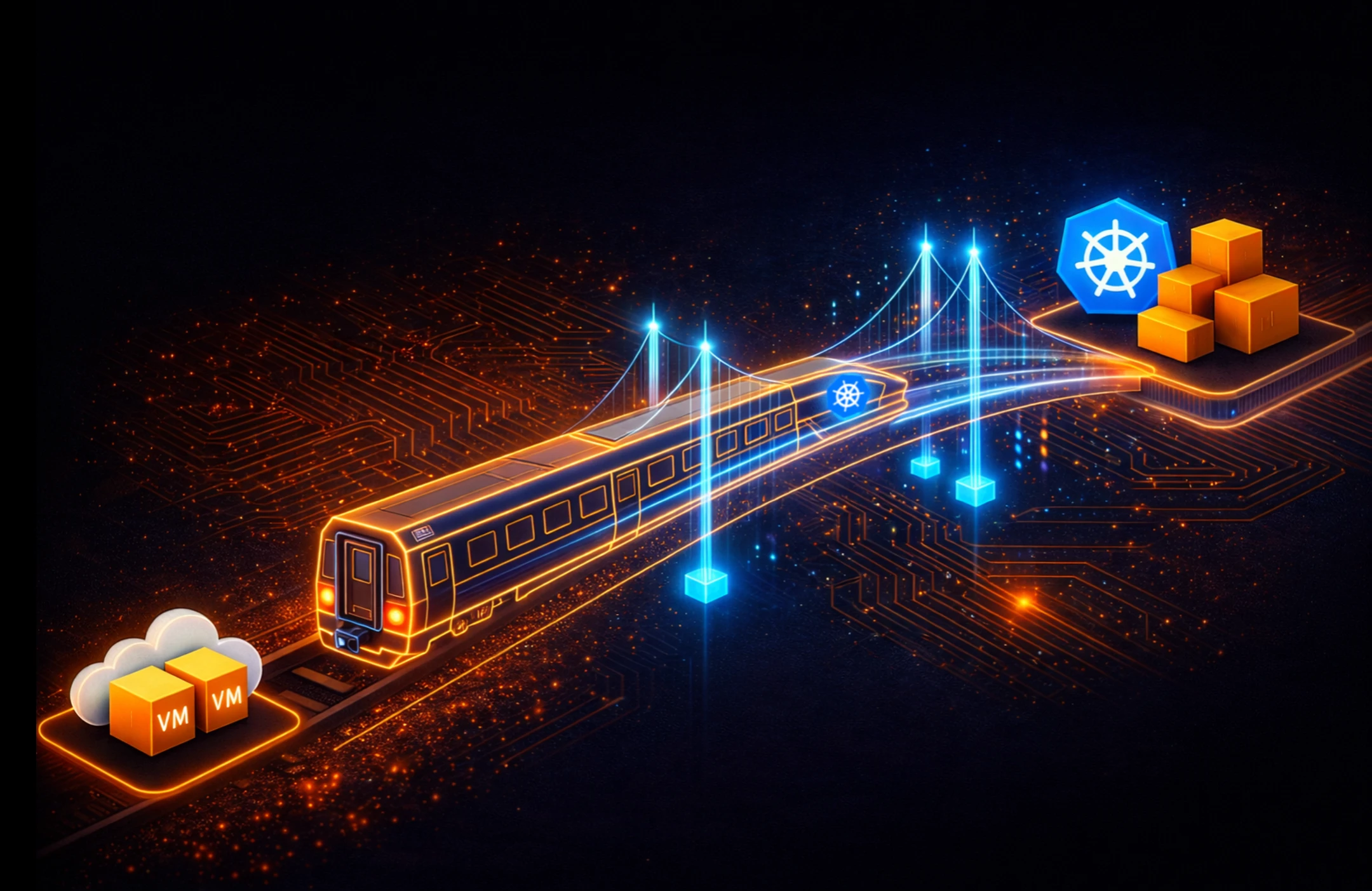
This blog is part of Demystifying Kubernetes for the VMware Admin, a 10-part blog series that gives VMware admins a clear roadmap into Kubernetes. The series connects familiar VMware concepts to Kubernetes—covering compute, storage, networking, security, operations, and more—so teams can modernize with confidence and plan for what comes next.
You understand the Kubernetes stack. The previous eight parts mapped VMware concepts to their Kubernetes equivalents across compute, storage, networking, security, and Day 2 operations. You know how KubeVirt bridges the gap between VMs and containers. You have the technical vocabulary.
Now comes the harder question. How do you move a production VMware estate to Kubernetes without disrupting the business?
Migration is a project management challenge as much as a technical one. Success depends on accurate assessment, workload categorization, team readiness, and phased execution. Organizations attempting to move everything at once fail. Organizations refusing to start at all fall behind. The right approach sits between those extremes.
This chapter provides the framework for planning your transition.
Assess Your VMware Estate
Every migration begins with inventory. You need a complete picture of your current environment before making any decisions about the target state.
Start with vCenter. Export your VM inventory, including resource allocation, storage consumption, network dependencies, and performance baselines. VMware Aria Operations (formerly vRealize Operations) provides historical utilization data for CPU, memory, storage IOPS, and network throughput. These baselines become your success criteria after migration.
Document application dependencies. A single VM rarely operates in isolation. Web servers connect to application servers. Application servers connect to databases. Databases replicate to standby instances. Map these relationships explicitly. Tools like VMware Aria Operations for Networks (formerly vRealize Network Insight) reveal east-west traffic patterns between VMs. These dependency maps determine which workloads migrate together and which require special handling.
Catalog every VM by business function, owner, SLA requirement, and compliance classification. A development workstation and a production database server belong in different migration waves. The assessment should answer four questions for each workload. What does the application do? Who owns the application? What are the uptime requirements? What are the data protection requirements?
Organizations commonly find that a significant portion of their VMs serve no active purpose during this assessment. Decommissioning unused VMs before migration immediately reduces scope and cost.
Categorize Your Workloads
The industry-standard framework for migration categorization uses the “6 Rs” model. AWS developed this framework by building on an earlier Gartner migration model, adding strategies like Retain and Retire to the original set. For a VMware-to-Kubernetes transition, four of these Rs apply directly.
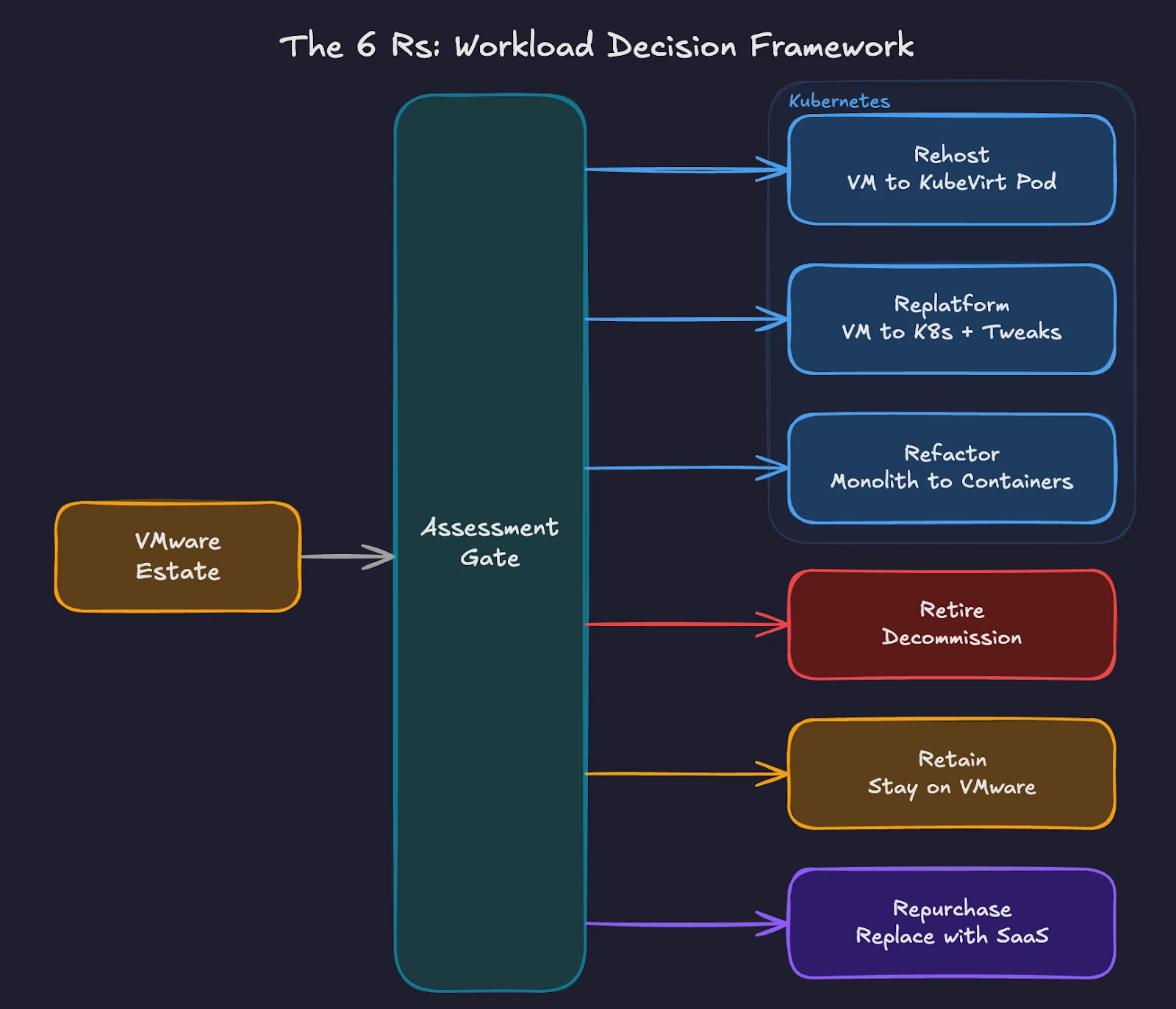
Fig 1: Workload categorization paths from VMware to Kubernetes using the 6 Rs framework.
Rehost (Lift and Shift). Move VMs to Kubernetes using KubeVirt with minimal changes. The VM runs inside a Kubernetes pod, managed by the KubeVirt operator. Operating systems, applications, and configurations remain unchanged. This approach works for legacy applications where source code is unavailable or where refactoring costs exceed the benefit. The Migration Toolkit for Virtualization (MTV) handles the actual VM migration from vSphere to KubeVirt, supporting both cold and warm migration workflows. For organizations running Pure Storage FlashArray, Portworx accelerates MTV migrations through Rapid VM Migration, which offloads data copies from the network to the array using native XCOPY operations. This bypasses host CPU and network overhead entirely, reducing migration times significantly for large VM disks. Once workloads are running on Kubernetes, Portworx delivers operational outcomes similar to Storage vMotion through its Enhanced Storage Migration feature and automated storage pool rebalancing via Autopilot policies. These features preserve familiar operational workflows on the new platform.
Replatform (Lift and Reshape) – Make targeted modifications during migration to take advantage of Kubernetes-native features without rewriting the application. Examples include replacing a VM-based load balancer with a Kubernetes Service, moving from local storage to persistent volumes backed by Portworx, or switching from cron-based scheduling to Kubernetes CronJobs. The core application architecture stays intact.
Refactor (Re-architect) – Redesign the application to run as containers. Break monolithic applications into microservices. Replace stateful session management with external state stores. Adopt 12-factor application principles. This approach delivers the greatest long-term benefit but requires the highest investment in development time and testing.
Retire – Decommission applications no longer needed. The assessment phase often reveals redundant services, abandoned projects, and legacy systems with no active users. Retiring these workloads before migration reduces complexity and licensing costs.
Two additional categories, Retain and Repurchase, complete the framework. Retain keeps certain workloads on the existing infrastructure when migration risk outweighs the benefit. Repurchase replaces on-premises applications with SaaS equivalents.
Most VMware estates follow a similar pattern. The largest share of workloads is rehost candidates. A smaller group benefits from replatforming. Only a fraction justifies full refactoring. The remainder splits between retire, retain, and repurchase. Your exact ratios depend on application age, business criticality, and available development resources.
Build Your Platform Team
Kubernetes requires a different operational model than VMware. In the VMware world, a small team of vSphere administrators manages the entire stack through vCenter. In Kubernetes, responsibilities are split across a platform team and application teams.
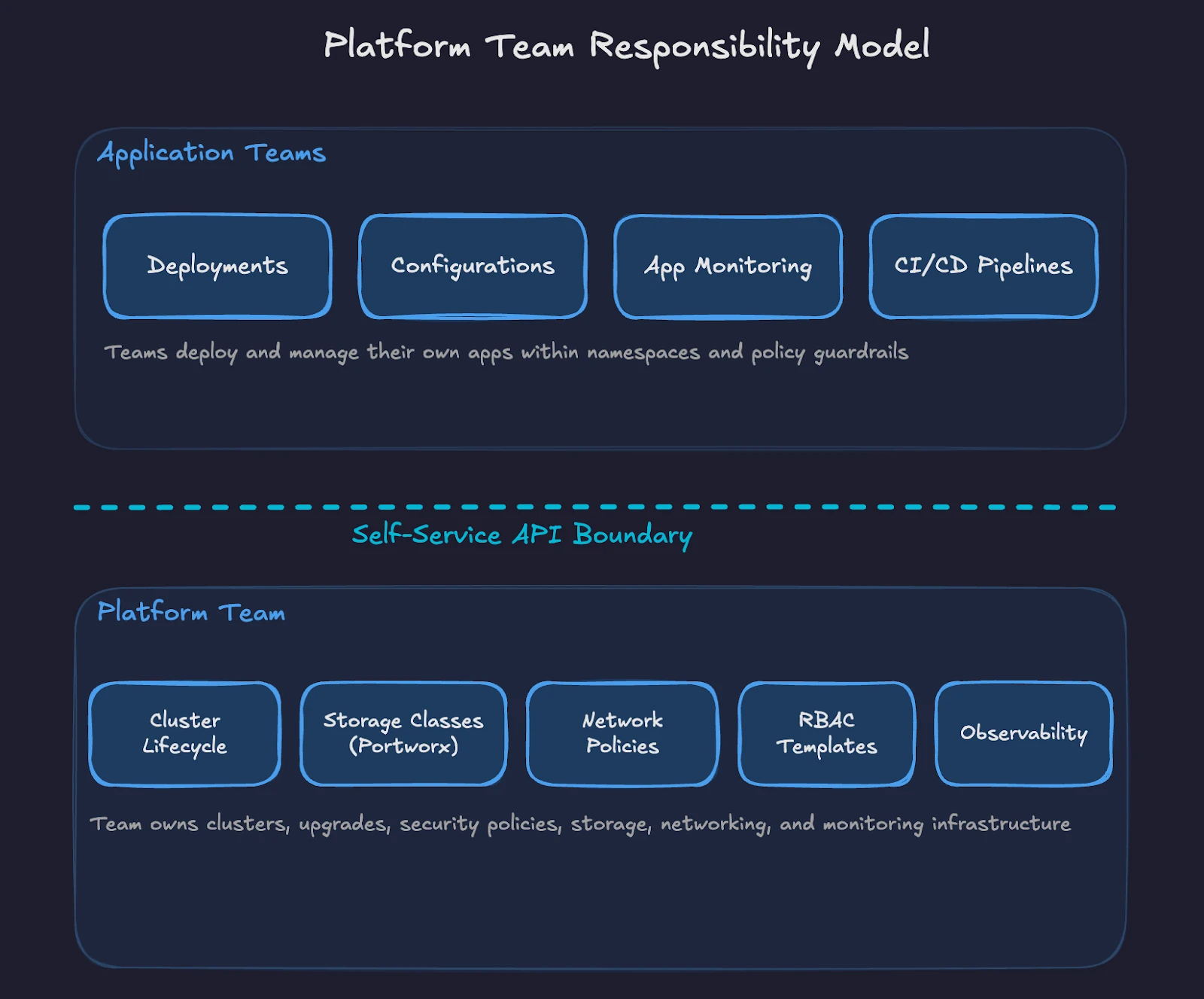
Fig 2: Ownership split between platform team and application teams in the Kubernetes operating model.
The platform team owns the Kubernetes clusters, including provisioning, upgrades, security policies, storage configuration, networking, and observability. This team builds the internal platform on top of raw Kubernetes, providing guardrails and self-service capabilities for application teams.
Start with your existing VMware administrators. Their infrastructure knowledge transfers directly. They understand resource management, high availability, disaster recovery, and storage operations. These skills apply to Kubernetes. The tools change, but the operational discipline remains the same.
A small initial platform team (often 3-5 engineers in early stages) with overlapping skills provides a starting point. At least one member should have deep Kubernetes experience. Others bring VMware operations, networking, storage, and security expertise. Cross-training fills gaps over time. Larger organizations scale this team as migration phases progress.
Define clear ownership boundaries from the start. The platform team manages cluster lifecycle, base images, storage classes, network policies, and RBAC templates. Application teams manage their deployments, configurations, and application-level monitoring within the namespaces and policies provided by the platform team.
Upskill Your Staff
The skills gap is the most underestimated risk in VMware-to-Kubernetes migrations. Technical professionals with years of VMware experience often resist change or doubt their ability to learn a new platform. Both reactions are addressable.
Start with fundamentals. Every team member should understand pods, deployments, services, namespaces, and persistent volumes. The Certified Kubernetes Administrator (CKA) exam provides a structured learning path and an industry-recognized credential. Pair formal training with hands-on lab environments where engineers practice real-world scenarios.
Create internal learning paths tailored to your environment. Storage administrators learn Portworx and CSI drivers. Network engineers learn CNI plugins and network policies. Security engineers learn RBAC, Pod Security Standards, and policy engines like Kyverno or OPA Gatekeeper. Each role maps existing expertise to Kubernetes-specific implementations.
Avoid the mistake of sending one person to a training course and expecting them to teach everyone else. Distributed learning across the team builds collective capability faster. Pair experienced Kubernetes practitioners with VMware veterans in daily work. The VMware engineer contributes operational rigor and production awareness. The Kubernetes engineer contributes platform-specific knowledge.
Upskilling timelines vary widely by team size, existing skill depth, and target complexity. Some organizations reach production readiness in a few months. Others need six months or longer, especially when teams are learning Kubernetes fundamentals alongside platform-specific tooling like Portworx, Kyverno, and GitOps workflows. Start structured training early and treat the pilot phase as a hands-on learning accelerator. This investment pays back through fewer misconfigurations, faster troubleshooting, and higher confidence during migration waves.
Execute in Phases
Phased migration reduces risk by limiting blast radius and building organizational confidence incrementally. Each wave teaches lessons applied to subsequent waves.
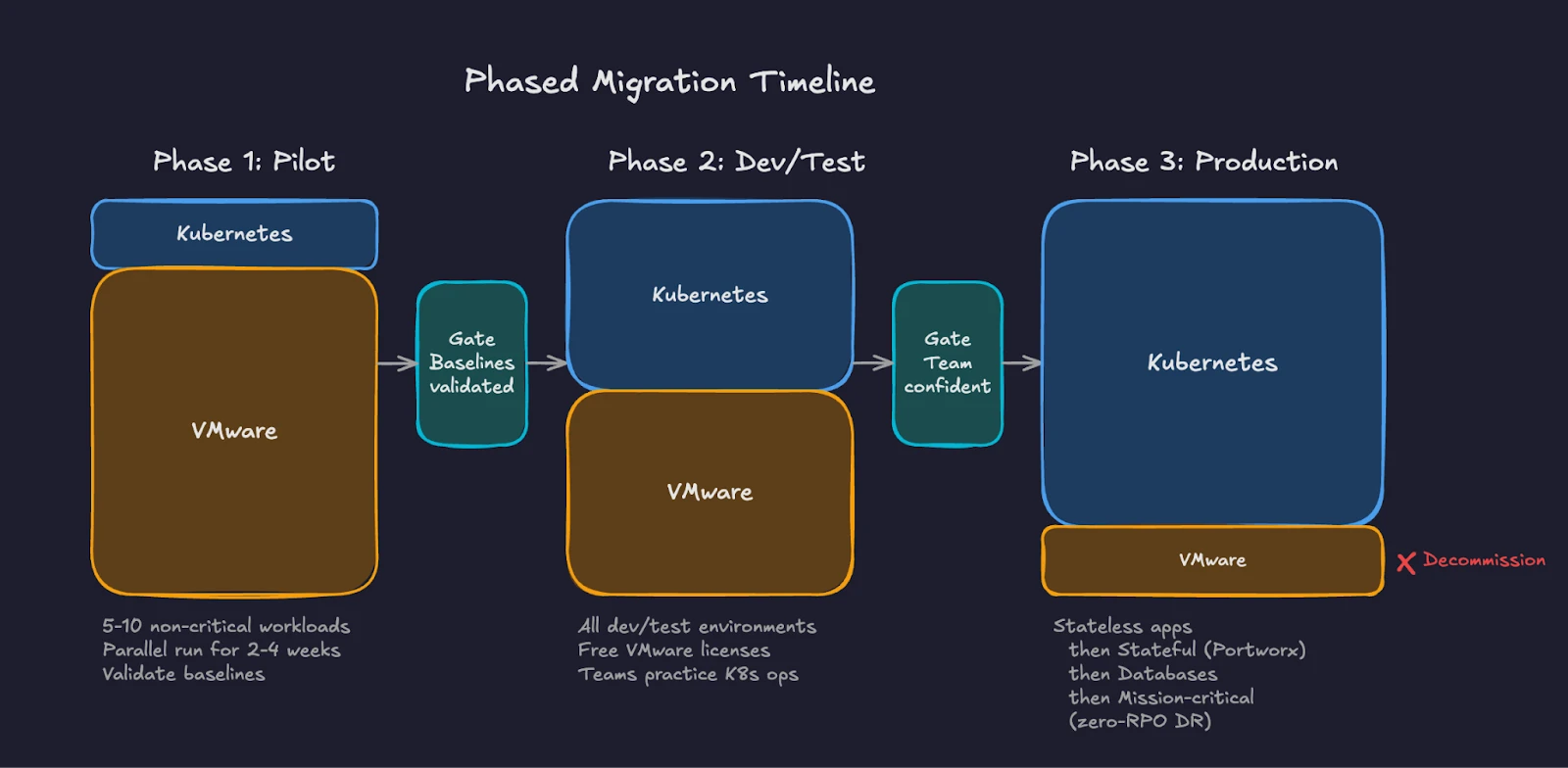
Fig 3: Three-phase migration timeline showing VMware footprint shrinking as Kubernetes adoption grows.
Phase 1 is the pilot. Select 5-10 non-critical workloads representing different application types. Include at least one KubeVirt VM workload to validate the lift-and-shift path alongside containerized workloads. Deploy Portworx for persistent storage. Configure monitoring, logging, and alerting. Run these workloads in parallel with their VMware counterparts for 2-4 weeks. Compare performance baselines. Document gaps and operational procedures.
Phase 2 targets development and testing environments. These workloads have lower SLA requirements and higher tolerance for disruption. Moving dev/test first frees VMware licenses and capacity while giving teams more practice with Kubernetes operations. Application teams begin deploying to Kubernetes as their default target.
Phase 3 addresses production workloads in waves of increasing criticality. Start with stateless web applications and API services. Progress to stateful workloads running on Portworx persistent volumes. Follow with database workloads using Portworx with features like synchronous replication and automated failover and follow careful validation of replication, failover, and consistency requirements balanced with any downtime tolerance.
Complete with mission-critical systems requiring zero-RPO disaster recovery.
Each phase should include explicit success criteria. Define acceptable latency thresholds, error rates, recovery time objectives, and team confidence levels before promoting workloads and moving to the next wave.
Measure Success
Define metrics before the first workload moves. Track both technical and organizational indicators.
Technical metrics include application response time before and after migration, storage IOPS and latency compared to VMware baselines, pod scheduling time versus VM boot time, recovery time during failure scenarios, and resource utilization efficiency.
To help identify performance issues, Portworx have developed an open-source benchmarking toolkit called “virtbench”. Virtbench provides automated testing routines to measure and validate KubeVirt VM provisioning, boot times, network readiness, and failure recovery scenarios. It’s designed for production environments running either KubeVirt or OpenShift Virtualization.
Organizational metrics include time-to-deploy for new applications, number of manual interventions required per week, mean time to resolution for incidents, team confidence scores through periodic surveys, and percentage of workloads migrated against the timeline.
Report progress to stakeholders regularly. Migration projects lose executive support when leadership sees no measurable outcomes. Weekly or biweekly dashboards showing workload counts, performance comparisons, and cost savings maintain visibility and funding.
Avoid Common Pitfalls
Organizations repeating the mistakes of earlier migrations lose time and credibility.
Do not skip the assessment. Moving workloads without understanding dependencies creates cascading failures when source systems go offline.
Do not attempt a single migration event. “Big bang” migrations fail at enterprise scale. Phase the work.
Do not underestimate storage complexity. Kubernetes persistent storage requires careful planning around storage classes, access modes, backup policies, and disaster recovery. Portworx addresses these requirements through a unified platform, but the configuration still demands attention and testing.
Do not ignore organizational change. Technical migration without team enablement creates a platform nobody knows how to operate. Invest in people alongside infrastructure.
Do not replicate VMware patterns on Kubernetes. Kubernetes operates differently by design. Teams that create one-namespace-per-VM or treat pods as permanent fixtures miss the benefits of the platform. Embrace the declarative model.
Do not delay decommissioning the old environment. Organizations running both platforms indefinitely pay twice the infrastructure cost and split their team’s attention. Set firm dates for VMware decommission after each phase validates successfully.
Your VMware operational discipline transfers directly to migration planning. You understand change management, maintenance windows, capacity planning, and phased rollouts. These skills apply to every stage of a Kubernetes transition. Assess the estate with the same rigor you apply to VMware upgrades. Categorize workloads using the 6 Rs framework. Build a platform team from your existing administrators. Upskill through structured learning paths and hands-on practice. Execute in phases, validate at every gate, and measure both technical and organizational outcomes. The tools change. The operational rigor stays the same.
Part 10 looks beyond the migration itself. You will learn how platform engineering principles shape the internal developer experience on Kubernetes. You will see how GitOps workflows, using tools like Argo CD and Flux, replace manual deployment processes. You will explore the broader Kubernetes ecosystem of Helm charts, operators, and custom resources, and understand how the platform extends to support containers, VMs, and AI workloads on a single control plane.
Demystifying Kubernetes – Blog series
Share
Subscribe for Updates
About Us
Portworx is the leader in cloud native storage for containers.
Thanks for subscribing!
Chapter 1: From ClickOps to GitOps: Why the Paradigm Is Shifting
Economic pressure, operational philosophy changes, and what this means for VMware professionals.
Read MoreChapter 2: KubeVirt: Running Virtual Machines in a Kubernetes World
How VMs and containers coexist—and why KubeVirt is the practical bridge forward.
Read MoreChapter 3: Mapping the Stack: From VMware SDDC to Cloud-Native Architecture
A mental model that translates vSphere, vSAN, and NSX into Kubernetes equivalents.
Read MoreChapter 4: Compute Reimagined: ESXi Hosts vs Kubernetes Nodes
How scheduling, abstraction, and control planes differ between hypervisors and Kubernetes.
Read MoreChapter 5: Storage Evolution: From Datastores to Persistent Volumes
Translating vSAN concepts into container-native storage and CSI-driven architectures.
Read MoreChapter 6: Networking Translated: NSX and the Kubernetes Networking Model
CNI plugins, services, ingress, and service meshes explained for VMware practitioners.
Read MoreChapter 7: Security Models Compared: vSphere Security vs Kubernetes Security
RBAC, isolation, policy enforcement, and shared responsibility in a cloud-native world.
Read MoreChapter 8: Day 2 Operations: Monitoring, Lifecycle, and Reliability
How observability, upgrades, backup, and DR work once Kubernetes is in charge.
Read MoreChapter 9: Planning the Migration: From VMware Estate to Kubernetes Platform
Assessment frameworks, migration strategies, team structure, and common pitfalls.
Chapter 10: Beyond Migration: Building a Cloud-Native Operating Model
Platform engineering, GitOps, extensibility, and preparing for what comes next.
Learn More
Janakiram MSV
Industry AnalystJanakiram MSV (Jani) is a practicing architect, research analyst, and advisor to Silicon Valley startups. He focuses on the convergence of modern infrastructure powered by cloud-native technology and machine intelligence driven by generative AI. Before becoming an entrepreneur, he spent over a decade as a product manager and technology evangelist at Microsoft Corporation and Amazon Web Services. Janakiram regularly writes for Forbes, InfoWorld, and The New Stack, covering the latest from the technology industry. He is an international keynote speaker for internal sales conferences, product launches, and user conferences hosted by technology companies of all sizes.