
Architect’s Corner
Portworx Async DR for OpenShift: Protecting Containers and KubeVirt VMs

Summarize Blog With
Table of Content
Introduction
In OpenShift-powered environments focused on application modernization, platforms rarely run just one type of workload. New cloud-native microservices live alongside existing virtual machines, both powering critical business operations. As these environments grow across regions and clouds, disaster recovery becomes a foundational requirement not just for infrastructure teams, but for the business itself.
Portworx by Pure Storage integrates deeply with OpenShift to deliver Asynchronous Disaster Recovery (Async DR) for both containerized applications and modern virtualization with KubeVirt. By combining asynchronous replication with application awareness, Portworx enables enterprises to protect mixed workloads across clusters and regions with minimal performance impact.
This blog walks through a real-world OpenShift scenario shown in the accompanying video demonstrating how Portworx Async DR protects containers and VMs together, simulates a site failure, and restores operations back to the primary cluster with confidence.
What Is Portworx Async DR?
Portworx Async DR is a replication-based disaster recovery mechanism that asynchronously copies application data from a source OpenShift cluster to a remote destination cluster.
Because replication happens without blocking application writes, Async DR is well-suited for cross-region protection and hybrid-cloud deployments where latency-sensitive synchronous replication is not practical.
When a disaster is declared, Kubernetes applications including KubeVirt virtual machines can be powered on at the destination site using volumes with low RPOs that have already been replicated, dramatically reducing downtime.
Why Asynchronous DR?
While synchronous DR provides zero RPO and near-zero data loss, it can introduce latency and requires low-latency links of less than 10ms round trip between sites. Async DR offers a more flexible alternative with several advantages:
- Geographic flexibility – Replicate data across regions or data centers with higher latency
- Lower performance impact – Application writes are not blocked by remote acknowledgments
- Cost efficiency – No need for high-speed, low-latency interconnects
- Scalability – Protect large numbers of applications across multiple clusters
Async DR is best suited for use cases where a small Recovery Point Objective (RPO) is acceptable in exchange for better performance and simpler infrastructure.
RPO and RTO Considerations
- Recovery Point Objective (RPO): Determined by the replication schedule (e.g., every 15, or 30 minutes)
- Recovery Time Objective (RTO): Depends on application size, cluster readiness, and restore automation
Portworx Async DR provides fine-grained control over both, allowing teams to balance cost, performance, and protection.
Async DR Architecture
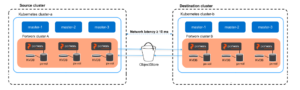
The following diagram shows an asynchronous DR setup involving two clusters that are geographically apart:
Common Use Cases
- Cross-region Kubernetes disaster recovery
- Hybrid cloud DR (on-prem to cloud)
- Multi-cluster application protection
- Planned migrations and data center evacuations
Key Components in the Walkthrough
The walkthrough environment relies on several Portworx and OpenShift building blocks:
- Portworx (PX) – Provides container-native storage and manages persistent volumes and replication.
- STORK (STorage Orchestrator foR Kubernetes) – The Kubernetes-native scheduler extender that enables application-aware snapshots, migrations, and recovery workflows.
- ClusterPair – Establishes secure connectivity and trust between the primary and DR clusters.
- MigrationSchedule – Defines which namespaces are protected and how frequently data is replicated.
- S3-Compatible Object Store or NFS Endpoint – Used to store application metadata and migration state so workloads can be restored even during a complete site outage.
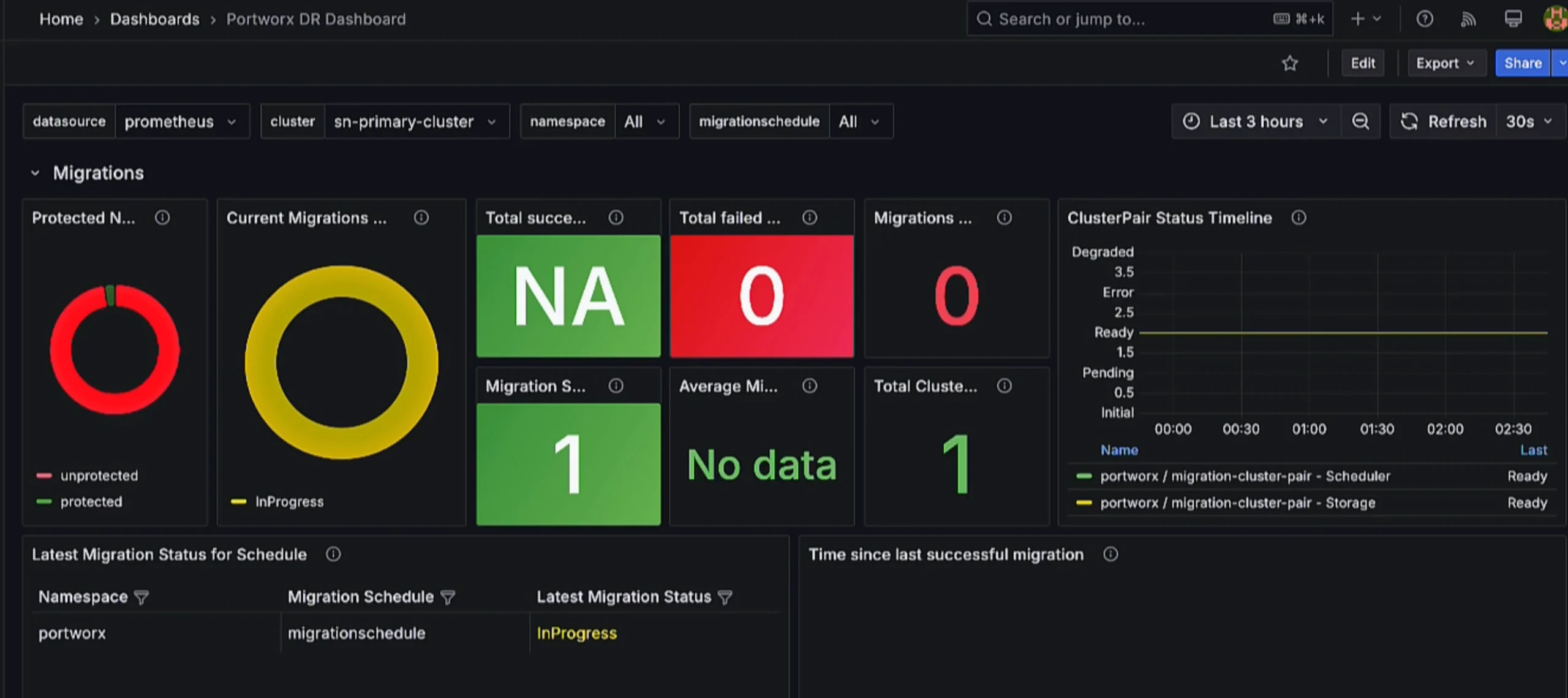
- Grafana Dashboards – Provide visibility into migration progress, replication throughput, and failover operations.
A Mixed OpenShift Platform in Action
The walkthrough begins with two OpenShift clusters: a primary production site and a secondary disaster-recovery site.
On the primary cluster, two types of workloads are running:
- A containerized “bbq-bookkeeper” application with a MySQL backend
- A KubeVirt-based Ubuntu virtual machine implementing a LAMP-style application in a separate namespace
Before any DR operations begin, new data is added to both environments inventory updates in the container app and new customer orders placed through the VM-based application. This establishes a clear checkpoint that can later be validated after failover.
Configuring Async DR
Cluster Pairing and Object Store
The first configuration step is pairing the clusters.
Using the ClusterPair configuration, secure connectivity is established between the primary and secondary OpenShift environments. At the same time, an S3-compatible object store is configured to persist application metadata and migration state, ensuring that recovery can proceed even if the primary site becomes unavailable.
Once pairing is complete, both storage and scheduler components report a ready state.
Scheduling Replication
Next, replication policies are applied through a SchedulePolicy and MigrationSchedule.
In this walkthrough, a 30-minute replication interval is configured, and both namespaces the container application and the VM workload are included in the same schedule. Kubernetes resources and volumes are protected together, while applications remain stopped on the DR cluster until failover is initiated.
As soon as the schedule is applied, the first migration begins automatically.
Progress is tracked both from the command line and through Grafana dashboards, which display:
- Active migrations
- Data transfer rates
- Volumes completed
- Resource creation
- Elapsed time
Once, the migration completes successfully, confirming that both container volumes and VM disks are synchronized to the DR cluster.
Simulating a Disaster: Failover in Action
To emulate a site outage, a controlled failover is triggered from the secondary cluster.
When a disaster occurs, controlled failover commands are used to activate workloads at the DR site. Portworx brings online only the applications defined in the MigrationSchedule, while networking and DNS redirection continue to be handled through standard enterprise mechanisms.
Portworx orchestrates the entire process:
- A final “last-mile” synchronization occurs
- If the primary site is still reachable at the time a disaster is declared, Portworx attempts a final “last-mile” synchronization to capture the most recent changes before activating the DR site.
- Applications on the primary site are scaled down
- Kubernetes resources are restored on the DR cluster
- Replicated volumes are attached
- Container workloads and KubeVirt VMs are powered on
Grafana tracks the operation in real time, shifting from in-progress to successful as the failover completes.
When the applications are accessed on the secondary cluster, the previously written inventory entries and VM-based orders are immediately visible confirming that data has been recovered consistently.
New transactions are then added while running entirely on the DR site, demonstrating that business operations can continue uninterrupted during an outage.
Important Consideration: Last-Mile Synchronization
The final synchronization step is only possible when the primary site remains accessible during failover initiation.
In the event of a sudden or catastrophic outage where the primary cluster is unreachable, Portworx activates the DR site using the most recent successfully replicated data.
Returning Home: Failback to the Primary Cluster
With production now running on the DR site, the walkthrough proceeds to failback.
A reverse MigrationSchedule is created on the secondary cluster, synchronizing newly written data back to the original site. Grafana once again visualizes the migration as it progresses.
Once synchronization completes, a controlled failback is initiated:
- Applications on the DR site are scaled down
- Updated volumes are replicated
- Workloads are restored on the primary cluster
- Containers and KubeVirt VMs are brought back online
When users reconnect to the primary cluster, the data added during the outage window is present, which confirms that no changes were lost.
Containers and VMs: One DR Platform
What the walkthrough ultimately highlights is operational simplicity.
Although containers and virtual machines have different runtime characteristics, Portworx protects both using the same DR foundation:
- Asynchronous replication at the storage layer
- Application metadata stored externally for recovery
- Namespace-based scheduling for mixed workloads
- Consistent failover and failback processes
- Unified monitoring through Grafana
Instead of managing separate DR solutions for virtualization and Kubernetes applications, OpenShift platform teams gain a single, predictable model for protecting modern and traditional workloads across clouds, hardware platforms, and storage backends.
Watch the Walkthrough
Watch the video below to see Portworx Async DR protect containerized applications and KubeVirt virtual machines on OpenShift from initial replication to failover and failback in a real-world scenario.
Conclusion
Portworx Async DR brings a unified, modern disaster-recovery experience to OpenShift environments running both containerized applications and KubeVirt virtual machines. By abstracting complexity behind a single platform, it enables organizations to protect mixed workloads across regions and clouds with confidence.
In the embedded video, that promise comes to life, containers and VMs are replicated, failed over, and restored using the same workflow turning what is traditionally a complex hybrid DR problem into a streamlined, operational reality.
Recommended for you